Product master data management is the discipline of defining, maintaining, and governing the product identities and core attributes that teams and business systems rely on. For a distributor, the hard part often starts before governance: product information arrives in supplier files that do not share the same fields, units, variants, or commercial context.
This guide explains how distributors can turn supplier PDFs, Excel quotations, catalogs, and images into controlled product records. It also separates product master data management (PMDM) from product information management (PIM), enterprise resource planning (ERP), and the upstream supplier-file intake layer.
Quick answer: a product master needs a stable identity, controlled attributes, clear ownership, readiness rules, and source evidence. Do not publish a normalized record until the team can explain which supplier item it represents and where important values came from.
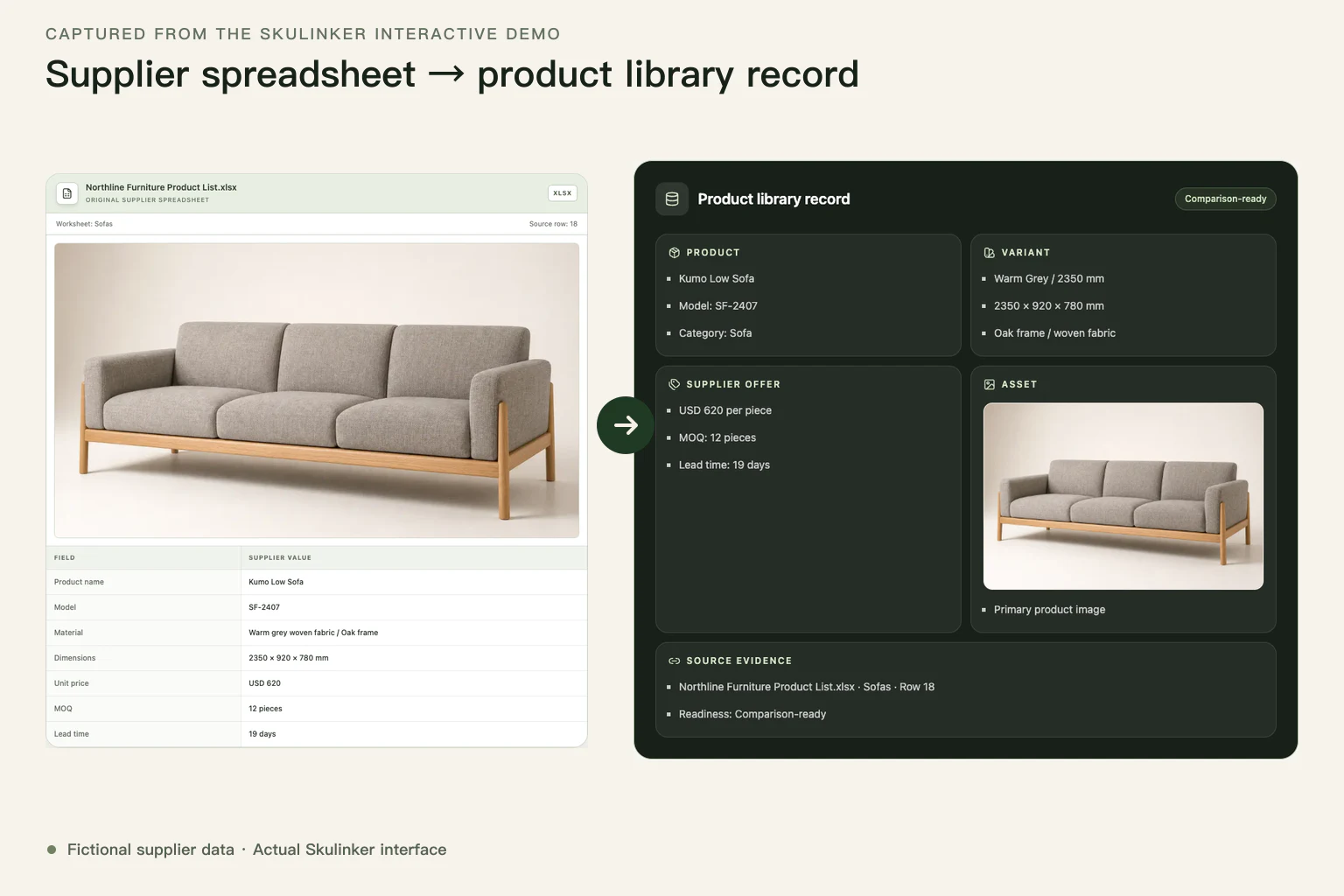
This actual Skulinker Demo capture uses fictional supplier data to show how an original spreadsheet becomes a source-connected product library record.
In this guide
- What product master data management means
- Fields that belong in a product master
- Why supplier files are difficult
- A distributor workflow
- A medallion view of data readiness
- Data quality and readiness gates
- PMDM, PIM, ERP, and intake boundaries
What Is Product Master Data Management?
Product master data management creates a consistent product identity that can be referenced across sourcing, sales, operations, analytics, and connected systems. It establishes field definitions, allowed values, ownership, matching rules, review workflows, and the authoritative version of a product record.
SAP's master data overview includes products and suppliers among the core entities shared across enterprise systems. GS1's Global Data Synchronisation Network illustrates why standardized product information and identifiers matter when trading partners exchange product data.
For a manufacturer, the initial product record may begin inside controlled engineering or ERP processes. For a distributor, it frequently begins with whatever the supplier sends: a PDF catalog, a quotation sheet, a folder of images, a finish card, or a message explaining an MOQ change.
Which Fields Belong in a Product Master?
The exact model depends on category and downstream use. A useful distributor model separates four field groups.
If the team still needs to define products, variants, supplier offers, assets, and evidence as separate entities, start with the furniture product master data model. This management guide assumes that foundation exists and focuses on keeping it governed as sources and business uses change.
| Field group | Examples | Management rule |
|---|---|---|
| Stable identity | Internal product ID, supplier, original SKU, model, parent product, variant | Preserve identity and source history even when display names change |
| Core attributes | Category, dimensions, material, finish, color, style, pack configuration | Use controlled definitions and category-specific validation |
| Commercial context | Price, currency, unit basis, MOQ, lead time, quotation date | Treat as time-sensitive supplier terms, not timeless identity fields |
| Source and status | Source file, page or row, image, review owner, readiness state | Keep evidence and uncertainty visible at the point of use |
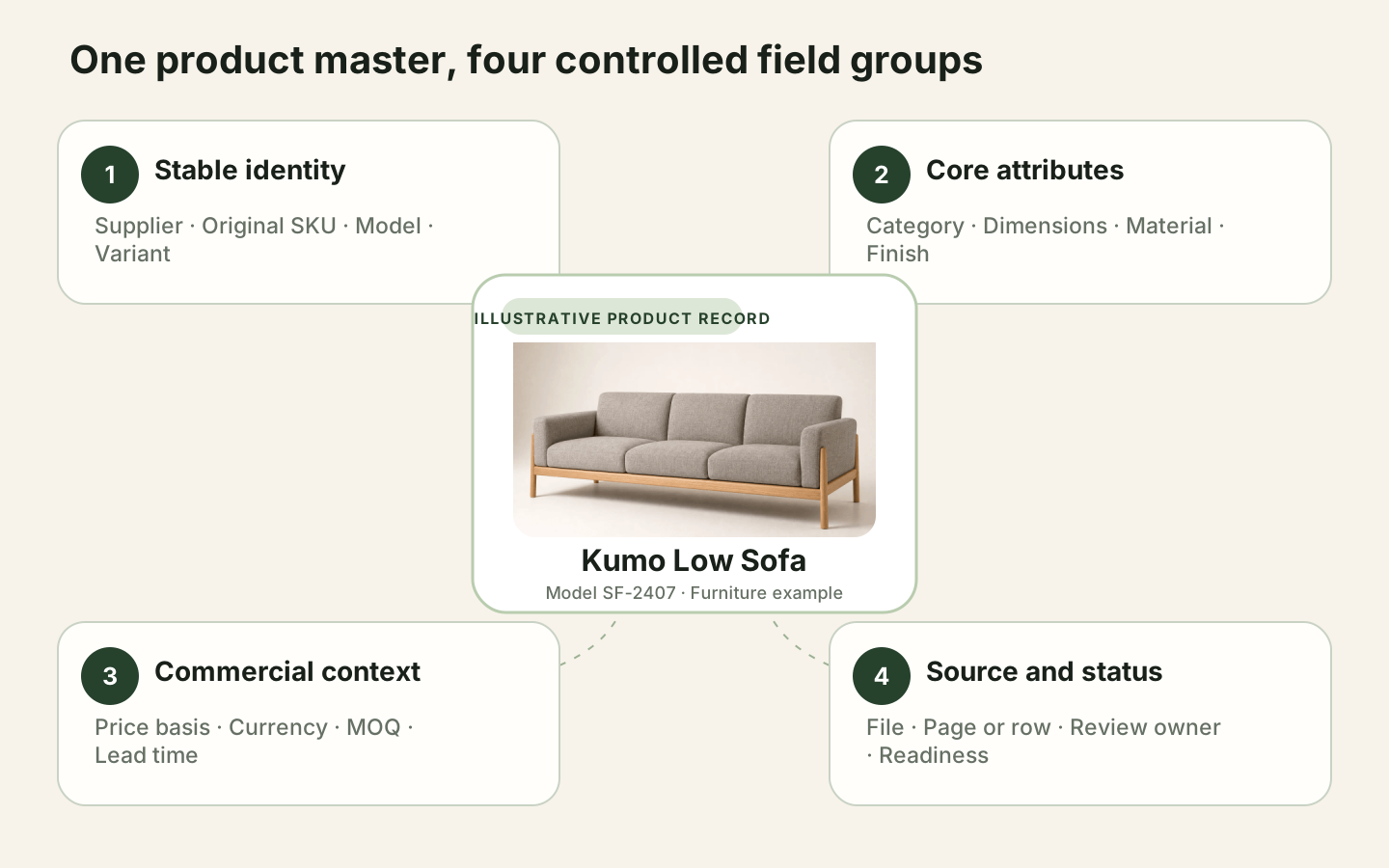
Swipe horizontally to read the full diagram →
A controlled product master connects identity, category attributes, commercial terms, and review evidence without treating them as one undifferentiated row.
Not every detail is master data. Marketing copy, channel-specific titles, translated descriptions, and campaign assets may be managed in a PIM or another content workflow. Inventory, purchase orders, invoices, and payments belong to transactional systems.
Why Supplier Files Complicate Product Master Data
Supplier files introduce problems that a clean database export hides:
- The PDF has the image and dimensions; the spreadsheet has the price and MOQ.
- A merged cell applies one currency or lead time to several rows.
- A model appears once as a product and again as several finish variants.
- The same dimension label refers to overall width in one catalog and carton width in another.
- Images are named by sequence rather than SKU.
- A new quotation changes commercial terms without changing the product identity.
A PMDM program cannot solve these issues by defining fields alone. It needs an intake process that preserves related files and source context before extraction and standardization. The supplier product data ingestion workflow covers that upstream package.
A Distributor Product Master Data Workflow
- Define the product identity. Decide which combination of supplier, original SKU, model, and variant distinguishes one product from another.
- Create a category field contract. List required and optional fields, units, allowed values, and owners for each product category.
- Keep supplier files together. Treat the catalog, quotation, images, and notes as one intake package.
- Extract candidates with source evidence. Capture values and the file, page, row, or image that supports them.
- Validate before standardizing. Confirm product and field identity before converting units or labels.
- Resolve duplicates and variants separately. A duplicate can be consolidated; a legitimate variant must preserve its relationship and difference.
- Publish by readiness. Permit internal search, comparison, quotation, or ERP import only when the relevant fields have passed review.
- Monitor supplier updates. Reopen commercial and affected product checks when a new file arrives.
This workflow makes the product master useful before every record is ready for every system. Sales may discover an item with a clear image and source while sourcing continues to confirm commercial fields.

Swipe horizontally to read the full diagram →
The workflow moves from definition to intake, validation, controlled publishing, and monitoring while source evidence stays attached.
Interactive Demo in this guide
Trace a product from a sourcing brief to a reviewable shortlist
The interactive sample shows matching, source review, explicit selection, and plan export without writing to a real workspace.
No sign-up required. Click the input below to try it.
- Describe the space and what you need
- Agent understanding
- Matched from the supplier file
- Details & source
- Add to plan
- Plan preview & export

How Medallion Architecture Helps Explain Product Data Readiness
Microsoft Learn defines medallion architecture as a Lakehouse data design pattern in which structure and quality improve through Bronze, Silver, and Gold layers. Furniture distributors can use that progression as an explanatory model for supplier product data readiness, even when they do not operate a Lakehouse.
| Medallion layer | Explanatory furniture-data state | Review question |
|---|---|---|
| Bronze / raw | Supplier PDFs, spreadsheets, catalogs, images, and original labels retained with source context | What arrived, from which supplier, and where can the original value be found? |
| Silver / validated | Extracted candidates that have been mapped, cleaned, deduplicated, normalized, and reviewed to the level required by the next action | Which values are comparable, which remain uncertain, and which rules have passed? |
| Gold / business-ready | Purpose-approved product records or datasets prepared for an explicit use such as internal search, comparison, a selection plan, or a controlled downstream handoff | What use is this record approved for, and who or which system can consume it? |
This mapping is an analogy, not Skulinker's physical storage architecture. Skulinker does not implement a Lakehouse or claim that its records are Databricks Bronze, Silver, or Gold tables. It helps teams retain supplier sources, prepare reviewable records, and use approved information in sourcing workflows before or beside enterprise data platforms.
A Gold layer is also not the same thing as an MDM golden record. The Gold layer describes consumption-oriented data in a Lakehouse. In Profisee's product master data management process, source data is integrated, matched, merged, deduplicated, standardized under governance rules, and then made available to downstream systems as golden records. A governed master record may eventually feed a Gold-layer data product, but one term describes a data-platform layer while the other describes an authoritative entity outcome.
Product Data Quality and Readiness Gates
One completeness score cannot safely control every action. Use explicit gates.
| Readiness state | Minimum evidence | Allowed use |
|---|---|---|
| Search-ready | Supplier, product identity, useful description or attributes, image when available, source | Internal discovery |
| Comparison-ready | Comparable dimensions, units, material or category attributes, reviewed variant identity | Cross-product or cross-supplier comparison |
| Quote-ready | Current price, currency, unit, MOQ, lead time, supplier, quotation date | Draft or customer quotation workflow |
| ERP-ready | Required field contract, approved formats, stable IDs, downstream mapping | Controlled system import |
The data quality management guide explains the dimensions behind these gates. The product catalog data cleaning page covers unit conflicts, duplicates, ambiguous prices, and image assignment.
PMDM vs PIM vs ERP vs Supplier-File Intake
| Layer | Primary responsibility | Typical output |
|---|---|---|
| Supplier-file intake | Capture, extract, validate, and connect messy incoming product sources | Candidate and reviewed supplier product records |
| Product master data management | Govern product identity, core attributes, matching, ownership, and authoritative records | Controlled product master |
| Product information management | Enrich product content and prepare it for teams, markets, and channels | Channel-ready product information |
| Enterprise resource planning | Run transactions, purchasing, inventory, finance, and operational planning | Transactional and operational records |
Some platforms combine several layers, and organizations divide responsibilities differently. The important design decision is to make every boundary explicit: which system owns the product identity, which one stores supplier evidence, where commercial updates are reviewed, and which system publishes downstream.

Swipe horizontally to read the full diagram →
Supplier intake prepares traceable records, PMDM governs product identity, PIM enriches content, and ERP runs transactions; explicit handoffs prevent blurred ownership.
How Skulinker Works Before or Beside a Product Master
Skulinker handles supplier-file intake, extracted product records, source evidence, review, private catalog search, product matching, shortlist, and export. It can help a distributor prepare and use product records before selected fields move into an ERP, PIM, or master-data process.
Skulinker does not replace enterprise product master data management, full PIM channel syndication, DAM, ERP transactions, governance approvals, or survivorship across every company system. It should not be described as the authoritative system for responsibilities the organization has assigned elsewhere.
Common Product Master Data Mistakes
- Using supplier SKU as the only identity. Supplier codes can be missing, reused, or changed.
- Mixing stable identity with temporary quotations. A price update should not create a new product by default.
- Merging variants as duplicates. Size, finish, market, and pack differences may be commercially important.
- Normalizing away source meaning.
900 mm overall widthand90 cm carton widthare not equivalent fields. - Publishing inferred facts without labels. Derived categories can support search, but missing certifications and terms must remain unconfirmed.
- Sending every discovered product directly to the ERP. Discovery, comparison, quotation, and system import have different quality gates.
Frequently Asked Questions
What is product master data?
Product master data is the controlled identity and core information used to reference a product across teams and systems. It commonly includes IDs, supplier relationships, models, categories, key attributes, variants, ownership, status, and source history.
Is product master data management the same as PIM?
No. They overlap, but product master data management emphasizes authoritative identity, governance, matching, and consistency. PIM commonly emphasizes enrichment and channel-ready product content. An organization may use one platform for both or separate systems with clear ownership.
Should price be part of product master data?
Price can be linked to the product record, but it should retain supplier, currency, unit basis, effective date, and quotation source. Treating one price as a timeless core attribute creates problems when suppliers update terms.
How do distributors start product master data management?
Start with one high-value category, define identity and required fields, keep each supplier package together, extract values with evidence, and establish separate readiness gates. Expand the model only after the workflow produces records teams can actually use.
Build Usable Product Records from Supplier Files
Product master data management succeeds when identity, attributes, source evidence, owners, and allowed actions stay connected. Skulinker helps distributors turn incoming supplier materials into records that sourcing and sales can review, search, match, shortlist, and export. Start Free
Next step
Turn supplier files into records your team can review
Start with one supplier package and move through extraction, source review, matching, and selection.
Continue reading