Supplier catalog management is the operational work between receiving a supplier file and making its products available to the business. It covers ingestion, extraction, validation, normalization, review, and publication into a product library.
For a furniture distributor, importer, or trading company, the source is rarely one clean feed. Product specifications may be in a PDF, prices in Excel, and images in a separate folder. If those parts are not joined into records, sales can only search the filenames or ask the person who received them.
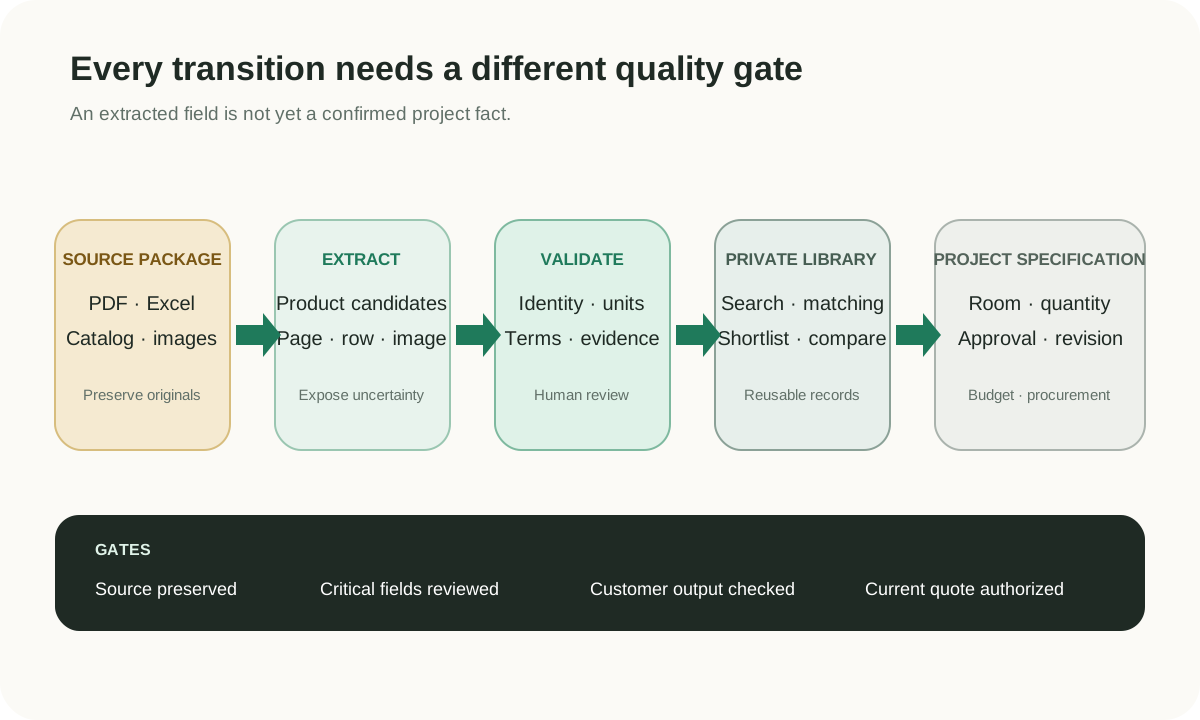
A managed catalog is not just an archive of supplier documents. Each product record should carry enough information for a colleague to find, compare, and quote it:
- Supplier and original SKU or model.
- Product category, dimensions, materials, finishes, and variants.
- Price, currency, unit, MOQ, lead time, and effective date when available.
- Product images and the source document or page.
- Review status, missing fields, and last update date.
The exact schema can vary by category. The important part is consistency across suppliers and a clear path back to the source.
The furniture product master data example shows how one supplier record can be separated into product, variant, commercial offer, asset, and source evidence instead of remaining one oversized row.
- Ingest the source package. Keep the PDF, spreadsheet, images, and supplier identity together.
- Extract product candidates. Separate products and variants without losing page or row context.
- Validate critical fields. Check identity, dimensions, price, currency, MOQ, and image assignment.
- Normalize shared fields. Align units, categories, materials, finishes, and commercial terms.
- Publish reviewed records. Make approved products available for sales search and comparison.
- Prepare downstream output. Export selected fields for ERP entry, quotations, or customer plans.
This workflow lets teams process a catalog in stages. A product can be visible for internal discovery while clearly marked for additional review before it is quoted or sent to an ERP.
These two resources focus on the work that happens before a supplier catalog becomes easy to search: finding products across messy files, then turning Excel, PDF, and image materials into usable product records.
Interactive Demo in this guide
Explore a supplier catalog without losing its source context
Try a sanitized sourcing request, inspect a match, and add an explicitly selected product to a plan.
No sign-up required. Click the input below to try it.
Spreadsheets work when the supplier count and product range are small. Problems appear when teams copy data from many formats into one master file: duplicate models are missed, unit conventions drift, images become detached, and updates overwrite older quote context.
The result affects more than data quality. Sales searches an incomplete ERP, sourcing searches folders, and both teams ask suppliers for information the company may already have. A shared catalog reduces that repeated handoff.
Once approved records are searchable, sales can describe the customer need using dimensions, style, material, budget, or product type. The results remain connected to the supplier and source file, so sales can compare options without treating the first keyword match as final.
Selected products can move into a shortlist and an editable quotation sheet. Sourcing can then verify the latest commercial terms without rebuilding the product list from the beginning.
Supplier catalog management starts with messy incoming product data. A PIM usually governs richer product information and channel distribution; an ERP manages transactions, inventory, purchasing, and finance. Skulinker prepares and maintains the supplier-side product records used before or alongside those systems.
The aim is not to duplicate every ERP field. It is to stop useful supplier products from disappearing simply because manual entry has not reached them yet.
See the supplier-file to private-catalog workflow, then use it as a checklist for the same intake package your team would actually review.
Start Free
Next step
Turn supplier files into records your team can review
Start with one supplier package and move through extraction, source review, matching, and selection.
Continue reading
Put this question into a fuller workflow
