Find, verify, and reuse supplier product information faster when images, prices, sizes, and model numbers live across PDFs, Excel sheets, and folders.
Aug 13, 2026
If you are trying to organize supplier product data, you may already have a folder for every supplier. That does not mean you can find a product quickly.
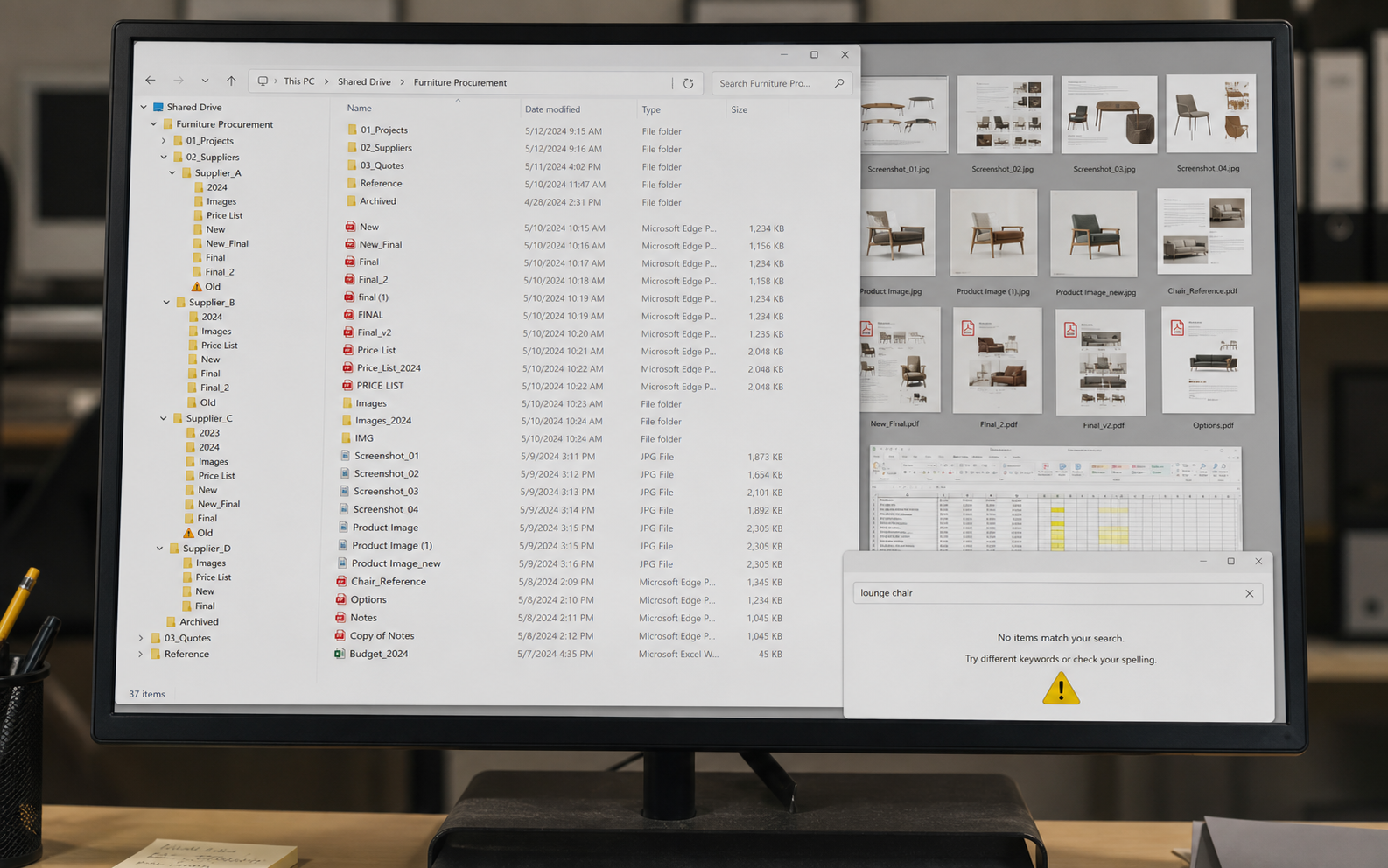
A customer sends you a photo of a chair and asks if you have anything similar. You know the company probably does. The problem is that you do not know where it is.
You open the shared drive. Then one supplier folder. Then another. The PDF has the product image, the Excel sheet has the price, and a separate file may have the dimensions. You can find the information eventually, but not in the few minutes you wanted to spend answering the customer.
Editorial reconstruction: a visual explanation of scattered supplier files,
not a real customer computer screenshot.
The problem is not always that the supplier files are untidy. They may be filed neatly under different supplier names. The problem is that you do not know which supplier has the product you need.
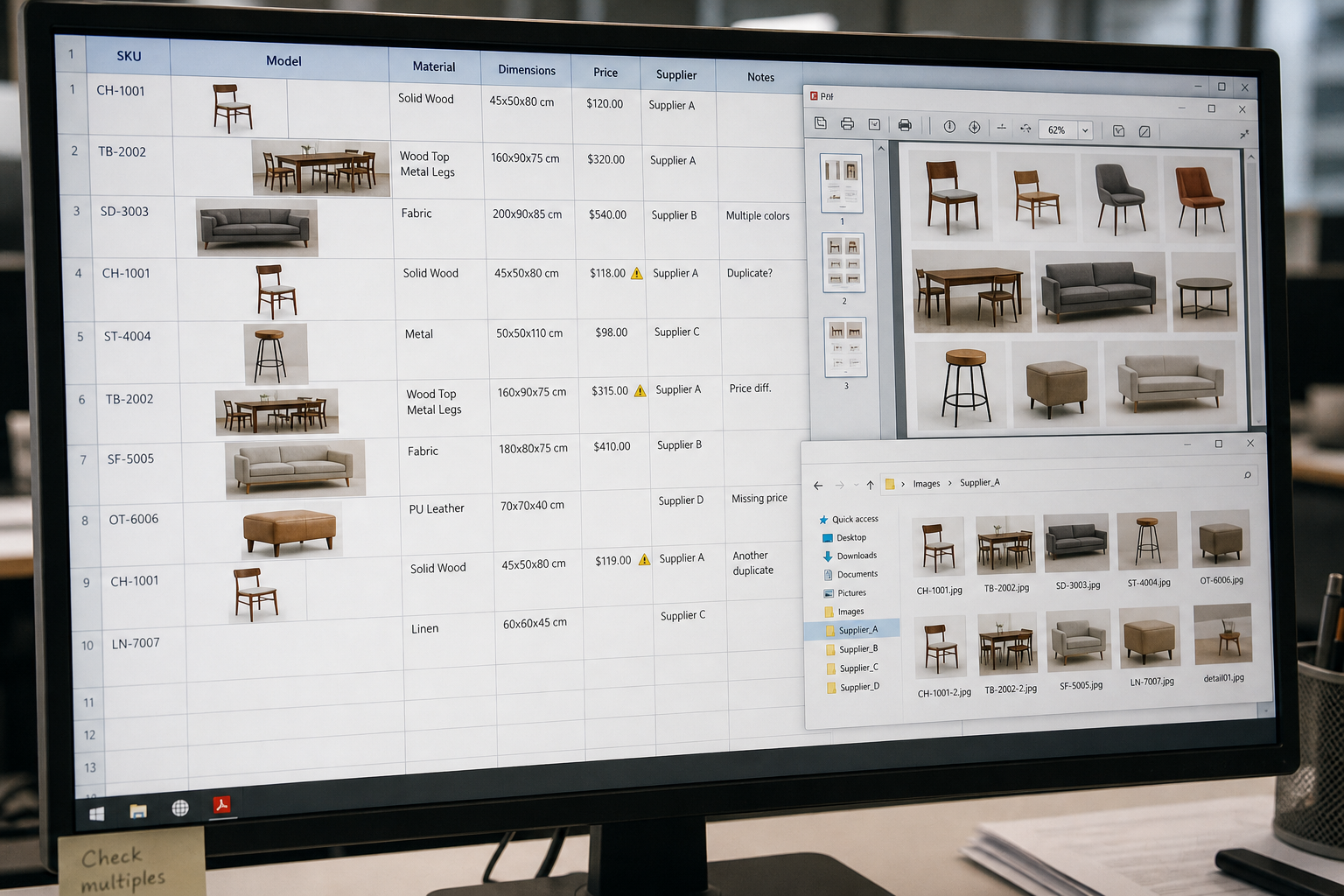
So you open the first supplier document and read through the product rows. Then you check the next supplier. You compare product names, model numbers, images, sizes, and finishes. If a product looks close, you open another file to check the price. If the price looks right, you still need to confirm the dimensions.
That is how a simple question — “Do we have something like this?” — turns into a manual search across several catalogs.
Editorial reconstruction: a visual explanation of copying supplier
screenshots and checking product rows across files.
You start to see the real issue: supplier information can be arranged neatly in folders and still be difficult to search. You do not need more folders. You need a product library where the image, model number, size, and price appear together, so you can find a similar product without remembering which supplier file might contain it.
The faster approach is not to build one enormous spreadsheet and retype every supplier file into it. It is to bring the product information you already have into one searchable record.
When the supplier material includes an image, model number, dimensions, material, and price, those details should appear together in one product record. The record should also show the original supplier file and, when available, the worksheet or row-and-column location where the information came from. Then you can go back to the source and check the details instead of relying on a product entry with no clear origin.
This is the difference between a file archive and a product library:
A folder tells you where a document was saved, but not which file contains the product a customer is asking about.
A manually maintained master sheet puts details in one place, but creates another place where data can be entered, updated, and copied incorrectly.
An intelligent product library does not depend on someone retyping supplier files into a master sheet. It uses the original supplier files as the basis, organizes images, model numbers, dimensions, materials, and prices into product records, and keeps the file location for each detail. That gives you a quick way to judge whether the information is reliable without reopening supplier folders and searching for the original details one by one.
The supplier product data ingestion guide explains how related PDFs, Excel price sheets, catalogs, and images can be handled as one supplier intake package. The point here is more practical: once those materials are available as product records, you can look for a product by what the customer needs instead of by the supplier folder name.
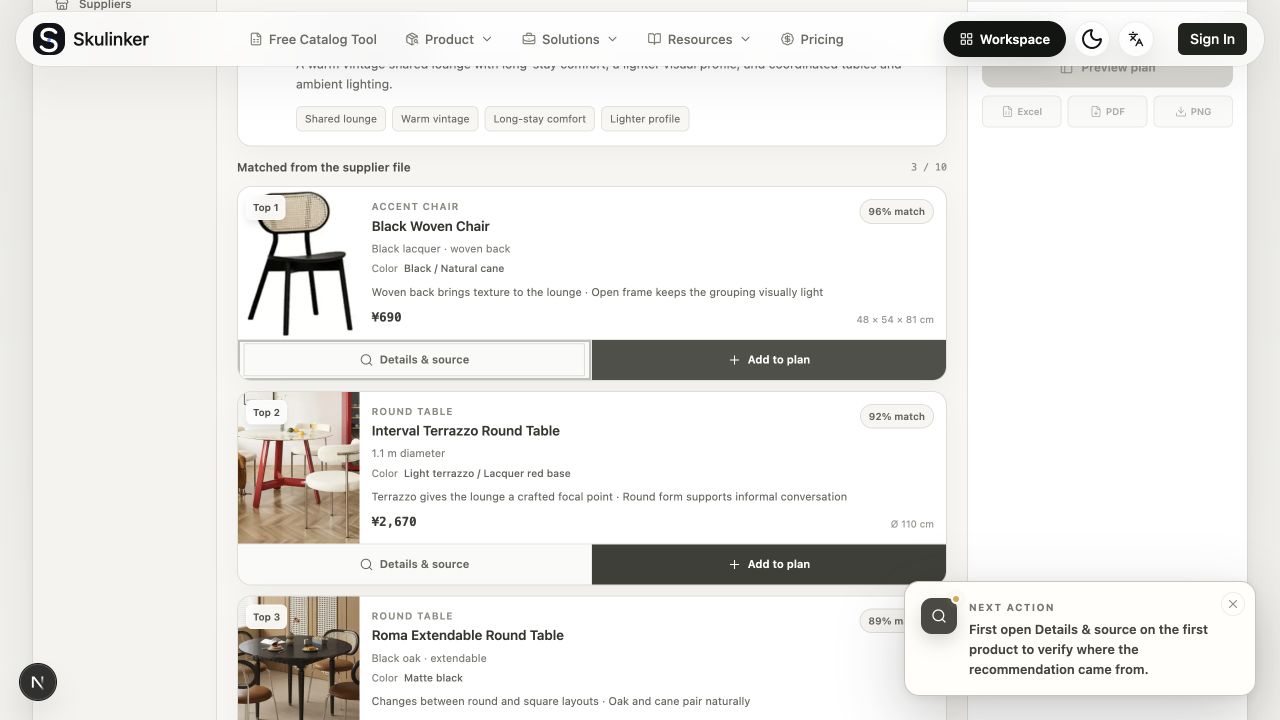
In the public Demo, the request is a warm vintage shared lounge. The result is not a list of filenames. It is a set of candidate products with images, product names, matching reasons, prices, and dimensions.
Sanitized public Demo: matching results are shown as product records, not as
a customer project or customer screenshot.
That changes the question you ask of the catalog. Instead of “Which supplier folder should I open first?”, you can start with “Which products match this request?” The result still needs a human check, especially when dimensions, finish, price, or lead time matter to the project. But you are checking a shortlist instead of searching every document from the beginning.
Interactive Demo in this guide
See how a supplier request becomes searchable product records
Use a sanitized local Demo to describe a furniture request, review matched products, open Details & source, add a product to a plan, and preview the result.
No sign-up required. Click the input below to try it.
Click below to start
Describe the space and what you need
Agent understanding
Matched from the supplier file
Details & source
Add to plan
Plan preview & export
Skulinker
Demo mode · Local state
Interactive Demo in this guide
Describe the space and what you need
The Agent structures the space, style, and use constraints before matching.
Local experience, not saved
A warm vintage shared lounge with long-stay comfort, a lighter visual profile, and coordinated tables and ambient lighting.
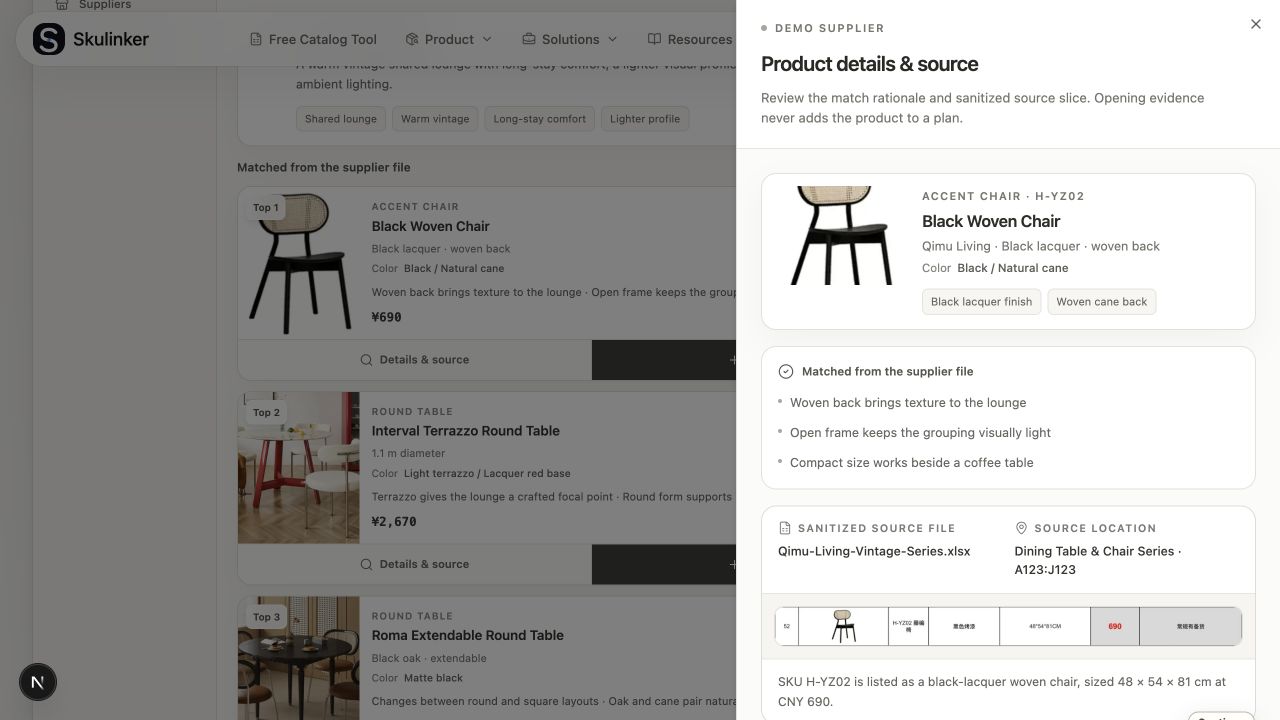
“Source” should not be a vague badge on a product card. When you find a candidate, click Details & source and check the original supplier file behind the record.
In the Demo, the source panel shows the sanitized supplier file, the worksheet and cell range, the SKU, the product image, the dimensions, and the listed price. That is the context you need to decide whether the match is useful enough to discuss with a customer.
Sanitized public Demo: the Details & source panel connects the match to
a supplier file and a specific worksheet range.
This does not turn a match into automatic approval. It simply gives you a shorter path to the evidence. You can see what was matched, where it came from, and which details still need confirmation.
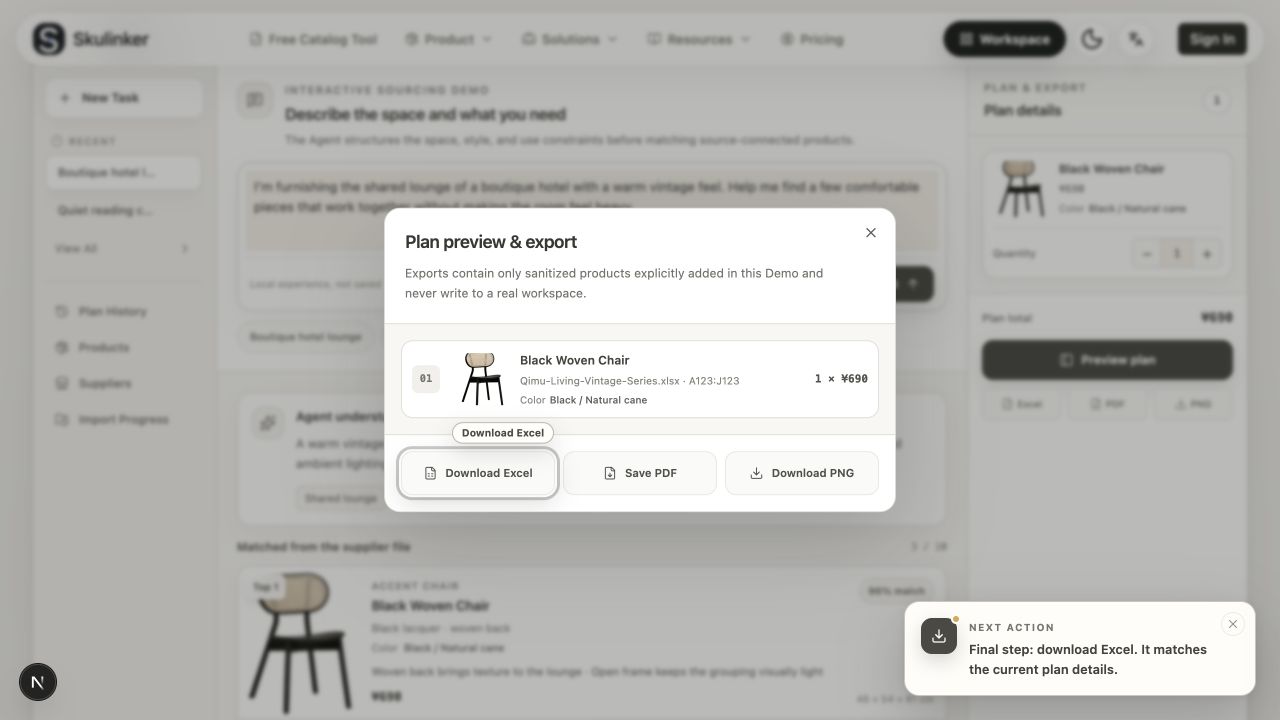
Once you have checked the product, you can explicitly add it to a plan. The plan keeps the selected product, quantity, price, and source file together so you do not have to reconstruct the same answer in another spreadsheet.
Sanitized public Demo: the selected product and its source file appear
together in the plan preview.
The Demo is a local, sanitized experience. It is useful for seeing the workflow, but it is not a saved customer workspace, a real customer quote, or proof that a product is suitable for a particular project.
No. Start with the supplier materials that your team searches most often. The useful first step is to make the product information discoverable and reviewable; you can improve field coverage as you learn what sales and sourcing actually need.
It should not. A usable product record needs a path back to the original supplier file and its location. That is why the Details & source view matters: you can review the file, worksheet or range, SKU, dimensions, and price before relying on the record.
No. Skulinker focuses on turning supplier PDFs, Excel sheets, catalogs, and images into searchable, source-connected product records for sourcing, matching, comparison, and selection plans. It does not replace the transaction, inventory, finance, or channel-governance responsibilities of an ERP or a full PIM.