I am the founder of Skulinker, with 10 years of experience in the real estate supply chain. My work has included procurement, supplier coordination, product sourcing, and turning supplier information into product data that project and sales teams can actually use.
Over those years, one problem kept repeating: suppliers sent valuable product information in many different formats, but our team still had to organize it manually before we could search, compare, or reuse it.
That experience led me to build Skulinker.
In short: Skulinker turns supplier PDFs, spreadsheets, CSV files, Word documents, catalogs, and images into structured, source-connected product records. Supply chain teams can build a private product library over time, while sales teams can find suitable products with natural language, prepare shortlists, and export editable selection plans.
The Daily Problem: Every Supplier Uses a Different Format
Supplier development teams work with information from many companies. One supplier may send a carefully formatted Excel quotation. Another sends a PDF catalog with prices in a separate spreadsheet. A third sends product images, a Word document, and a message explaining materials or dimensions.
Even when the files are all spreadsheets, their structures are rarely the same:
- Product names, model numbers, dimensions, materials, colors, and prices appear under different headers.
- Some suppliers put one product in each row; others use merged cells or several sheets.
- Images may sit inside cells, appear on another page, or arrive in a separate folder.
- Units, currencies, MOQ, lead times, and notes follow different conventions.
The result is repetitive work. We open one supplier file after another, interpret its structure, and manually copy the useful fields into an internal spreadsheet or ERP system. It takes time, creates opportunities for mistakes, and makes future product searches depend on remembering where a file was saved.
Why We Did Not Want to Put Everything Into the ERP
Our first instinct was to create ERP product records for everything we collected. In practice, that introduced another problem.
Supplier development happens before a commercial relationship is fully validated. A team may review hundreds or thousands of potential products, but only a small number may reach a quotation, sample request, purchase order, or active project. Creating formal ERP master data for every early-stage product adds unnecessary work and fills the ERP with records that the business may never use.
We needed another layer before ERP: a place to preserve, structure, search, and evaluate supplier product information without treating every discovered item as approved master data.
What Is a Pre-ERP Private Product Library?
A pre-ERP private product library is a working collection of supplier products that sits between incoming files and formal operational systems.
It should let a team:
- archive supplier materials from different channels;
- turn useful fields and images into searchable product records;
- retain the connection between every record and its original source;
- compare products and supplier offers;
- review and improve extracted information;
- move only commercially relevant, approved products into ERP when appropriate.
This separation gives procurement and ERP teams a cleaner boundary. The product library supports discovery and evaluation; the ERP remains focused on validated master data and transactions.
How Skulinker Turns Supplier Files Into Product Records
Skulinker was built around the supplier file rather than the project. Teams can upload the materials they already receive—regardless of whether the useful information is inside a PDF, spreadsheet, document, catalog, or image.
The workflow is straightforward:
- Upload supplier files and related materials.
- Use AI to identify products and extract fields such as model, supplier, category, image, dimensions, material, color, price, currency, MOQ, and notes.
- Map that information into a consistent product structure.
- Review the extracted records while preserving their source evidence.
- Save reviewed records to the team's private product library.
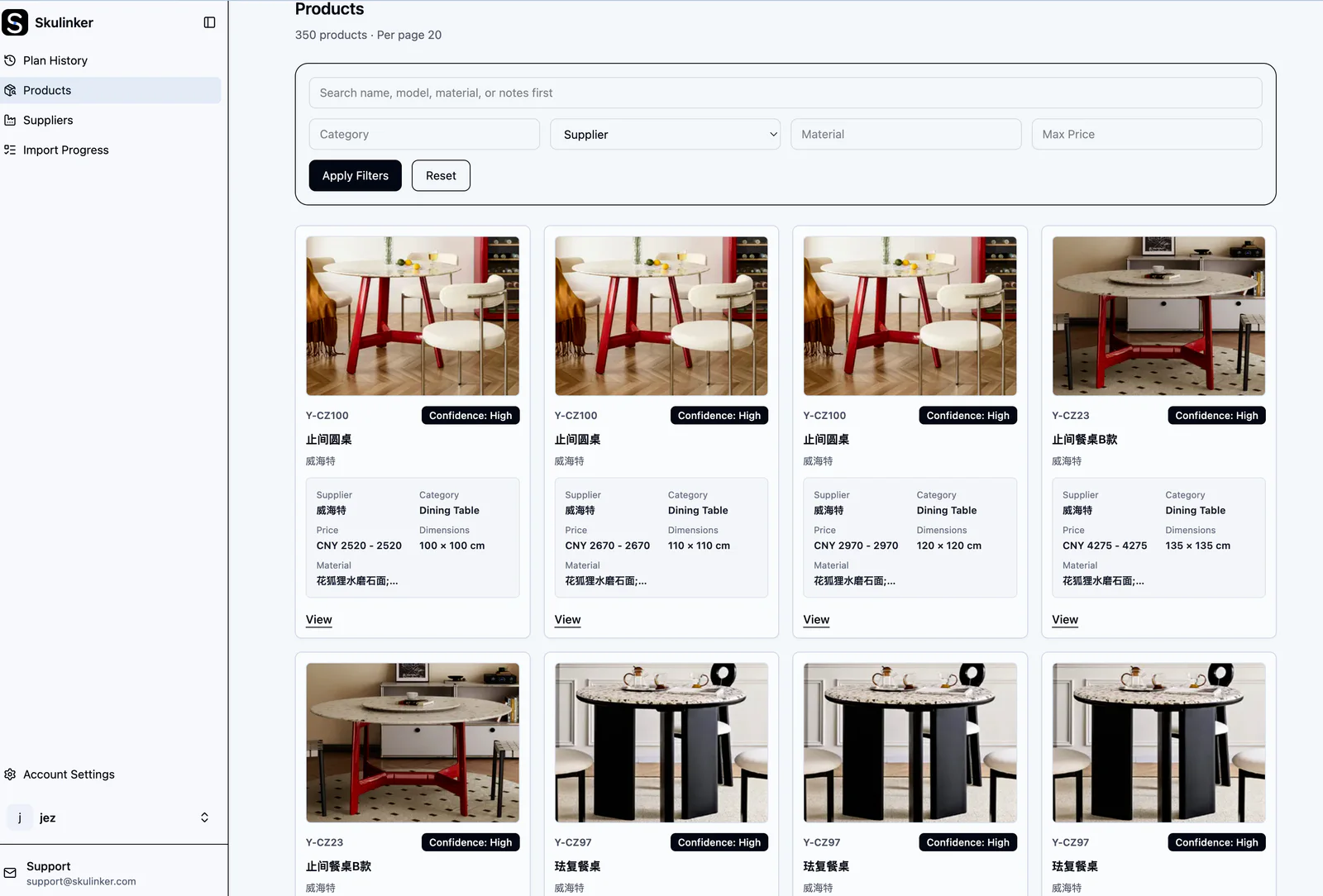
Supplier files become consistent product records that can be filtered by product name, model, category, supplier, material, price, and other fields.
The goal is not to pretend that AI extraction is always perfect. The goal is to remove repetitive data entry while making review practical. A user can check important values against the original material rather than trusting a disconnected database row.
How Skulinker Helps Supply Chain and Procurement Teams
Supplier development is cumulative work. Every new catalog, quotation, and specification sheet tells us something about a supplier's product range, price level, materials, capabilities, and strengths.
Without a structured library, that knowledge remains trapped in folders and individual memory. With Skulinker, the team can preserve the work and build a reusable sourcing asset.
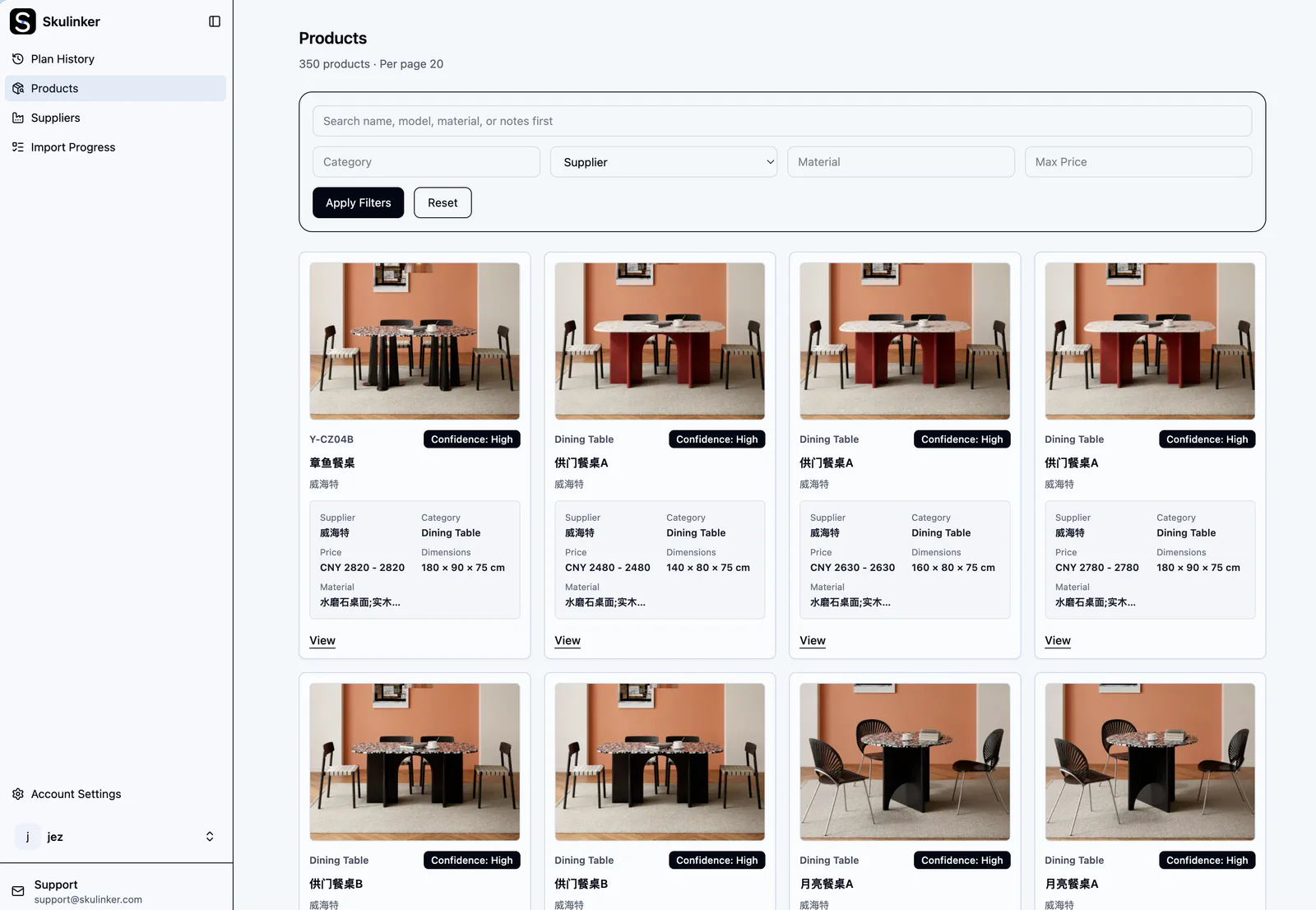
A private product library makes supplier products and their variants visible in one consistent workspace instead of separate files.
For supply chain and procurement teams, this means they can:
- preserve promising products before they are ready for ERP;
- compare supplier, price, material, dimensions, specifications, MOQ, and lead time;
- keep product information connected to its source;
- understand each supplier's range and advantages over time;
- reuse earlier sourcing work when a similar request arrives.
Instead of beginning every request by reopening old folders, the team begins with a searchable history of what it has already learned.
How Skulinker Helps Sales Teams
Sales teams usually start with a customer need, not a supplier file. A request might be: “Find a white dining table and four chairs within a budget of 3,000,” or “We need lightweight lounge chairs for a boutique hotel.”
In Skulinker, the user can describe that request in natural language. The system searches the private library, identifies relevant products across suppliers, and presents comparable candidates. Users can review images, prices, dimensions, materials, suppliers, and matching reasons before adding products to a plan.
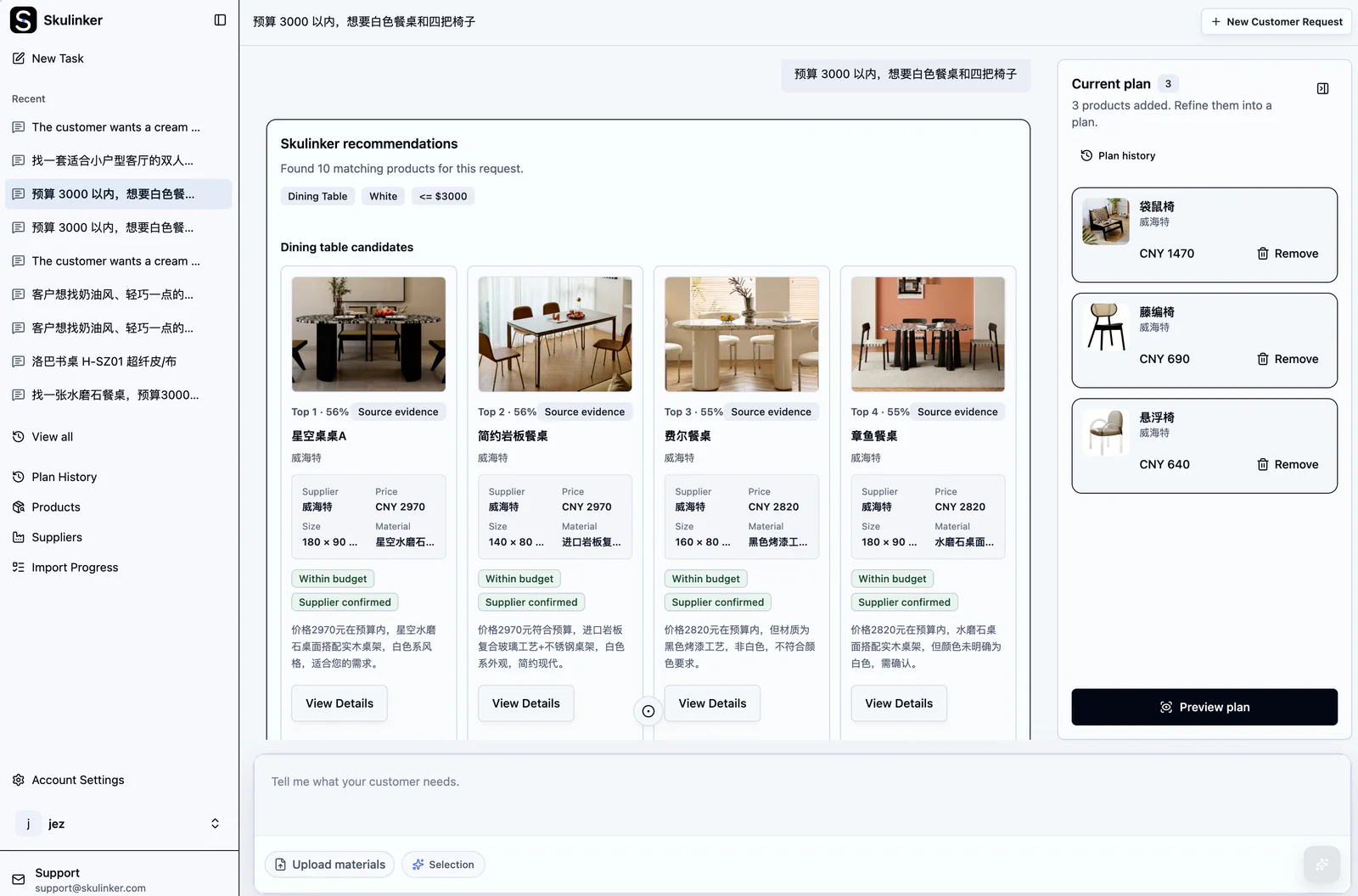
A customer request written in everyday language can be matched against products that the team has already collected and reviewed.
The matching result remains connected to source evidence. When a product looks suitable, a user can inspect the original supplier document, sheet, page, and row supporting the record. That makes it possible to verify critical information manually before it reaches a customer.
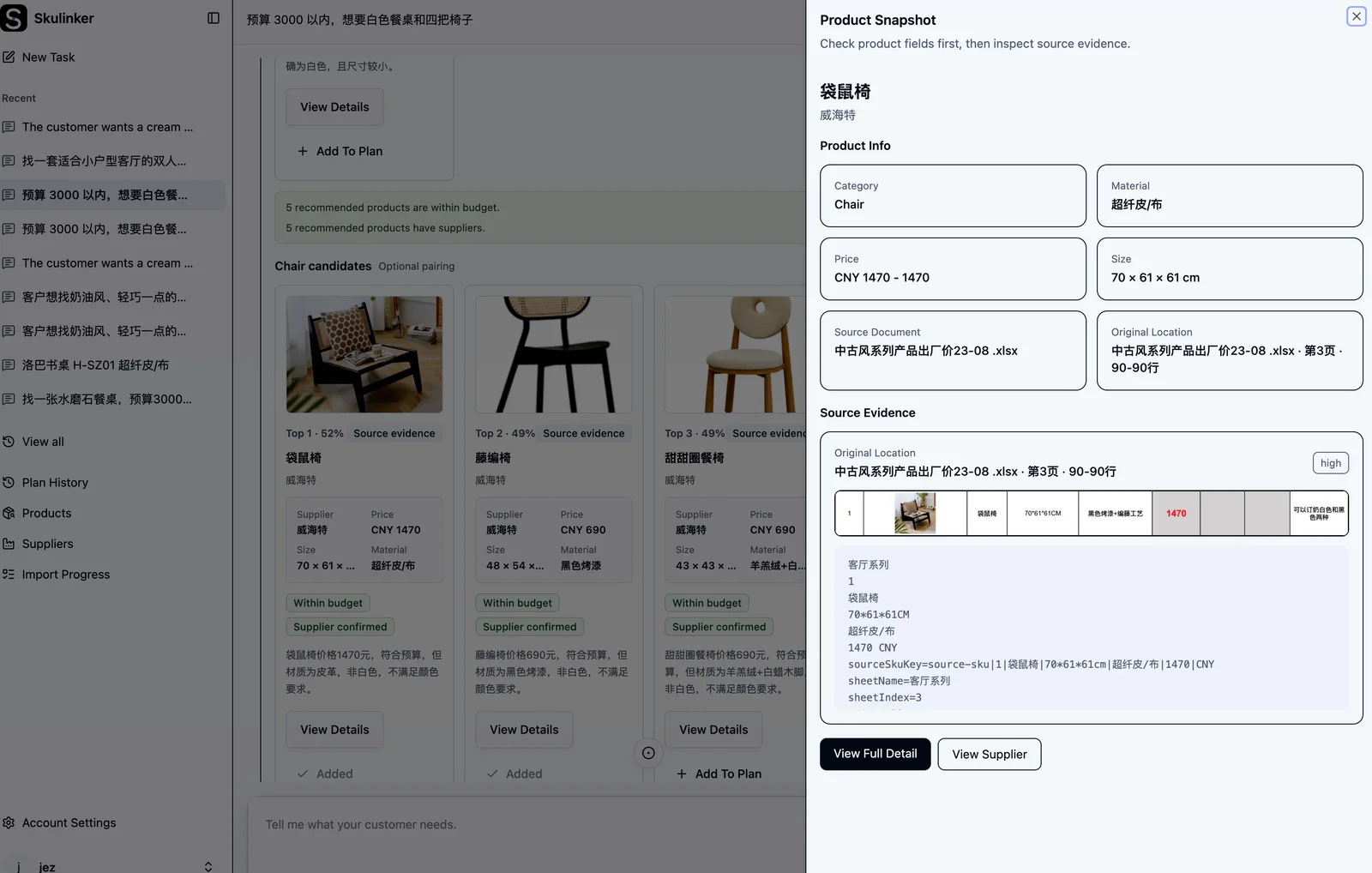
Source evidence shows where an extracted product came from, so users can return to the relevant supplier spreadsheet location for human review.
After choosing products, sales or sourcing teams can build a shortlist and export it as Excel, PDF, or PNG. The exported Excel plan includes product images and editable fields, allowing the team to adjust quantities, notes, pricing, or presentation details before sharing it with a customer.
A Practical Example
Imagine a sales colleague needs five lounge chairs for a boutique hotel. The chairs should feel light, suit a warm interior, fit within a defined size range, and stay under budget.
The traditional workflow is to remember which suppliers might have suitable products, open their catalogs one by one, find the right pages, check separate price sheets, and copy the options into a new proposal.
With a private product library, the team can:
- enter the requirement in natural language;
- review matching chairs from several suppliers;
- compare images, dimensions, materials, and prices;
- open source evidence to confirm any important field;
- add the best options to a customer plan and export an editable quotation shortlist.
The exported file remains editable for customer-specific changes.
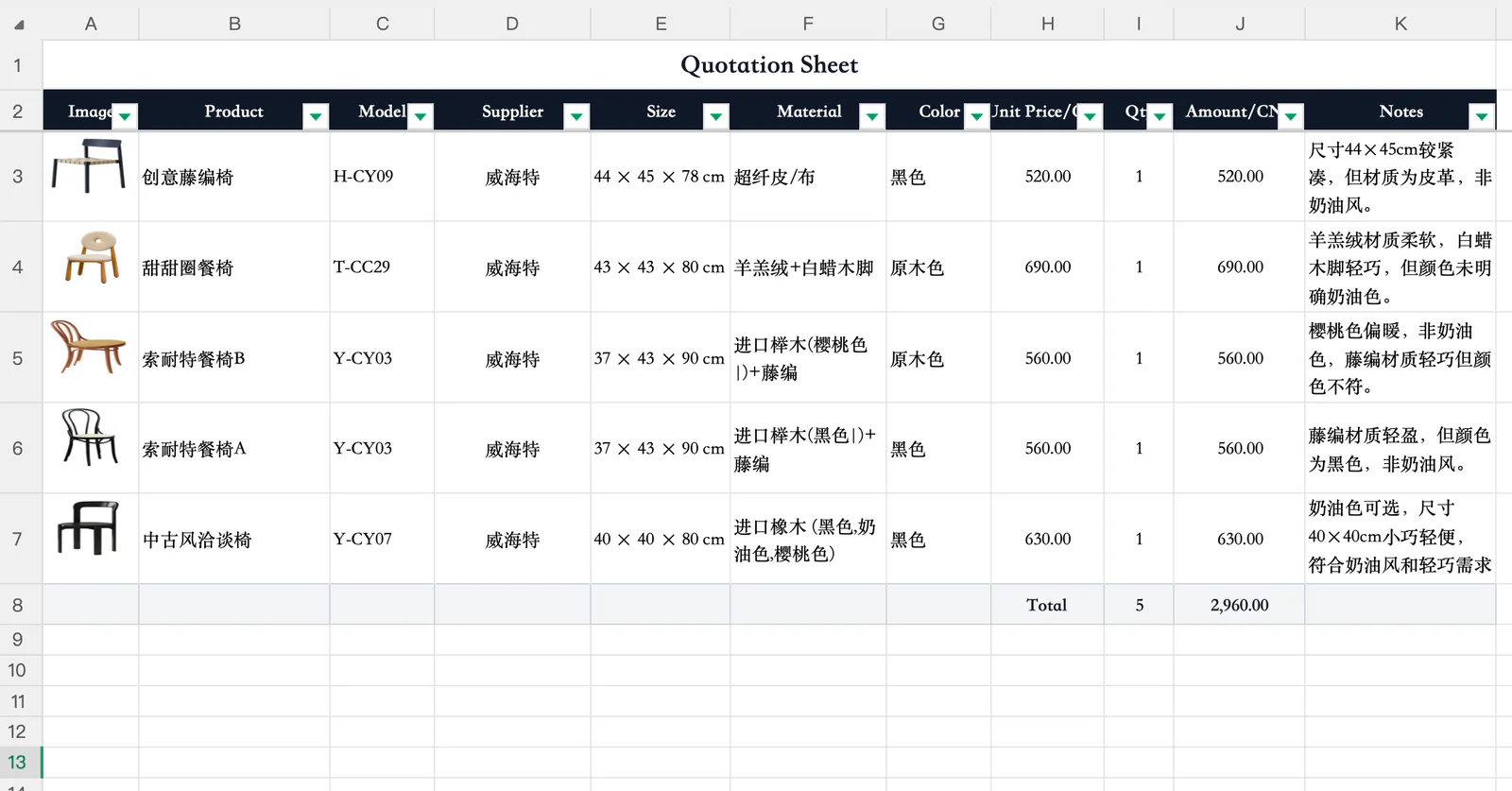
The exported Excel selection plan includes product images and structured fields, and remains editable for customer-specific changes.
The important change is not only speed. The sourcing work becomes reusable. The next time a similar request arrives, the team starts from accumulated product knowledge rather than from scattered supplier files.
Skulinker Is Not Intended to Replace an ERP
Skulinker does not replace an ERP. It does not try to run purchase transactions, accounting, inventory, payments, or every master-data governance process.
Its role is earlier in the workflow:
supplier materials → structured product records → private product library → search, comparison, and selection → approved products for downstream systems
Once a product has reached the appropriate commercial and data-quality stage, the team can move the necessary information into its ERP, PIM, or other system of record. Until then, the product can remain useful for discovery and evaluation without cluttering formal master data.
For a broader explanation of this boundary, see our guide to product master data management for distributors and the supplier product data ingestion workflow.
What I Learned From Building Skulinker
The hardest part of supplier product data is not simply reading a file. It is preserving context while turning inconsistent information into something a team can trust and reuse.
Three principles have shaped the product:
- Start with the supplier materials teams already have. A useful workflow must accept real-world formats instead of requiring every supplier to adopt a new template.
- Keep structured data connected to its source. Extraction becomes more useful when a person can verify important fields quickly.
- Treat the product library as a long-term company asset. Every reviewed supplier file should make the next sourcing or sales request easier.
This is why Skulinker focuses on the space before ERP entry: the work of collecting, understanding, comparing, and reusing supplier product information.
Frequently Asked Questions
Who is Skulinker for?
Skulinker is designed for sourcing, procurement, supplier development, product-data, ERP-preparation, and sales teams that routinely receive product information from multiple suppliers.
Which supplier file formats can be used?
Teams can work with common supplier materials such as PDFs, Excel and CSV files, Word documents, catalogs, and images. The useful fields can differ by category and supplier, so review remains an important part of the workflow.
Why keep product records before ERP entry?
Many products are evaluated long before they become approved commercial items. A pre-ERP library keeps them searchable and comparable without forcing the team to create formal ERP records too early.
Can users verify where a product field came from?
Yes. Source-connected records preserve the relevant original document and location so users can review important details against supplier material.
Building a Better Supplier Product Data Workflow
I built Skulinker because our own supply chain work needed a better bridge between scattered supplier files and formal business systems. The product helps teams turn daily document processing into a private knowledge base that supports both sourcing decisions and customer responses.
If this workflow sounds familiar, you can explore Skulinker, review the workflow examples, or start with your own supplier files.
Next step
Turn supplier files into records your team can review
Start with one supplier package and move through extraction, source review, matching, and selection.
Continue reading