Furniture sourcing software is not one product category with one universal feature list. It can describe tools for capturing supplier source files, building a private product library, developing FF&E specifications, managing budgets, or executing procurement. The useful question is not “Which tool has the most checkmarks?” It is “Where does our work start, which facts must remain trustworthy, and what deliverable must leave the system?”
For hotel designers, interior architecture firms, furnishing companies, furniture distributors, and procurement teams, the same product information may move through several systems. A supplier PDF or Excel price sheet introduces the commercial facts. A reusable library makes those products discoverable. A project specification adds room, quantity, approval, and design intent. Procurement then converts approved items into quotes, orders, and delivery tracking. Selecting software without separating these layers creates expensive overlap and leaves the first data problem untouched.
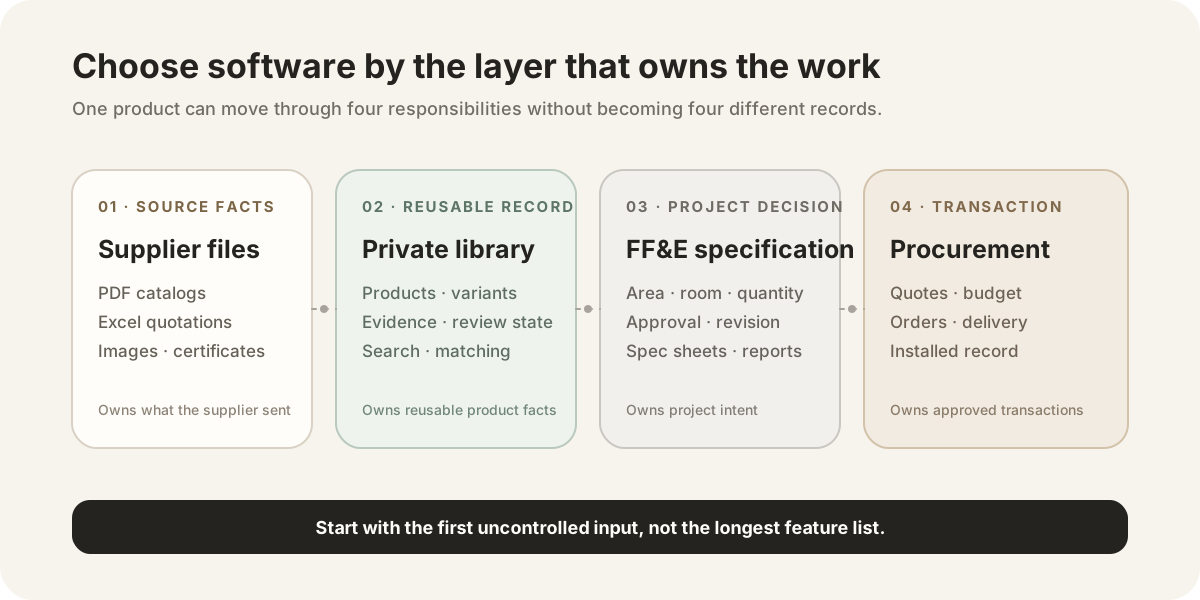
Furniture sourcing begins before a designer places a chair on a schedule. Factories and suppliers send catalogs, quotations, images, material notes, certificates, and finish options. Those files contain product identity and commercial evidence, but the facts may be split across pages and formats. A model number can be in a PDF, the current price in a spreadsheet, and the correct image in a separate folder.
The sourcing team must answer several different questions:
- What products has the company received from its suppliers?
- Which source supports the dimensions, material, price, and lead time?
- Which products fit a client requirement or design brief?
- Which item was approved for a room or project?
- What quantity, budget, quote, purchase, and delivery state applies?
No single field answers all five. Product identity is not the same as a supplier offer. A reusable enterprise record is not the same as a project line item. A shortlist is not a purchase order. Good software makes those relationships explicit instead of collapsing them into one spreadsheet row.
Skulinker concentrates on the first two transitions: turning supplier files into source-connected product records and using that private catalog for search, matching, comparison, shortlist creation, and editable plan export. It does not replace a complete specification, budgeting, Revit, procurement, ERP, PIM, MDM, DAM, or channel-syndication system.
This is where transactional facts originate: supplier identity, model or SKU, dimensions, construction, finish, price, currency, MOQ, lead time, image, and supporting documents. The files may be imperfect, but they remain the evidence that a reviewer or salesperson needs when a record is uncertain.
A library converts those files into reusable records. It needs stable supplier identity, structured attributes, variants, update dates, review status, and a route back to the source. Search and similarity matching belong here because the team wants to find products across suppliers without rebuilding a project schedule first.
A project specification introduces design and delivery context: area, room, quantity, tag, approval state, responsible person, revision, installation note, and report format. The same product can appear in several projects with different quantities or approved finishes. This layer should reference product facts without confusing a project decision with the enterprise master record.
Approved specifications feed estimates, quote requests, supplier comparisons, purchase orders, payments, logistics, installation, and closeout. Commercial terms need effective dates and project scope. A historical price should not silently become today’s confirmed quote.
Many platforms cover more than one layer. The map is therefore a decision tool, not a claim that products fit into exclusive boxes.
Interactive Demo in this guide
Describe a sourcing brief, then inspect the evidence
Use the same sanitized workflow to move from a room brief to ranked matches, source context, an explicit shortlist decision, and an editable plan.
No sign-up required. Click the input below to try it.
The comparison below uses capabilities described on each vendor’s public website as of July 27, 2026. It does not score usability, service quality, private roadmap, or features that require a sales call to verify.
| Platform | Publicly emphasized starting point | Reusable library | Project specification and design work | Budget and procurement | Distinctive fit to evaluate |
|---|
| Skulinker | Supplier PDFs, Excel files, catalogs, and images | Private, source-connected supplier product records for search and matching | Shortlist and editable customer selection-plan output; not a full FF&E specification suite | Does not replace complete budgeting, purchase-order, or logistics software | Teams whose bottleneck is turning supplier data into searchable options and client-ready selections |
| Gather | Product capture through a Web Clipper and custom import | Searchable Resource Library | Selection Boards, custom specification fields, revisions, collaboration, and exports | Budget and cost analysis are publicly described | Interior design teams centered on design development and specification packages |
| Fohlio | URLs, PDFs, structured imports, and product/material data | AI Product & Materials Library with cross-project reuse | Specifications, reports, workflows, templates, analytics, and Revit integration | Budgeting and procurement are part of the public platform scope | Firms wanting broad specification-to-procurement operations |
| Specsources | Manufacturer websites, SpecGrab, SpecWeb, and product data | Product library | Spec sheets, Spec Books, collaboration, and SpecBIM/Revit | Budget and procurement workflows are publicly described | Teams that prioritize mature specification writing and BIM-connected delivery |
These products serve overlapping users. It would be inaccurate to say that one serves “designers” while another serves “the supply chain.” Designers also receive supplier files, and furniture sales teams also create project selections. The difference is the work that each platform makes central.
Read the detailed comparisons for Skulinker vs Fohlio, Skulinker vs Gather, and Skulinker vs Specsources before treating this summary as a buying decision.
Use the furniture product master data guide to define the product, variant, supplier offer, asset, and source-evidence structure you expect the demonstration to preserve.
A product library is useful only when the team can trust and reuse it. Ask vendors to demonstrate a real supplier package rather than a polished sample record. Upload or import a PDF, spreadsheet, images, and a later price update. Then inspect what happens to:
- Product identity. Can the system distinguish model, variant, and supplier offer?
- Source evidence. Can a reviewer return to the file, page, row, or source URL that supports a field?
- Missing and conflicting values. Does uncertainty remain visible, or does the system invent completeness?
- Search. Can users find products by dimensions, material, style, budget, or natural-language need?
- Reuse. Can a product be selected for another client without copying stale project fields?
- Updates. Can a new quotation update commercial context without erasing the previous evidence?
- Export. Can the team produce an editable deliverable and continue professional review?
A folder of catalogs is an archive, not a product library. A public marketplace is a discovery source, not the company’s private history of suppliers and terms. A project schedule is a delivery document, not necessarily the enterprise catalog. Furniture product library software explains these distinctions in detail.
If project delivery is the dominant problem, test the fields and approvals that exist after product selection. The demonstration should include room and area assignment, quantities, custom specification fields, revisions, alternates, issue dates, reports, budget comparison, vendor quotes, and—when required—Revit or other BIM exchange.
Ask who owns a change. If a supplier revises the finish code, does that update every project automatically, create a review task, or remain isolated? If a designer changes a project description, does it alter the reusable product record? The right behavior depends on governance, but the product should make the boundary clear.
For purchasing, inspect the difference between a planning price, vendor quote, approved cost, purchase-order amount, invoice, and final cost. A product that says “procurement” may cover only quote comparison, while another may manage orders and tracking. Public feature pages provide a starting point; a representative workflow is required for confirmation.
The guide FF&E specification software vs supplier product library maps data owners and handoffs without assuming that one system must replace the other.
Start with one representative project and one messy supplier package. Write down the current hours, handoffs, and failure points without turning them into a fictional return-on-investment claim. Then evaluate software in this order:
- Define the first trusted input and the final required deliverable.
- Separate enterprise product facts from project decisions and commercial transactions.
- Mark capabilities that are mandatory now, useful later, or already covered by another system.
- Run the same source package through each shortlisted product.
- Ask users from design, sourcing, sales, and procurement to review the result.
- Test corrections, revisions, and a second project—not only the first import.
- Confirm export, ownership, access control, support, pricing, and migration terms directly with the vendor.
This process may lead to one platform, a staged adoption, or two connected tools. A team could use a source-focused library before handing selected products into a full FF&E workflow. Another team may prefer an end-to-end specification and procurement suite that already covers enough input formats. The architecture should follow the operating bottleneck.
Evaluate Skulinker when the recurring problem is a growing set of supplier PDFs, spreadsheets, catalogs, and images that colleagues cannot search or reuse. Its relevant path is source intake → structured records → private search and matching → shortlist → editable customer plan. Review source evidence before quoting, and use dedicated downstream systems where formal specifications or transactions are required.
Evaluate Gather when design development, Selection Boards, custom specification data, revision control, team collaboration, and specification exports are central. Its public Resource Library and Web Clipper also matter, so the decision should not assume that Gather lacks reusable product data.
Evaluate Fohlio when the firm needs a wider product-and-materials library, specifications, workflows, reports, templates, budget controls, procurement, analytics, and Revit integration in one platform. Fohlio also publicly describes PDF and URL extraction; Skulinker should not be selected on the false premise that Fohlio cannot ingest product data.
Evaluate Specsources when detailed specification writing, Spec Books, budgets, procurement, collaboration, and SpecBIM/Revit are primary. Its SpecGrab and SpecWeb capabilities make website-based product capture part of the comparison.
The appropriate choice can change as a team matures. Document the decision, the excluded requirements, and the handoff to other systems so that a tool does not quietly become an ungoverned source of truth.
It is software that supports one or more stages of finding, organizing, selecting, specifying, pricing, or purchasing furniture. The label is broad, so buyers should identify whether they need supplier data intake, a private product library, FF&E specification, procurement, or a combination.
Not necessarily. FF&E software usually emphasizes project specifications, schedules, budgets, reports, and procurement. Furniture sourcing can begin earlier with supplier product discovery and private catalog organization. Some platforms cover both.
No. A source-connected library can make supplier products searchable and reusable, but it does not automatically provide ERP transactions, full PIM governance and syndication, MDM survivorship, DAM operations, or accounting.
Keeping reusable supplier product records reduces repeated entry and preserves the facts behind future selections. Project-specific quantities, approvals, notes, and revisions should remain distinguishable from the reusable record.
Use current official documentation, request a demonstration of the exact workflow, and confirm pricing and contract terms with each vendor. Product capabilities can change after this comparison date.
Compare the adjacent platforms in Skulinker vs Fohlio, Skulinker vs Gather, and Skulinker vs Specsources. Then clarify the data-layer decision with FF&E software vs supplier product library, the furniture product library guide, and the workflow from supplier product data to FF&E specification.
See how the same product-data responsibilities change in nursing home design, large-store layout planning, and hotel FF&E standards. If supplier documents remain the unresolved starting point, continue with supplier catalog management, the AI product data extractor, and private catalog product search.
Try the public Demo
Next step
Compare the sourcing layer with a real brief
Describe a room, review source-connected matches, and see where a shortlist belongs before evaluating a broader FF&E platform.
Continue reading
Put this question into a fuller workflow
