Skulinker helps furniture buyers find product matches from supplier catalogs, PDFs, Excel sheets, and images. Instead of searching a public shopping index, your team searches the private product library built from its own supplier files.
Use this page when the job is practical: find the right product, find similar products, compare supplier options, and turn the result into a customer-ready plan.
Most buying teams already have the product information they need. The problem is that it sits across PDF brochures, Excel price sheets, image folders, showroom notes, and supplier messages.
Skulinker turns those files into structured product records so buyers and sales teams can find product matches by need, style, material, size, price, supplier, lead time, and shortlist context.
Generic product search tools are built for broad discovery. Skulinker is built for teams that need to find products inside their own supplier catalog data.
After supplier files are imported, Skulinker keeps the source context connected to each product record. That means a match can include the product name, supplier, SKU-like identifier, price, MOQ, lead time, image, and source evidence your team needs before sending anything to a customer.
Teams that search products in supplier catalogs need more than keyword matching across filenames. Skulinker turns imported supplier data into structured records, so each private product search can use category, style, material, dimensions, price, MOQ, lead time, supplier, and source context.
This is AI product search for supplier data: your team can describe a need in natural language, review ranked matches against its own catalog library, and check the underlying evidence before shortlisting a result. It is intentionally scoped to the supplier files your organization imports rather than public marketplace inventory.
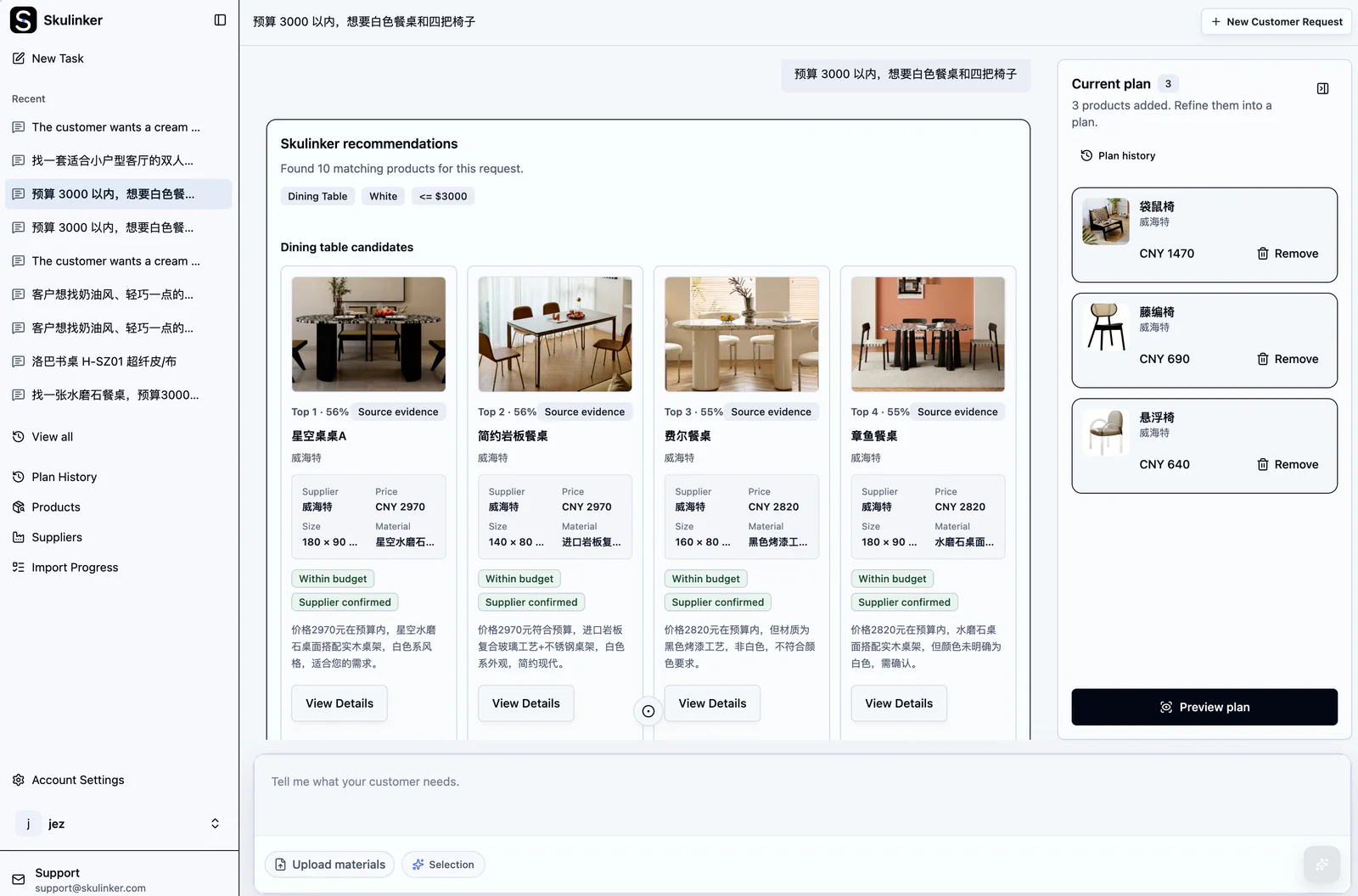
The screenshot is a real Skulinker search state. The ranked cards are candidates from the private library, not automatic purchase decisions; the user can inspect evidence and choose which result belongs in the plan.
When a customer asks for a warm minimal lounge chair, a fabric sofa under budget, or a matching set for a room plan, the request is rarely written like a database query.
Skulinker helps turn that request into search conditions and ranked product matches:
- Find product records by style, room, material, size, budget, or supplier.
- Find similar products when the exact requested item is unavailable.
- Compare supplier options for the same or similar product.
- Keep source files and extracted attributes visible for review.
- Add matched products to a shortlist and export customer-ready product plans.
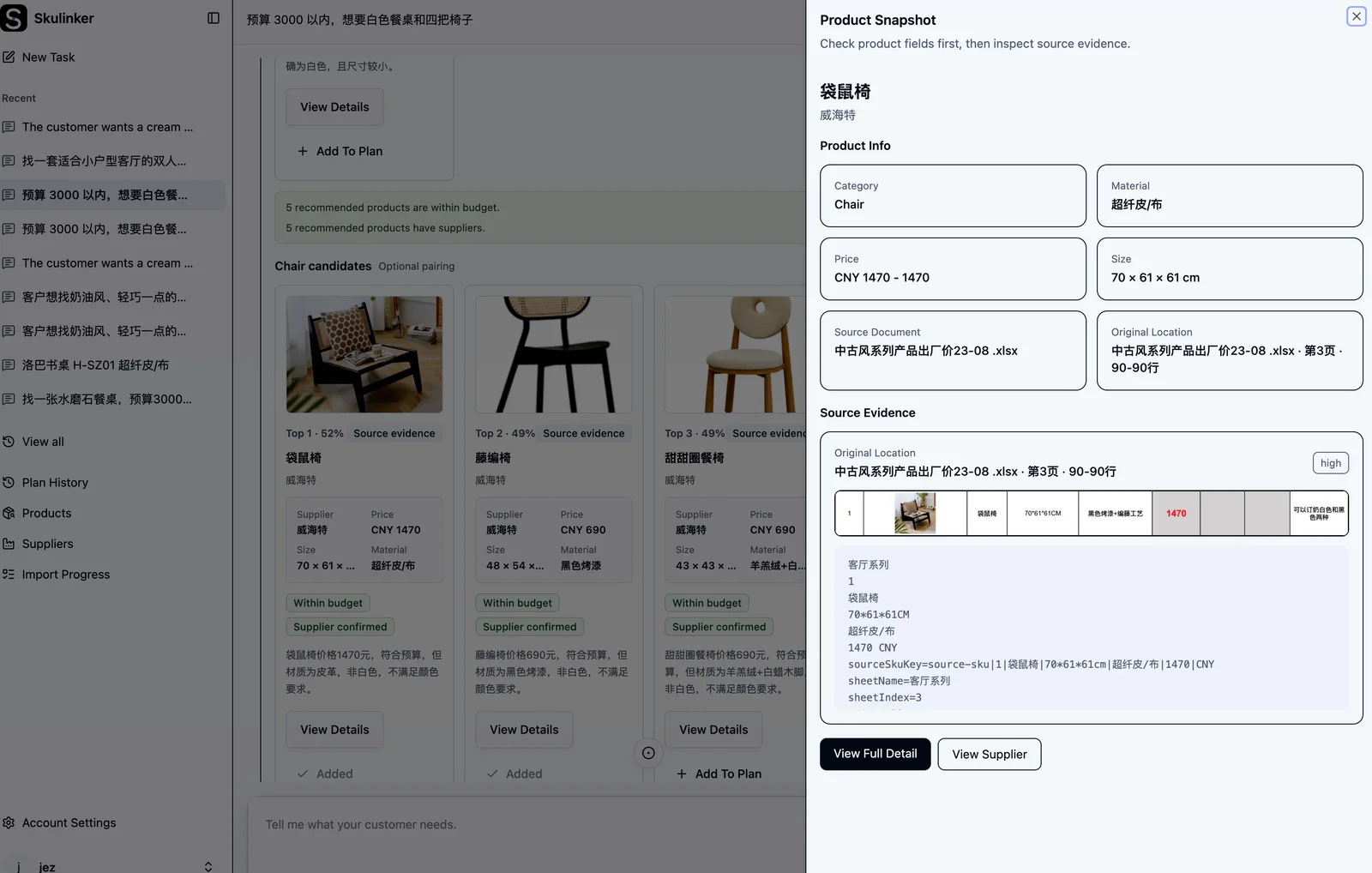
Finding a plausible chair is only the discovery step. The evidence view answers the next question: which supplier record, source location, dimensions, material, and price context support this candidate?
Interactive Demo in this guide
Describe a space, review matches, and build a plan
Use the sanitized furniture library to test natural-language matching without entering a real workspace or uploading files.
No sign-up required. Click the input below to try it.
For Skulinker, "find product" does not mean browsing the open web. It means finding usable supplier products from private catalog data and moving directly into sourcing, comparison, and plan delivery.
That focus matters because buying teams do not only need a result. They need a result they can trust, quote, compare, and send.
The strongest product match is not always the cheapest option. Buyers often need to weigh price, MOQ, lead time, finish, image quality, certification notes, and supplier reliability.
Skulinker keeps the find product workflow connected to the next steps:
- Upload supplier catalogs, PDFs, Excel sheets, and images.
- Extract structured product records from the files.
- Search or describe what the customer needs.
- Review matched and similar products.
- Compare suppliers before quoting.
- Export a customer-ready product plan.
In Skulinker, "find product" means searching your private supplier catalog data for product matches, similar products, supplier options, and quote-ready records.
Yes. Skulinker can help find similar products by using structured product fields such as style, category, material, dimensions, price, supplier, and source context.
Yes. After supplier files are imported into a private product library, Skulinker helps teams search products in supplier catalogs with natural-language needs and structured fields, then review source evidence before comparing or shortlisting a match.
Skulinker is designed for private supplier catalog workflows. It helps your team find products from the supplier data you import and manage.
Next step
Turn a room brief into reviewable product options
Describe the space, inspect ranked matches and source evidence, then add only the products you choose to a plan.
Continue reading
Put this question into a fuller workflow
