
Skulinker vs Gather: Catalog Matching vs Specifications
Skulinker and Gather serve overlapping interior design, furniture, and sourcing teams, but they make different work central. Gather publicly emphasizes a Web Clipper, searchable Resource Library, Selection Boards, custom specification fields, revision tracking, collaboration, budget and cost analysis, and specification exports. Skulinker emphasizes supplier PDF, Excel, catalog, and image intake, source-connected private records, natural-language product matching, shortlist creation, and editable customer selection plans.
Gather is the stronger product to evaluate when design development and issuing structured specification packages drive the workload. Skulinker is the stronger product to evaluate when the recurring problem is converting factory source material into a searchable private catalog and responding to customer requirements across many suppliers. Both can support reusable product data, so the decision cannot rest on the false claim that Gather lacks a library.
Comparison Method and Scope
This comparison uses current public product information rather than private access or vendor-provided performance numbers. Gather’s homepage and pricing pages describe product capture, a Resource Library, Selection Boards, custom specification data, revisions, collaboration, budgets, and exports. Exact limits and commercial terms should be confirmed with Gather.
Skulinker’s implemented scope covers supplier file intake, structured product extraction, source context for review, private catalog search and AI matching, comparison, shortlist, and export or sharing of an editable selection plan. Skulinker is not a replacement for a complete FF&E specification package, revision-issuance process, project budget, purchase order, payment, logistics, ERP, full PIM, MDM, DAM, EDI, or Revit system.
Competitor features checked on July 27, 2026. Product capabilities and pricing can change; verify current details with each vendor.
Skulinker vs Gather Feature Comparison
| Evaluation dimension | Skulinker | Gather, based on public pages |
|---|---|---|
| Primary work entry | Supplier PDF, Excel/CSV, catalog, and image package | Web product capture, design selection, and imported resource data |
| Reusable library | Private supplier product records with source context | Searchable Resource Library for product reuse |
| Web capture | Source packages and file-based intake are central | Web Clipper is a publicly emphasized capture method |
| Supplier files | PDF, spreadsheet, catalog, and image intake | Custom data import is publicly offered; verify the exact file workflow and extraction behavior |
| Search and matching | Structured search and natural-language matching across private suppliers | Library search, filters, product selection, and design workflow |
| Design selection | Product comparison, shortlist, and editable customer plan | Selection Boards and project-centered selection |
| Specification | Handoff output; not a full spec-writing system | Custom specification fields, specification exports, and related design documentation |
| Revisions and collaboration | Selection-plan editing and sharing; not complete issue control | Revision tracking and team collaboration are publicly described |
| Budget | Price context can appear in records and plans; not complete project budget control | Budget and cost analysis are publicly described |
| Best evaluation starting point | Repeated cleanup and matching of private supplier files | Interior design development, specifications, revisions, and presentation |
A demonstration should prove depth. “Import,” “library,” “budget,” and “export” can mean different things. Test the same product package and project requirement in each platform.
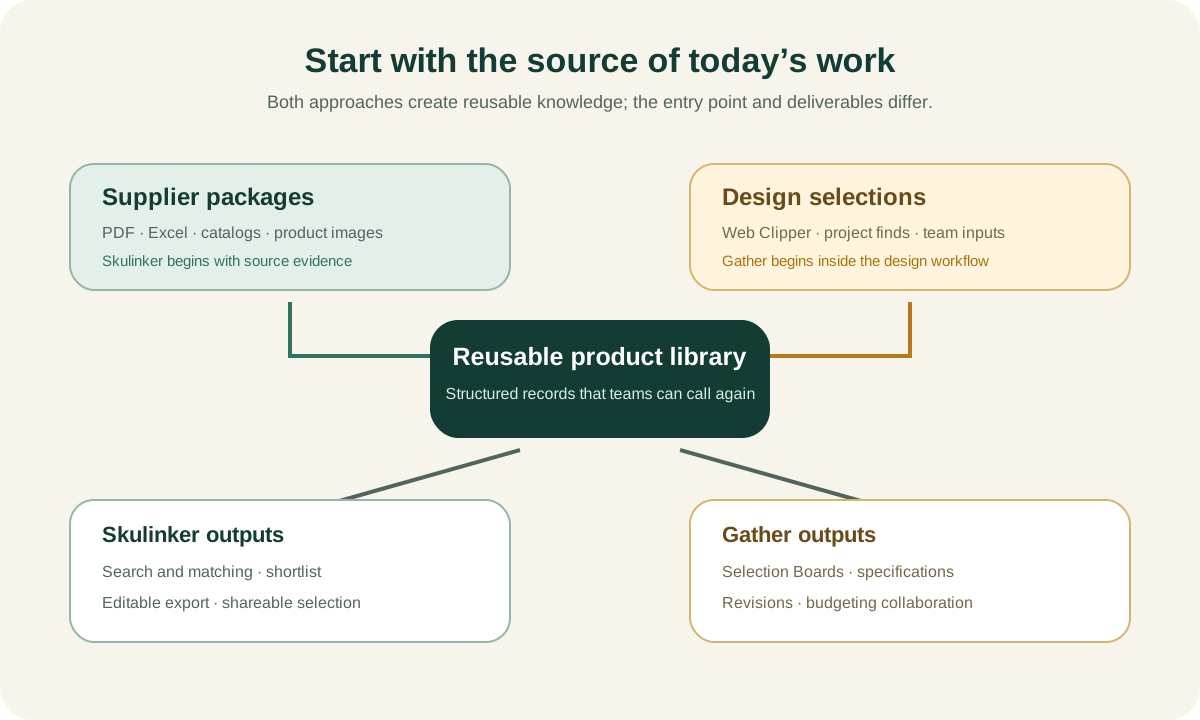
Two Valid Entry Points to the Same Product Lifecycle
The supplier-file entry point begins when a factory sends a catalog and quotation. The first task is to establish supplier identity, separate products and variants, connect images, normalize dimensions, retain price context, and show the source behind each value. A designer may be the person receiving those files; this is not a supply-chain-only task.
The design-selection entry point begins when a designer discovers or chooses a product for a project. A Web Clipper can capture a manufacturer webpage, a Resource Library can store reusable products, and a Selection Board can organize options for a room or client. The team then adds specification fields, notes, costs, and revisions.
These directions meet in the middle:
supplier facts → reusable product record → design selection → project specification → budget and procurement.
The choice depends on where the uncontrolled work accumulates. If every project starts by manually copying supplier PDFs into a new sheet, a source-focused intake layer has leverage. If the library is already usable but project selections, specifications, presentations, revisions, and budgets remain fragmented, Gather’s public workflow is closer to the problem.
Supplier PDF and Spreadsheet Intake
Skulinker is designed around supplier document packages. A PDF can contain product names, images, dimensions, and materials; an Excel sheet can contain price, currency, MOQ, and lead time; separate images can require model association. The extraction result remains a candidate until critical fields and source context are reviewed.
Gather publicly offers custom data import, but its website gives more prominence to the Web Clipper and design workflow. Ask Gather to demonstrate the exact package the organization receives:
- scanned and text-based PDFs;
- products spanning several pages;
- one spreadsheet row per finish or price tier;
- high-resolution images in a separate folder;
- later price updates;
- source traceability for corrected values.
This is not an argument that Gather cannot handle those inputs. It is a requirement to confirm workflow depth rather than extrapolate from the word “import.”
Ask Skulinker to demonstrate how the reviewed output will reach the team’s required specification fields and documents. Its editable selection plan is a handoff artifact, not a substitute for all of Gather’s design-specification controls.
Resource Library and Private Supplier Product Library
Gather’s Resource Library is a reusable product asset, not a temporary project-only list. Public descriptions emphasize saving products, searching resources, and reusing them across work. Gather should receive credit for that capability.
Skulinker’s private supplier product library emphasizes the chain from source package to product record. It can store supplier, model, category, dimensions, materials, images, price context, and evidence, then support search and matching. Its strongest use case appears when the company’s product advantage resides in many private factory catalogs rather than only products captured from public websites.
Evaluate both libraries with governance questions:
- Can a record exist without being approved for customer use?
- How are supplier, product, variant, and price offer separated?
- Can a user return to the PDF page, spreadsheet row, or source URL?
- Do project-specific notes alter the reusable item?
- How are duplicates, substitutes, discontinued products, and alternatives represented?
- Can users retrieve the complete record and supporting assets?
- How are private prices and supplier terms permissioned?
The furniture product library software guide provides a neutral field model for the demonstration.
Search, Matching, and Customer Selection
Skulinker supports a sourcing or sales user who starts with a requirement rather than a known product. The user can search a private catalog with attributes and natural language, review candidates, compare products, add selected items to a shortlist, and export or share an editable customer plan.
Natural-language matching is useful for requests such as “a curved lounge chair in a light neutral fabric for a hotel lobby, under 900 mm wide.” It should not automatically approve a product. Dimensions, performance, commercial terms, and source evidence still require review.
Gather’s Selection Boards publicly support the design process of organizing and presenting selected products. Ask how products move from the Resource Library to boards, how alternates are handled, what client-facing view is available, how comments and approvals work, and which fields continue into specifications.
The practical difference may be who creates the initial candidate set. Skulinker emphasizes matching the organization’s supplier catalog to a need. Gather emphasizes collecting and developing design selections into structured project output. Real teams may perform both.
Specification Fields, Revisions, and Exports
Gather is publicly stronger in specification-development features. Custom specification fields let a firm adapt data to its process. Revision tracking matters when a selection changes after presentation or issue. Team collaboration and exports support coordinated deliverables.
During evaluation, test:
- project, area, room, item code, and quantity;
- selected finish and project modification;
- custom fields for different categories;
- revision reason, timestamp, and responsible person;
- client and internal approval state;
- product and project image handling;
- specification, schedule, board, and budget exports;
- reuse without copying stale project fields.
Skulinker can export an editable selection plan with selected product context. It does not replace a controlled specification revision history or the complete reports a design firm may need. If these controls are mandatory, do not mark them as a future workaround; treat them as selection requirements.
Budget and Commercial Context
Gather publicly offers budget and cost analysis. Confirm whether the required plan supports project budgets, markups, taxes, freight, alternates, revisions, and other cost fields. Confirm how quotes and final procurement data enter if the firm manages purchasing.
Skulinker can retain supplier price context in product records and carry selected values into an editable plan. The context should include supplier, currency, unit, effective date, and source. It is not a complete budget-to-actual or purchasing ledger. A catalog price should never be represented as an approved quote without confirmation.
This distinction is particularly important for furniture sourcing. The same model can have several quantities, incoterms, currencies, and dates. Both products should be tested with a later supplier price update and an already issued project.
When Gather Is the Stronger Fit
Gather is the stronger fit when the firm’s daily center of gravity is interior design development: capturing products from the web or importing resources, maintaining a Resource Library, creating Selection Boards, using custom specification fields, tracking revisions, collaborating, analyzing budgets, and exporting project documentation.
It can also be the cleaner one-platform choice when its import capabilities sufficiently handle the organization’s existing product data. Teams should test their own PDFs and spreadsheets rather than assume a separate intake system is mandatory.
Before buying, confirm plan limits, seats, storage, support, import service, exports, client presentation, permissions, and the exact budget workflow on Gather’s current official pages and contract.
When Skulinker Is the Stronger Fit
Skulinker is the stronger fit when supplier PDF, Excel, catalog, and image cleanup is repeated across many factories, and the organization wants those records to become a long-lived private product asset. It is particularly relevant when sourcing or sales must respond to a client need by searching and matching products across private suppliers.
Source evidence and review state help prevent an extracted field from becoming a false approved fact. The shortlist path supports rapid option building while leaving formal project specification, revision, budget, and procurement responsibilities explicit.
Skulinker can precede Gather if two systems are justified, but it does not currently promise a native Gather connector or writeback. Export and handoff must be tested. It should not be selected as a replacement for the design controls the team actually requires.
Can Skulinker and Gather Work Together?
A possible non-native workflow is:
- Ingest supplier PDF, Excel, catalog, and image packages in Skulinker.
- Review product identity, attributes, images, and source evidence.
- Search and match products to a client requirement.
- Create a shortlist and confirm selected variants.
- Export the reviewed product data.
- Recreate selected resources downstream.
- Build Selection Boards, project specifications, revisions, budgets, and exports.
- Keep supplier updates separate from issued project history.
The extra handoff is worthwhile only if it removes more repeated work than it creates. Test identifiers, images, field mapping, permissions, and version rules.
The guide supplier product data to FF&E specification provides the governance model.
Evaluation Questions
- Which real inputs are supported: web pages, PDF, Excel, CSV, and image folders?
- Can reviewers inspect source evidence for every important product field?
- How are variants and later price offers represented?
- Can a user search with an imprecise customer requirement?
- How does a relevant result become a board or shortlist?
- Which custom specification fields are available?
- How are revisions, approvals, and team permissions controlled?
- What budget calculations and cost history are supported?
- Which exports remain editable and preserve images?
- Can data be migrated out with relationships and evidence?
- What exact plan, seat, and service terms apply?
Use pass, partial, configuration required, unsupported, and not tested. Do not use a star score that hides workflow tradeoffs.
Frequently Asked Questions
Is Skulinker a Gather alternative?
It is an alternative for supplier-file intake, private product matching, shortlist, and selection-plan workflows. It is not a full replacement for Gather when Selection Boards, custom specification fields, revisions, team collaboration, budgets, and design exports are required.
Does Gather have a reusable product library?
Yes. Gather publicly describes a searchable Resource Library. The decision should compare how data enters, how source evidence is preserved, and how products move into projects.
Which product is better for supplier PDFs?
Skulinker makes supplier document packages central. Gather offers custom import, so test the exact PDFs, spreadsheets, images, extraction expectations, and evidence requirements before deciding.
Which product is better for interior design specifications?
Gather publicly offers the more complete design-specification workflow, including Selection Boards, custom fields, revisions, collaboration, budgets, and exports. Confirm the required depth in a demonstration.
Can Skulinker replace an FF&E specification platform?
No. It can prepare source-connected product records and an editable shortlist handoff, but it does not replace complete specification, revision, budget, procurement, or BIM processes.
Continue the Comparison
Read the furniture sourcing software overview, Skulinker vs Fohlio, Skulinker vs Specsources, and the private product library guide. To evaluate the source-data layer, continue with supplier catalog management and the AI product data extractor.
Official sources reviewed: Gather homepage, Gather pricing, and Skulinker.
See the Skulinker workflow examples
Next step
Turn supplier files into records your team can review
Start with one supplier package and move through extraction, source review, matching, and selection.
Continue reading