Furniture product library software gives a company a reusable, searchable record of the products it can source, specify, or sell. Unlike a folder of PDFs, the library separates each product and variant into structured fields. Unlike a public marketplace, it reflects the company’s own suppliers, evidence, review history, and commercial context. Unlike a project schedule, it survives the end of one project and can support the next request.
For interior design, hospitality, architecture, furnishing, distribution, and sourcing teams, the library is valuable because supplier information arrives before it becomes a project decision. A factory catalog, Excel quotation, image folder, certificate, and email attachment may all describe the same model. The product record should join those facts without erasing where they came from.
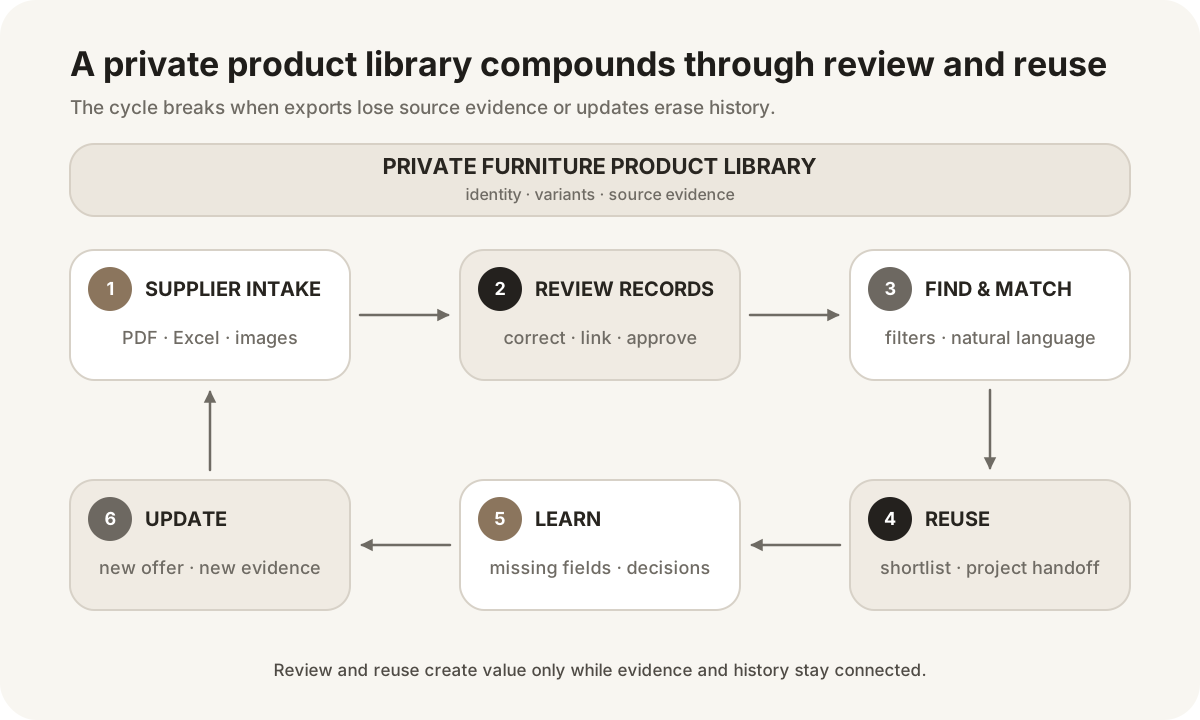
A private furniture product library is an internal database of products and supplier relationships that the team can search and reuse. “Private” means that the organization controls which suppliers, models, prices, evidence, notes, and approvals are visible. It does not mean the data never leaves the system; controlled exports and project handoffs remain important.
The library needs several connected objects:
- Supplier: legal or trading identity, contacts, region, currency context, and source packages.
- Product: stable model identity, category, description, dimensions, construction, materials, and images.
- Variant: finish, color, size, upholstery, configuration, or another controlled difference.
- Offer: supplier, price, currency, unit, MOQ, lead time, effective date, and quotation scope.
- Evidence: PDF page, spreadsheet row, source URL, image relationship, certificate, or reviewer note.
- Review state: extracted, incomplete, needs review, approved for internal discovery, or confirmed for a specific use.
Those objects should not be flattened without reason. A price change does not necessarily create a new product. A finish change may create a variant. Two supplier models that look alike remain separate identities even when they are useful substitutes.
| Approach | What it stores well | Search and reuse | Source and update control | Main limitation |
|---|
| File folders | Original catalogs, images, and quotations | Filename and folder search | Original file can be preserved | Product-level facts remain trapped inside files |
| Master spreadsheet | Shared rows and familiar filters | Works at modest scale | Manual links and version discipline are possible | Images, variants, evidence, permissions, and concurrent updates become fragile |
| Public product marketplace | Public brands and discoverable products | Broad public discovery | Source is controlled by the marketplace | Does not represent private supplier terms or the company’s complete sourcing history |
| Project FF&E schedule | Selected items, room, quantity, and issue context | Strong within one project | Revision can be project-controlled | Reuse can carry stale project fields and may not preserve supplier intake evidence |
| Private furniture product library | Reusable products, variants, offers, and evidence | Cross-supplier filters, search, matching, and controlled reuse | Can retain provenance, review state, and version context | Needs governance and may still require FF&E, PIM, ERP, or procurement systems downstream |
The right architecture can combine these. Original files should remain available even after extraction. A spreadsheet can be a valid export. A marketplace can introduce products. A project schedule can consume library records. The library’s role is to connect them around a stable, reusable product identity.
Start with fields that support real decisions instead of building an abstract schema with hundreds of empty columns.
Supplier, manufacturer, original model or SKU, internal identifier, category, subcategory, collection, parent product, variant relationship, lifecycle state, and aliases. The supplier identity matters because model numbers can collide across factories.
Width, depth, height, seat height, unit, weight, materials, construction, finish, color, upholstery, style, assembly, indoor or outdoor use, and available options. Keep original values when normalization changes notation.
Price, currency, unit basis, MOQ, packaging, lead time, incoterm when available, quotation date, effective period, and supplier contact. These values should carry scope and date because they are more volatile than dimensions.
Primary image, alternate images, drawings, PDF page, spreadsheet row, source URL, certificate, test report, extracted text, and reviewer comments. Evidence must be usable: a generic link to a 300-page file is less helpful than a product page reference.
Import job, created date, last reviewed date, reviewer, completeness state, conflict notes, approved use, project history, and change reason. Governance should communicate uncertainty rather than turning every extracted value into a false fact.
The schema will differ for seating, casegoods, lighting, fabrics, and architectural finishes. Category-specific fields can sit beside a common identity and provenance core.
The first import saves some manual entry. The larger benefit appears through reuse:
- A supplier package becomes structured candidate records.
- Reviewers correct identities, units, images, and ambiguous fields.
- Sales or design searches the library for a real client requirement.
- Selected products move into a shortlist or project.
- The team learns which fields were missing or decisive.
- A new supplier quotation updates offer context.
- Future searches benefit from the reviewed records and decisions.
This is a data flywheel only when corrections persist and sources remain visible. If every export becomes a disconnected spreadsheet, learning stops at the file boundary. If updates overwrite history, the library becomes less trustworthy as it grows.
Track operational measures that can be observed: percentage of records with a source, fields requiring review, duplicate candidates resolved, products reused across projects, time from file receipt to searchable record, and stale commercial terms. Do not invent a universal percentage of time saved.
Basic filters answer precise questions: category, dimensions, material, supplier, finish, and price context. Full-text search handles descriptions and model aliases. Natural-language matching helps when a user describes a need rather than a field value: “a compact walnut bedside table under 500 mm wide for a hotel room.”
Matching should distinguish four tasks:
- Duplicate detection: do two records represent the same supplier product?
- Variant linking: do items share a parent but differ by a controlled option?
- Offer association: does a new quotation describe an existing model?
- Substitute discovery: can a different product satisfy a similar need?
These tasks need different thresholds. A broad substitute search can show more options because the user reviews them. An identity merge needs strong evidence because a false merge can move price, image, or certification to the wrong product.
Skulinker supports private product search and matching from supplier records, then lets users compare candidates and create a shortlist. It does not provide complete MDM survivorship or automated downstream writeback. The product data matching guide explains review thresholds and evidence.
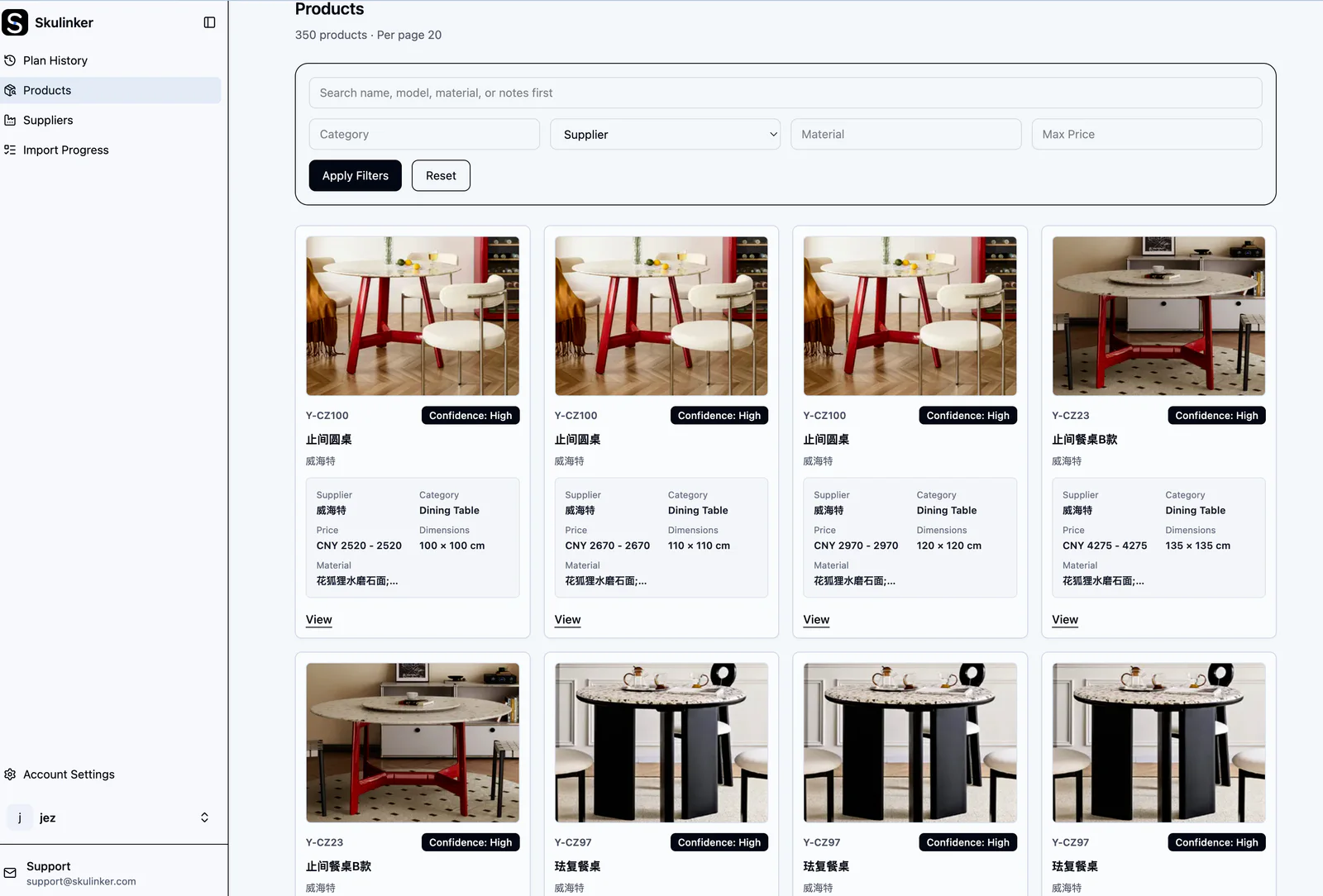
This real Skulinker workspace shows the difference between a folder and a working library: products are visible as records with images, categories, supplier context, and filters. The screenshot is evidence of the searchable layer; it does not imply that every incoming value has been approved automatically.
Interactive Demo in this guide
Search, verify, and shortlist from a private furniture library
Use the sanitized workflow to describe a room, inspect source-connected matches, and add only the products you choose to a plan.
No sign-up required. Click the input below to try it.
A reusable record should move into a project without losing the distinction between base fact and project choice.
Suppose the library contains a lounge chair with standard dimensions, four factory finishes, a historical catalog price, and a linked PDF page. A hotel project chooses one finish, adds custom fabric, assigns 24 units to a lobby, and receives a current quote. The standard product remains reusable. The custom fabric, lobby quantity, approval, and quote belong to the project or commercial context.
A practical handoff includes:
- stable product and supplier identifiers;
- selected variant and project modification;
- source evidence links;
- review or confirmation state;
- project room, quantity, and tag;
- current quote reference rather than an unqualified price;
- fields that remain editable in the destination system.
The supplier product data to FF&E specification guide maps this handoff. Teams requiring formal revisions, Spec Books, budgets, purchase orders, and Revit should use an appropriate FF&E platform after or alongside the library.
A private furniture product library is not automatically the final system for every process.
Choose or retain a full PIM when the company needs complex enrichment workflows, localization, digital-asset governance, product completeness policies, brand portals, and multi-channel syndication. The library can feed reviewed supplier records into it.
Use an ERP for vendor transactions, purchase orders, inventory, finance, invoices, and accounting controls. A searchable catalog does not create a posted transaction.
Use FF&E specification software when designers need controlled room schedules, quantities, tags, approvals, revisions, issue packages, budgets, procurement, and BIM connections. The library provides reusable candidates; the project system manages design delivery.
Use MDM when identity resolution, survivorship, cross-domain governance, stewardship, and authoritative distribution across enterprise systems are mandatory.
The FF&E software versus supplier product library comparison helps assign each fact to the appropriate owner.
Run a proof with a real package that includes a catalog, price sheet, separate images, variants, and one later update. Ask:
- Which input formats and file sizes are supported?
- How are product boundaries and multi-page records detected?
- Can a user see the source behind a value?
- Are original and normalized dimensions both retained?
- How are suppliers, products, variants, and offers represented?
- Can reviewers correct fields without losing extraction context?
- What prevents a similar product from becoming a false duplicate?
- Can users search by structured filters and natural-language need?
- How does a selected record move into a shortlist, schedule, or downstream system?
- Can the organization export its records, images, relationships, and evidence?
- How are permissions and private supplier terms controlled?
- What happens when a supplier changes a price, finish, or model?
Evaluate the complete correction and reuse cycle, not just upload speed. A fast import that produces records no one trusts does not solve the sourcing problem.
Skulinker is designed for teams whose product data begins in supplier PDFs, Excel or CSV files, catalogs, and images. It structures candidate products, keeps source context available for review, and builds a private catalog for search and matching. Users can compare relevant products, add items to a shortlist, and export or share an editable customer selection plan.
The platform does not replace complete PIM syndication, ERP transactions, MDM governance, DAM operations, EDI, formal FF&E specification, Revit, budgeting, purchase orders, or logistics. Those boundaries are part of selecting the right architecture, not a footnote.
See the furniture sourcing software comparison when evaluating Gather, Fohlio, Specsources, and Skulinker around the broader workflow.
A catalog is often a supplier publication or customer-facing collection. A product library is the organization’s structured database of products, suppliers, variants, offers, evidence, and review state across many catalogs.
Yes, if access controls and governance support it. Price should include supplier, currency, unit, date, quantity scope, and source so that users do not treat an old catalog value as a current quote.
Not automatically. The team needs rules for supplier identity, variants, internal identifiers, duplicate resolution, and offers. Similar products from different suppliers usually remain separate even when they can substitute for one another.
AI can extract product candidates from files, propose fields, normalize descriptions, and improve natural-language matching. Review remains necessary for identity, conflicting dimensions, image assignment, commercial terms, and certification.
No. It improves access to product facts and options. Designers and specifiers still interpret the brief, codes, performance requirements, suitability, aesthetics, and project constraints.
If the company’s product knowledge is still trapped in folders and spreadsheets, begin with supplier catalog management and AI product data extraction. Compare the design-library entry point in Skulinker vs Gather, then see how evidence changes product review in nursing home design. Skulinker can help create source-connected records, make them searchable, match products to a need, and prepare a customer-ready shortlist.
Next step
Search one product record instead of one more folder
Use the homepage Demo to move from a sourcing brief to source-connected matches and an editable selection plan.
Continue reading
Put this question into a fuller workflow
