AI Product Data Extraction Tool for Supplier Catalogs

Extract product data from supplier PDFs, Excel price sheets, catalogs, and images, then review and normalize the records for sales or ERP use.
Jul 9, 2026

Skulinker is an AI product data extractor for teams that receive product information from suppliers but cannot use it as delivered. It turns supplier PDFs, Excel sheets and price lists, catalogs, and image folders into structured product records that sourcing can review and sales can search.

The work does not end when text is extracted. A usable record must keep the supplier, original file, product image, SKU or model, dimensions, material, price, MOQ, and other source evidence together. It must also be clean enough to compare with records from other suppliers.

When Supplier Files Never Become Usable Product Records

A sourcing team may add new suppliers every week while the ERP team can only enter a small part of each catalog. The files remain in email, shared drives, and chat histories. Sales then asks sourcing to find a product again, even though the company already received it.

This is common for furniture distributors, importers, and trading companies because one supplier may send a designed PDF, another an Excel quotation, and another a folder of images with model numbers in the filenames. The information exists, but it is not yet a product library.

What a Product Data Extractor Should Preserve

Extraction should create a record that a person can verify, not anonymous rows separated from their origin. For each product, the useful result normally includes:

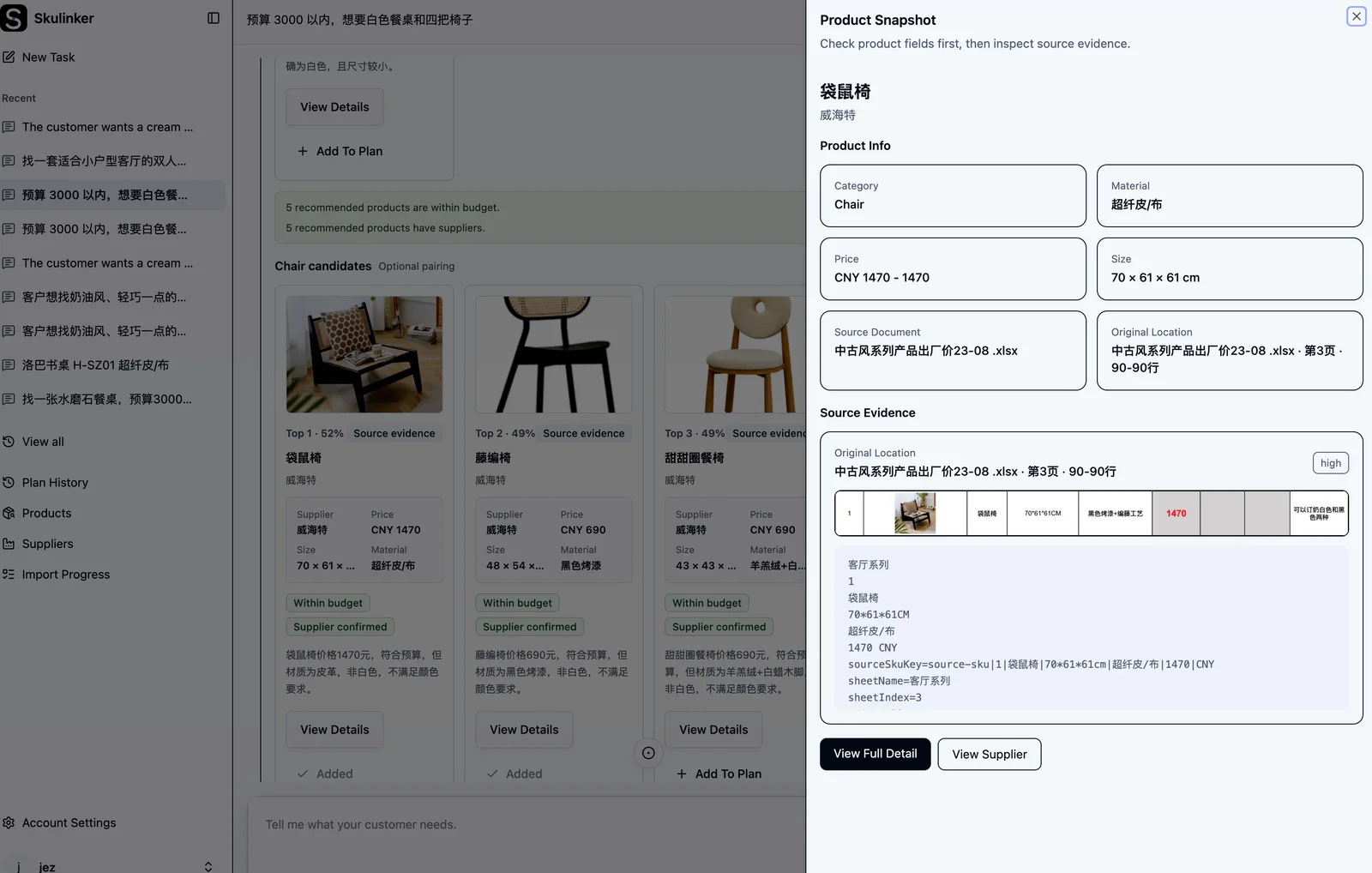
  • Supplier name, source file, page, and original model or SKU.
  • Product name, category, material, finish, color, and dimensions.
  • Price, currency, unit, MOQ, lead time, and quotation date when provided.
  • Product and variant images connected to the correct record.
  • Missing or uncertain fields that still need human review.

Keeping source evidence matters when two documents disagree or when sales needs to confirm where a price came from. It also makes later corrections faster because the reviewer can return to the exact supplier material.

Clean and Normalize Before Products Are Published

Supplier files rarely use the same field names or units. W x D x H, Size, and Overall Dimensions may describe the same attribute. One supplier quotes per piece, another per carton, and a third omits the currency from individual rows.

Skulinker helps clean extracted values and normalize comparable fields while retaining the original value. The review step should catch duplicate SKUs, mixed units, variant rows, missing prices, and images that cannot be assigned confidently. Only reviewed records should move into the searchable library or an ERP preparation file.

A Practical Extraction Workflow

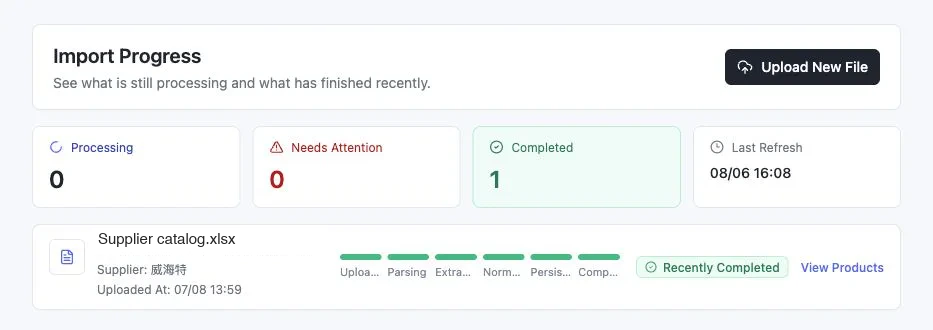
  1. Upload the supplier catalog, quotation sheet, and related images together.
  2. Extract product fields without removing the supplier and document context.
  3. Review low-confidence values and fields that affect price or product identity.
  4. Normalize units, category names, materials, and commercial terms used across suppliers.
  5. Publish the approved records to the shared product library.
  6. Search by customer requirements, compare options, and export an editable quotation sheet.

This gives sourcing and sales one working set of records. Sourcing can continue adding suppliers; sales does not need to wait for every product to be keyed into the ERP before it can be found.

Extractor, Converter, and Scraper Are Different Tools

A file converter changes a PDF into another format. A web scraper collects information from web pages. Neither automatically creates a reviewed supplier product record with images, commercial terms, and source evidence attached.

Skulinker is built for private supplier materials and product-data operations. It is most useful when the business outcome is a searchable internal catalog, supplier comparison, customer shortlist, or editable quote rather than a one-time spreadsheet conversion.

Start Free