
Skulinker vs Specsources: Product Library vs FF&E Specs
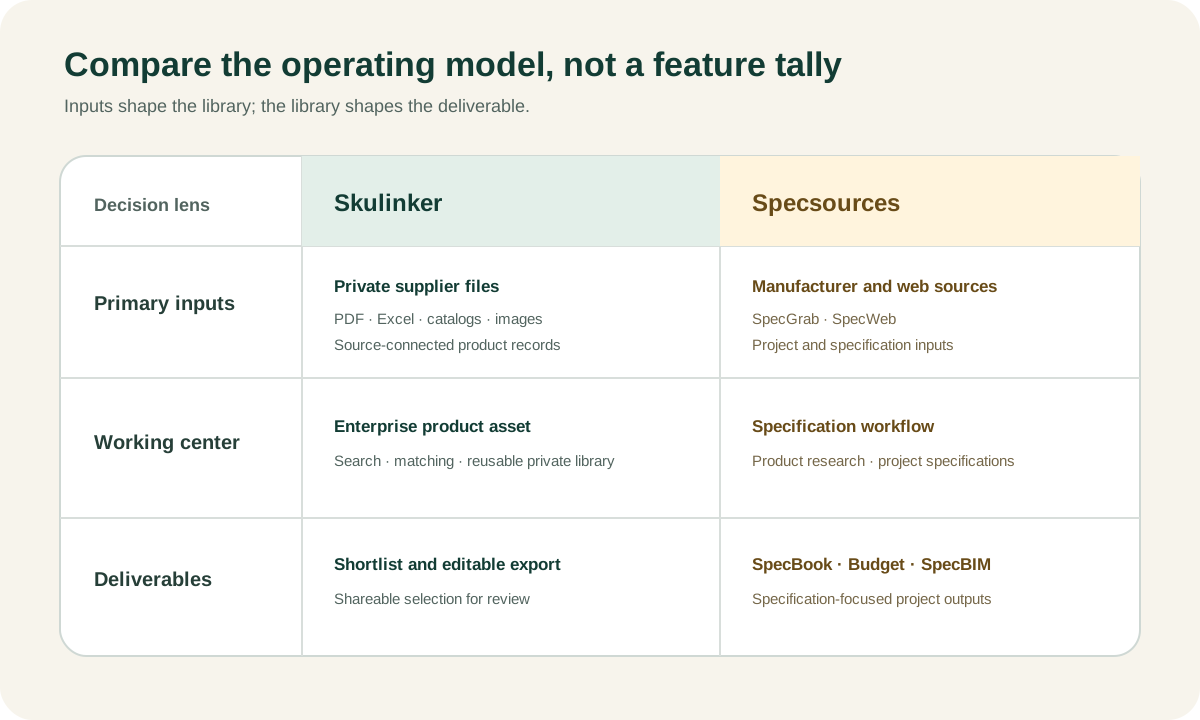
Skulinker and Specsources both help furniture and design teams create usable product data, but their public workflows begin and end differently. Specsources presents SpecWeb as FF&E specification software and publicly describes SpecGrab for capturing manufacturer website data, a product library, specification sheets, Spec Books, budgets, procurement, collaboration, and SpecBIM/Revit. Skulinker begins with supplier PDFs, Excel or CSV files, catalogs, and images, then builds source-connected private product records for search, AI matching, shortlist, and editable customer selection plans.
Specsources is the stronger fit to evaluate when a firm needs mature specification writing, project documentation, budgets, procurement, and BIM-connected delivery. Skulinker is the stronger fit to evaluate when the unresolved work is extracting and matching private supplier files across a furniture portfolio. A fair decision recognizes that Specsources has a product library and web capture, while Skulinker is not a complete replacement for Spec Book or Revit workflows.
Comparison Method and Scope
The comparison uses capabilities described on official public pages as of the review date. It does not include a hands-on trial, unpublished roadmap, customer service assessment, or independent cost benchmark. Specsources’ public FF&E specification pages describe SpecWeb, SpecGrab, a product library, collaborative specification, reports or Spec Books, budgets, procurement, and SpecBIM/Revit.
Skulinker’s implemented path includes supplier file intake, structured product extraction, source context for review, private product search and natural-language matching, product comparison, shortlist, and editable plan export or sharing. It does not replace complete specification writing, Spec Book issuance, project budgeting, procurement transactions, purchase orders, payments, logistics, ERP, PIM syndication, MDM, DAM, EDI, or Revit.
Competitor features checked on July 27, 2026. Product capabilities and pricing can change; verify current details with each vendor.
Skulinker vs Specsources Feature Comparison
| Evaluation dimension | Skulinker | Specsources, based on public pages |
|---|---|---|
| Primary starting point | Supplier PDF, Excel/CSV, catalog, and image package | Manufacturer website capture and FF&E specification development |
| Capture tools | File-based supplier intake and extraction | SpecGrab for website capture and SpecWeb environment |
| Product library | Private supplier records with source context | Publicly described product library for reuse in specifications |
| Source evidence | Connects product candidates to supplier source context for review | Website capture and specification data are public; confirm the required page/field provenance in a demo |
| Search and matching | Structured private search and natural-language product matching | Product library search and selection within specification workflow |
| Project specification | Shortlist and editable selection plan; not complete spec writing | Specification sheets, Spec Books, reports, collaboration, and project fields |
| Budget and procurement | Handoff output; not budget or PO replacement | Budget and procurement capabilities are publicly described |
| BIM / Revit | No complete Revit workflow | SpecBIM/Revit integration is publicly described |
| Strongest evaluation case | Factory and supplier files that need structure and matching | Specification, documentation, budget, procurement, and BIM delivery |
Use the table to choose what to test, not to declare a winner. Public capability labels do not reveal extraction accuracy, implementation effort, workflow configuration, support, or contract limits.
Input Strategy: Supplier Packages vs Manufacturer Websites
Specsources’ SpecGrab addresses a common designer task: capturing product information from a manufacturer website rather than retyping it into a specification. This can be efficient when a current public product page contains the required image, model, dimensions, finish, and descriptive information.
Skulinker addresses another common reality: the supplier’s useful products are in a private PDF catalog, Excel quotation, image folder, or messaging attachment. A factory may not maintain a structured English website. Current price and MOQ may exist only in a spreadsheet. The company may have negotiated options that are not public.
The two inputs can describe the same product but have different evidence and commercial meaning:
- a public manufacturer URL may be current and easy to revisit;
- a supplier PDF may contain a broader collection or project-specific version;
- a quotation may be the only source for current price and terms;
- a separate image can be higher quality but harder to associate;
- a certificate may apply only to a particular construction or market.
Ask Specsources to demonstrate both its strongest website workflow and any file import required by the team. Ask Skulinker to demonstrate multi-page product extraction, variant handling, separate-image association, and later price updates. Do not compare each product using a source chosen only to favor it.
Product Library, Provenance, and Reuse
Specsources publicly describes a product library that supports repeated specification work. Product capture through SpecGrab can feed reusable data rather than requiring designers to begin from zero. The library should be evaluated as a real strength.
Skulinker’s private product library is built around the organization’s supplier source packages. Product identity, supplier, attributes, image, price context, review state, and source evidence remain connected. The library supports internal discovery even when a product has not yet been promoted into a formal project specification.
For either platform, test:
- whether the source URL, file, page, or row remains available;
- how a website change or new supplier file affects an existing record;
- whether project-specific descriptions and quantities stay separate;
- how variants, duplicate candidates, alternates, and discontinued items work;
- how private supplier terms are permissioned;
- whether records, relationships, images, and evidence can be exported;
- what review state prevents an uncertain record from being issued.
Source evidence is not a decorative attachment. It enables a designer, procurement user, or salesperson to verify the fact that drives a customer decision.
Search, AI Matching, and Product Selection
Skulinker lets a user search the private supplier catalog with fields and natural-language requirements. A query can combine category, dimensions, material, style, budget context, and client intent. The system proposes candidates for human review, comparison, and shortlist.
This path supports a furniture sourcing company that needs to answer, “Which of our suppliers has something close to this brief?” It should not merge products simply because they look similar. It should also expose missing price, certification, or lead-time evidence.
Specsources’ public workflow centers product discovery inside specification development. Ask how designers search the product library, capture new website products, compare alternatives, and bring selected items into a Spec Sheet or Spec Book. If natural-language requirements or image-based similarity are important, request a current demonstration rather than assuming them.
Both systems still require professional judgment. Search relevance does not establish design suitability, performance, code compliance, availability, or an approved commercial offer.
Specification Sheets and Spec Books
Specsources is publicly positioned for specification work. A complete evaluation should use the firm’s actual template and verify:
- item number, category, area, room, and quantity;
- manufacturer, supplier, contact, and model;
- selected size, finish, upholstery, and custom requirements;
- attachments, notes, approvals, and responsibilities;
- report layout, branding, pagination, and issue status;
- revisions and change communication;
- alternative products and value-engineering decisions;
- project archive and cross-project reuse.
Spec Books are controlled project deliverables. They need more than product rows: consistent fields, project context, issue dates, revisions, page structure, and stakeholder communication.
Skulinker can produce an editable selection plan from shortlisted products. That output is useful for a customer proposal or as a handoff, but it is not a full Spec Book system. Teams that need formal specification issuance should count this as a real gap rather than relabel the exported plan.
The workflow guide supplier product data to FF&E specification explains how reviewed products can move into a dedicated specification product.
Budgets, Procurement, and Commercial Control
Specsources publicly includes budgeting and procurement in its FF&E software scope. Confirm the current depth for planning budgets, quotes, supplier comparison, taxes, freight, purchase documents, status tracking, reports, and permissions. “Procurement” can range from quote support to a complete purchasing process.
Skulinker can retain price context from supplier files and place selected values into an editable output. The value should keep supplier, currency, unit, date, and source. It is not a project budget ledger, purchase order, invoice, payment, or logistics system.
Use a test case where a supplier changes the price and lead time after the first specification issue. Observe whether the product library, project budget, issued document, and purchasing record remain distinct. A platform that updates everything silently can create as much risk as a platform that updates nothing.
SpecBIM and Revit
Specsources publicly describes SpecBIM and Revit integration. This matters when the design team must connect product information and project specifications to BIM objects or a coordinated Revit workflow.
Do not reduce Revit evaluation to an integration logo. Demonstrate:
- which objects and fields move in each direction;
- how object identity and specification identity remain aligned;
- what happens to variants and substitutions;
- who controls updates and conflicts;
- which Revit versions and deployment conditions apply;
- whether non-Revit stakeholders can review the resulting data;
- what reports and audit history remain available.
Skulinker does not currently provide a complete Revit workflow. If Revit integration is mandatory, Specsources has a clear public advantage for evaluation. Skulinker could still prepare source-connected supplier records upstream, but the handoff would need to be designed and tested.
When Specsources Is the Stronger Fit
Specsources is the stronger fit when specification authors and designers need SpecGrab website capture, a reusable product library, detailed SpecWeb project records, Spec Sheets or Spec Books, collaboration, budgets, procurement, and SpecBIM/Revit.
It is also a strong fit when the organization’s primary product sources are manufacturer websites and the captured information already supports specification needs. One system may then reduce handoff and duplicate entry.
Confirm current pricing directly because public pricing language can change. Evaluate user roles, project limits, storage, training, data migration, export, support, implementation, and every required procurement or Revit feature.
When Skulinker Is the Stronger Fit
Skulinker is the stronger fit when the company’s unique product capability lives in private supplier PDFs, Excel quotations, catalogs, and image folders, especially from factories without consistent web data. It is also relevant when sourcing and sales need natural-language matching across those suppliers and rapid creation of a customer shortlist.
Source evidence and visible review state support responsible use of extracted data. A product can become discoverable without pretending that its price, certification, or lead time is already confirmed for a project.
Skulinker is not a replacement for Specsources when the mandatory requirement is formal Spec Books, budget control, procurement, or Revit. It can be an upstream library and matching layer only if the extra handoff is operationally justified.
Can Skulinker and Specsources Work Together?
A possible non-native architecture is:
- Receive and organize supplier file packages in Skulinker.
- Extract product candidates and review source evidence.
- Match a project or customer requirement against the private library.
- Shortlist selected products and export reviewed fields.
- Enter the selected items downstream.
- Add project areas, rooms, quantities, specification notes, approvals, budgets, and reports.
- Use SpecBIM/Revit where required.
- Keep issued project decisions distinct from future supplier updates.
This page does not claim a native Specsources connector, automatic writeback, or lossless field mapping. Demonstrate the handoff using images, variants, custom fields, and identifiers before adopting two systems.
Evaluation Questions
- Are the main product sources public websites or private supplier files?
- Can the system preserve the exact source behind a specification field?
- How are multi-page products, image folders, variants, and later offers handled?
- Can users match an imprecise customer request to private products?
- How does a selected candidate become a formal project item?
- Can the required Spec Sheet and Spec Book templates be reproduced?
- How are revisions, approvals, alternates, and collaboration controlled?
- What budget and procurement transactions are actually supported?
- How does SpecBIM/Revit exchange work with the firm’s objects and fields?
- Can all product, project, evidence, and relationship data be exported?
Score the demonstrated workflow as pass, partial, configuration required, unsupported, or not tested. Avoid an unverified numerical rating.
Frequently Asked Questions
Is Skulinker a Specsources alternative?
It is an alternative for private supplier-file intake, product matching, shortlist, and editable selection plans. It is not a full replacement for Specsources when detailed specifications, Spec Books, budgets, procurement, or SpecBIM/Revit are required.
What are SpecGrab and SpecWeb?
Specsources publicly describes SpecGrab as a way to capture product information from manufacturer websites and SpecWeb as its FF&E specification environment. Confirm current workflow details with Specsources.
Which platform is better for private factory catalogs?
Skulinker makes PDF, spreadsheet, catalog, and image packages central. Specsources should still be tested for the organization’s file imports and specification requirements before a decision.
Which platform is better for Revit?
Specsources publicly offers SpecBIM/Revit integration. Skulinker does not currently offer a complete Revit workflow.
Can both systems maintain a product library?
Yes. The comparison should focus on source types, provenance, search and matching, specification depth, procurement, Revit, and deliverables—not the mere presence of a library.
Continue the Comparison
Read the furniture sourcing software overview, Skulinker vs Fohlio, Skulinker vs Gather, and FF&E specification software vs supplier product library. For source-data preparation, inspect supplier catalog management and the AI product data extractor.
Official sources reviewed: Specsources FF&E Specification Software, Specsources homepage, and Skulinker.
See the Skulinker workflow examples
Next step
Turn supplier files into records your team can review
Start with one supplier package and move through extraction, source review, matching, and selection.
Continue reading