Moving supplier product data into an FF&E specification is a controlled handoff, not a single import. The workflow begins with supplier PDFs, Excel price sheets, catalogs, images, and certificates. It separates products and variants, validates critical facts, publishes reviewed records into a private product library, selects products for a project, and then adds room, quantity, approval, revision, budget, and procurement context.
The handoff fails when teams confuse an extracted value with a confirmed fact, a reusable product with a project item, or a catalog price with a current quote. A reliable workflow retains the source, makes uncertainty visible, and assigns each downstream field to the appropriate system and reviewer.
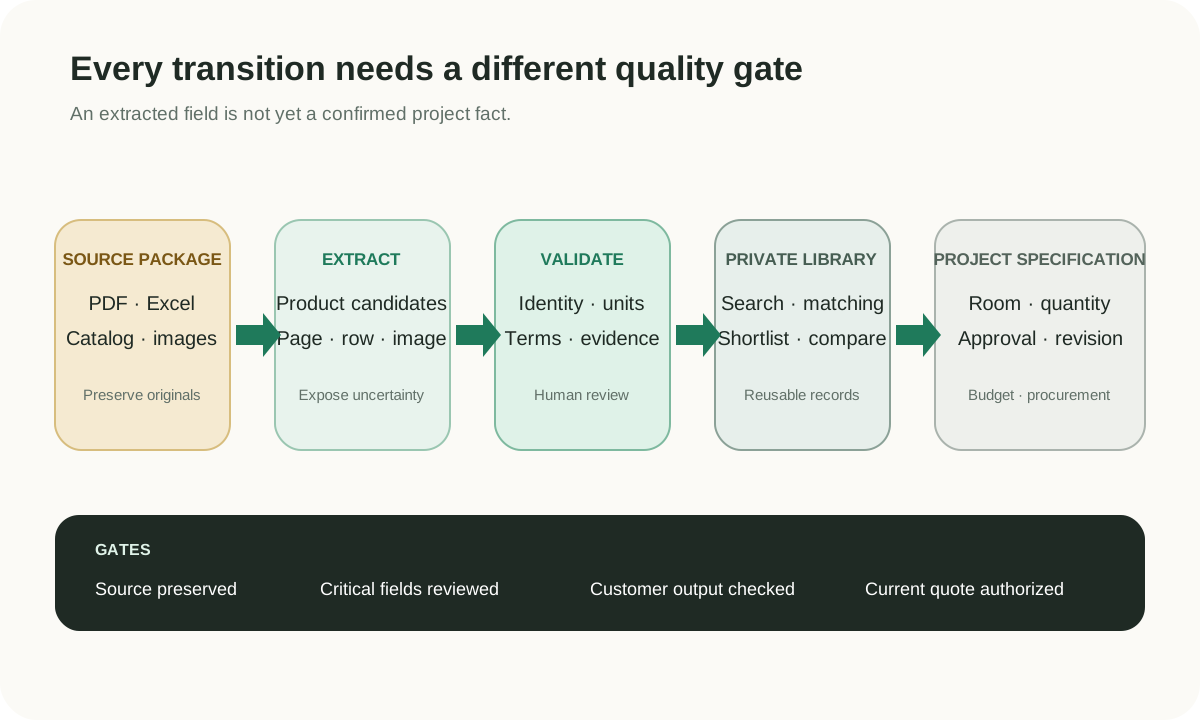
Treat the intake unit as a supplier package rather than an isolated file. A typical package can include:
- a PDF catalog with product images, model numbers, dimensions, materials, and options;
- an Excel or CSV quotation with price, currency, unit, MOQ, and lead time;
- a folder of high-resolution images with inconsistent filenames;
- material, finish, warranty, compliance, or test documents;
- an email or message that explains exceptions not present in the attachments.
Capture supplier identity, received date, sender, applicable region, intended project, and the relationship between files. Preserve the originals. The PDF may be less convenient than structured data, but it remains evidence when a reviewer asks why a field was accepted.
Before extraction, classify the files. Is the PDF text-based or scanned? Does one product span several pages? Does the spreadsheet contain one row per model, variant, carton, or price tier? Are the images embedded, linked, or separate? The answers determine how records should be segmented.
The supplier product data ingestion page provides a broader intake model. Extraction should not begin by throwing unrelated supplier files into one anonymous queue.
Extraction converts layouts and rows into candidate records. The objective is to capture what the source says, not to fill every destination field.
For each candidate, retain:
- supplier and source-package identity;
- source file, page, row, image region, or URL;
- original model or SKU-like identifier;
- category and product name;
- dimensions with original unit and normalized value;
- materials, construction, finish, color, and options;
- product images and their assignment evidence;
- price, currency, unit, MOQ, lead time, and effective context when present;
- missing, ambiguous, or conflicting fields.
Cross-page products require special care. A hero image and model name may appear on one page while the dimension table and finishes appear on the next. Scanned pages introduce OCR uncertainty. A spreadsheet can repeat a model for several finishes or price tiers. The extractor should propose relationships and expose its evidence rather than silently joining everything.
AI can speed candidate creation and normalization, but it should not manufacture a price, certificate, or material from what “usually” applies to a category. AI product data extraction describes the source-grounded boundary.
Validation is not one pass/fail state. Different facts have different consequences.
| Validation area | Questions | High-impact failure |
|---|
| Product identity | Do supplier, model, category, and variant agree? | Two products are merged or one product is duplicated |
| Dimensions | Are width, depth, height, unit, and orientation clear? | A product is selected for a space it cannot fit |
| Materials and finish | Is the value standard, optional, or project-specific? | A customer sees an unavailable or incorrect option |
| Images | Does the image belong to the exact model or only the collection? | A shortlist visually misrepresents the item |
| Price and unit | Are currency, unit basis, quantity tier, tax, and date known? | An old or mismatched value becomes a quote assumption |
| MOQ and lead time | Are conditions and effective dates present? | Project feasibility is judged on stale terms |
| Certification | Does the document apply to the exact construction and jurisdiction? | A generic document is mistaken for project compliance |
Use review states such as extracted, incomplete, conflict, needs supplier confirmation, reviewed for discovery, and confirmed for a project. A record can be useful for internal search while still blocked from customer quotation.
Normalization should preserve original values. Convert 2800 × 950 × 850 mm into structured dimensions, but keep the source string. Align material labels for search while retaining the supplier’s wording. Never use normalization to hide a contradiction.
Publishing makes a record available for controlled reuse; it does not declare the product permanently correct. The library should maintain:
- stable internal product and supplier identifiers;
- product, variant, and supplier-offer relationships;
- source evidence and received dates;
- current review and completeness state;
- structured fields for filtering;
- full text for discovery;
- image relationships;
- version or effective context for volatile terms;
- permissions for private supplier data.
This is where a company begins to build institutional product memory. Designers can find products from a supplier they did not personally contact. Sales can search by a client need rather than a filename. Sourcing can compare options without asking the same factory for the same basic information again.
The library should not automatically promote every candidate. Review gates can vary by use: internal discovery may accept a missing price; a customer-facing plan may require verified imagery and dimensions; a purchase decision requires current commercial confirmation.
See the furniture product master data guide for the core product, variant, offer, asset, and evidence model, then use furniture product library software to evaluate the operating layer around it.
Interactive Demo in this guide
Move reviewed products into an FF&E selection plan
Use a sanitized workflow to inspect evidence, explicitly add products, set quantities, and preview an export.
No sign-up required. Click the input below to try it.
The input now changes from a source file to a client or project requirement. A request may contain category, style, size, material, finish, budget range, quantity, intended room, delivery region, or reference image.
Search can combine structured filters, text, and semantic meaning. The result is a candidate set, not an automatic approval. Reviewers should see why each product matched, which required fields are missing, and which facts are historical.
A shortlist is useful because it creates a smaller decision space while keeping alternatives separate. It can contain:
- product and supplier identity;
- selected variant or option;
- images, dimensions, and materials;
- price context with currency and date;
- source evidence;
- match rationale;
- questions for supplier confirmation;
- reviewer notes;
- customer-facing description.
Skulinker supports private product matching, comparison, shortlist creation, and editable selection-plan export. It does not certify that a semantically similar product meets performance, code, availability, or current-price requirements. Those judgments remain with the appropriate professional and supplier.
Once a product is selected for design development, the project layer adds:
- project, phase, building, floor, area, and room;
- item code or tag;
- quantity, unit, spare factor, and installation responsibility;
- project-selected finish, upholstery, custom size, or modification;
- designer, client, technical, and procurement approvals;
- revision, issue date, status, and change reason;
- planning budget, current quote, tax, freight, and contingency;
- vendor, purchasing, delivery, and installation information;
- report, schedule, drawing, and Spec Book requirements.
The promotion should reference the reusable record while protecting project history. If a supplier changes a standard dimension after issue, the project team needs a review decision—not a silent global update. If a project creates a custom variant, it can later be assessed for reuse without pretending that it was always the factory standard.
Gather, Fohlio, and Specsources publicly offer varying combinations of reusable libraries, specification, reporting, budget, procurement, collaboration, and Revit-related workflows. Review the furniture sourcing software comparison and product-specific pages when choosing the destination system.
A specification describes what the project intends to use. Procurement needs current, controlled commercial data:
- confirm product identity, selected options, and quantity;
- request or update supplier quotes;
- compare unit basis, currency, tax, freight, duty, packaging, and lead time;
- record approved vendor and value-engineering decisions;
- create purchase orders in the authorized procurement or ERP process;
- track acknowledgements, production, inspection, shipping, delivery, installation, and closeout;
- retain final documents and feed relevant confirmed changes back to the library.
Do not treat a library price as an approved PO amount. The product record can help prepare the request, but transactions require dates, scope, authority, and accounting controls.
Skulinker currently exports editable selection information; it does not replace purchase-order management, payment, inventory, logistics, or ERP writeback.
| Data | Owner before selection | Owner after project approval | Update rule |
|---|
| Supplier source file | Intake repository or supplier record | Referenced by project and procurement | Preserve the original; add later versions |
| Standard product identity | Private product library | Referenced by specification | Change through reviewed product governance |
| Project-selected finish | Candidate choice or shortlist | FF&E specification | Change through project revision |
| Quantity and room | Not applicable to base product | FF&E specification | Change within project scope |
| Catalog price | Library offer context | Reference only | Never promote without date and scope review |
| Current project quote | Sourcing or procurement | Procurement / ERP | Version by supplier, date, quantity, and terms |
| Purchase order | Not a library fact | Procurement / ERP | Controlled transaction |
| Customer plan | Shortlist workspace | Project record when approved | Remains editable proposal until approval |
This ownership model prevents feedback from becoming corruption. Confirmed supplier changes can improve the reusable product. Project quantities and comments should not.
Before library publication, require product identity, supplier, at least one usable image when relevant, critical dimensions, source evidence, and visible missing-field state.
Before customer presentation, verify that the image and description match, units are readable, price context is labeled, and uncertain claims are removed or marked.
Before FF&E issue, apply the project’s design, technical, accessibility, code, approval, revision, and document controls.
Before procurement, obtain current quotes and authorized approval. Confirm quantity, option, packaging, lead time, logistics, tax, and contractual scope.
The gates should be proportional. Internal discovery does not need the same proof as purchase, but the interface must prevent users from confusing the two.
Some platforms can import PDFs, but direct import does not remove the need to segment products, validate identity and dimensions, distinguish variants, and review commercial context. Reusable records and project fields should remain conceptually separate.
At minimum, establish supplier identity, product or model identity, category, source evidence, and a visible review state. Required attributes then depend on the category and intended use.
Ask when critical dimensions, construction, certification, selected options, availability, price, MOQ, or lead time are missing, contradictory, outdated, or consequential to the project.
No. Matching proposes relevant candidates. Approval requires design, technical, commercial, and project review appropriate to the decision.
Skulinker supports structured supplier records, private search and matching, shortlist, and editable plan export. It is not a replacement for a complete Spec Book, revision, budgeting, procurement, or Revit suite.
Use one representative PDF, price sheet, image folder, and client request to test the workflow. Clean the catalog data, retain source evidence, publish reviewed records, and make the handoff explicit. Compare the downstream specification emphasis in Skulinker vs Specsources, then apply the same evidence controls to large-store layout and fixture data. Skulinker can support the path from supplier files to searchable products and a customer-ready shortlist before formal FF&E specification and procurement.
See how Skulinker carries selected records into an editable plan.
Start Free
Continue reading
Put this question into a fuller workflow
