
FF&E Software vs Supplier Product Library: Key Differences
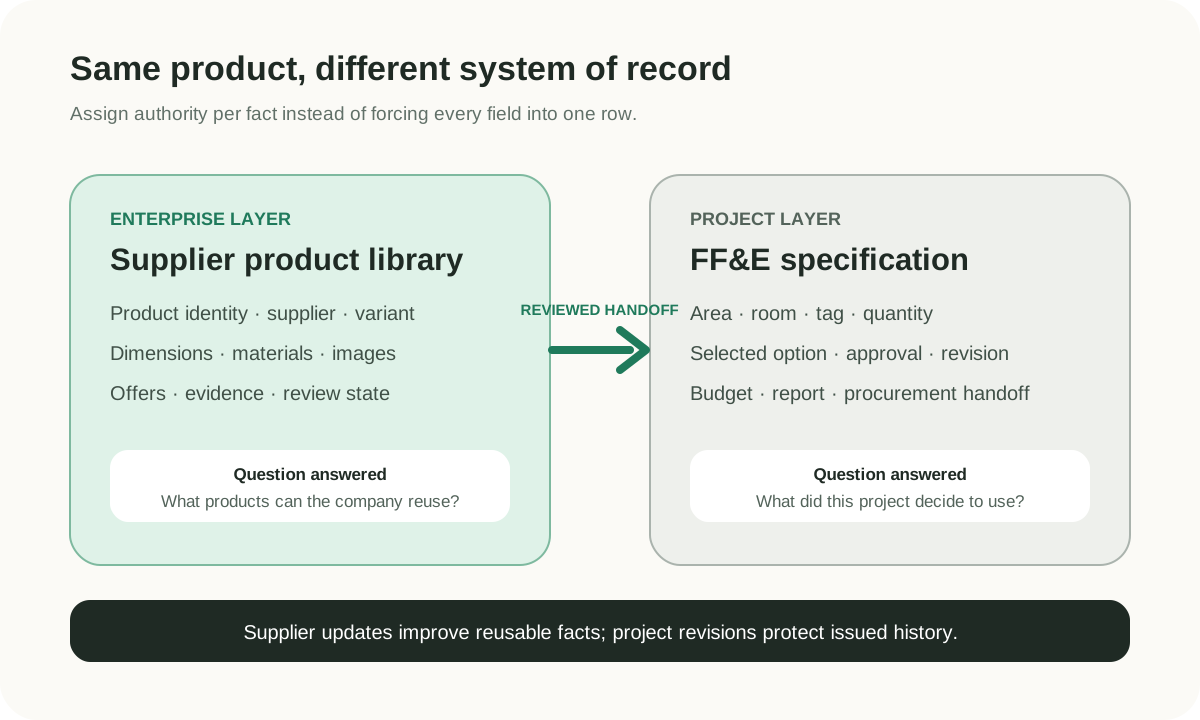
FF&E specification software and a supplier product library solve related but different data problems. A supplier product library organizes reusable product facts that originate in catalogs, quotations, spreadsheets, images, and certificates. FF&E specification software applies selected products to a project, adding location, quantity, design intent, approval, revision, budget, and issue-ready documentation. Many teams need both layers, even when one platform covers portions of each.
The difference matters because the same sofa can exist as an enterprise product record, several supplier offers, and several project line items. Treating all three as one row makes updates unsafe. A new supplier price should not silently rewrite an issued schedule, and a project-specific upholstery note should not change the reusable product for every future designer.
Direct Comparison
| Question | Supplier product library | FF&E specification software |
|---|---|---|
| Primary object | Reusable product and supplier records | Project-specific specification items |
| Transactional source | Supplier PDF, spreadsheet, catalog, image, quotation, certificate, or URL | Approved product plus project brief, room data, quantities, revisions, and design decisions |
| Typical owner | Sourcing, product-data, library, sales, or shared design operations | Designer, specifier, project manager, procurement, or design operations |
| Update rhythm | When a supplier, product, offer, image, or attribute changes | When project scope, selection, quantity, approval, issue, or revision changes |
| Core questions | What products do we have, where did each fact come from, and what matches this need? | What is specified for this project, where, how many, under which revision, and at what planned cost? |
| Common deliverable | Search result, comparison, shortlist, reusable record, or data export | FF&E schedule, spec sheet, Spec Book, budget, approval report, or procurement handoff |
| Main governance risk | Duplicate identity, detached source evidence, stale supplier terms, and inconsistent attributes | Uncontrolled revisions, wrong quantities, project changes leaking into master data, and outdated budget assumptions |
The table describes system responsibilities, not exclusive vendor categories. Gather, Fohlio, and Specsources publicly describe reusable libraries alongside specification capabilities. Skulinker provides a private source-connected supplier product library, matching, shortlist, and editable selection-plan path, but it is not a replacement for a complete FF&E specification suite.
The Supplier Product Library as an Enterprise Record
A useful library answers “What product capability does our company have?” It persists beyond one project. For each furniture product, the record may include supplier, original model, category, dimensions, material, finish, color, images, price context, MOQ, lead time, certificates, review status, and source evidence.
The word “enterprise” does not mean that the record is universally final. A supplier can change construction or discontinue an item. The important controls are identity, version context, provenance, and a visible review state. A value extracted from a 2024 catalog is different from a 2026 confirmed quote, even if both describe the same model.
A private library supports:
- searching across suppliers without opening every file;
- comparing structurally similar products;
- reusing approved or previously reviewed records;
- finding alternates when a product is unavailable;
- preparing a shortlist before a project schedule exists;
- showing the original evidence when a fact is questioned.
It should also preserve the difference between a product, a variant, and an offer. A walnut finish may be a variant. A new price list is usually an offer or commercial version, not a new product. Two similar lounge chairs from different factories are alternatives, not duplicates.
The furniture product library software guide provides a field model and evaluation checklist.
FF&E Specification as a Project Record
An FF&E specification answers “What did this project decide to use?” The project record references or copies approved product facts, then adds contextual fields such as:
- project, phase, building, level, area, and room;
- item number, tag, category, and specification section;
- required quantity, spare factor, unit, and installation responsibility;
- selected finish, custom dimension, fabric direction, or project modification;
- design approval, client approval, issue status, and revision;
- planning price, quote, budget code, tax, freight, and contingency;
- vendor, procurement status, delivery milestone, and closeout evidence.
These values are not universal product truth. A bedside table can be approved in a standard room but rejected in an accessible room. A custom size for one hotel should not overwrite the factory’s standard size. A quantity belongs to a room or project, not to the base product.
Specification software earns its value through project controls: revision history, role-based review, report templates, coordinated schedules, budget comparison, quote and procurement workflows, and integrations such as Revit where required. Teams should test those controls with a real issue cycle rather than judging a product only by its library screen.
Where the Two Layers Meet
The handoff should be deliberate:
- Receive supplier files and keep each package tied to the supplier and received date.
- Extract candidate product records without discarding the original page, row, image, or URL.
- Review identity, dimensions, material, price context, and missing fields.
- Publish appropriate records into the private product library.
- Search, match, compare, and shortlist products against the client or design requirement.
- Promote selected products into a project specification.
- Add room, quantity, finish, approval, budget, issue, and procurement fields.
- Send approved specification lines into purchasing and delivery workflows.
- Feed confirmed supplier updates back into the reusable record without rewriting issued project history.
The supplier product data to FF&E specification workflow expands every step and shows where Skulinker currently participates.
Choosing a System of Record
“System of record” should be assigned per fact, not used as a slogan for an entire platform.
| Fact | Suggested authoritative owner | Why |
|---|---|---|
| Original supplier document | Document intake or source repository | It preserves what the supplier actually sent |
| Standard model and attributes | Reviewed product library | The facts can be reused across projects |
| Effective supplier quote | Sourcing or procurement record with date and scope | Commercial terms expire and vary by project |
| Project description and selected finish | FF&E specification | They express a project decision |
| Room and quantity | Project schedule or specification | They have no meaning outside project scope |
| Approved purchase amount | Procurement or ERP | It is a controlled transaction |
| Invoice and payment | ERP or finance system | Accounting controls apply |
| Customer-facing shortlist | Selection-plan workspace | It is a proposal, not yet a transaction |
This assignment prevents convenient but misleading automation. For example, an AI extraction result can propose a dimension, but the reviewed source-connected record owns the accepted value. A semantic match can suggest an alternative, but it should not merge product identities. A shortlist can show a planning price, but it cannot certify a final vendor quote.
Common Architecture Choices
One broad FF&E platform
Choose this pattern when the platform handles the team’s supplier inputs sufficiently and the dominant requirement is specification, reports, budget, procurement, collaboration, and BIM. Fewer systems can reduce handoff work. The risk is forcing messy supplier data into project records before it is reusable or sufficiently reviewed.
A library first, then an FF&E platform
Choose this pattern when supplier data volume and variety are the bottleneck. The library structures and searches the source portfolio; selected records then move into the project system. This architecture requires clear identifiers and export or integration discipline, but it prevents every project from repeating the same catalog cleanup.
A library plus spreadsheets
This can be a practical transition for smaller teams. A private library supports discovery and source evidence while an editable spreadsheet carries project fields. The limits are revision control, permissions, coordinated reports, budget history, and procurement scale.
ERP or PIM as the center
An ERP is authoritative for transactions, inventory, purchasing, and finance; a full PIM governs product enrichment and distribution. Either may consume reviewed supplier data, but neither label guarantees efficient intake from furniture PDFs or project-grade FF&E workflows. Evaluate the actual modules and interfaces.
What Skulinker Does in This Architecture
Skulinker accepts supplier PDFs, Excel or CSV files, catalogs, and images, then creates structured product records with source context for review. Users can search their private supplier catalog, use natural-language product matching, compare candidates, add selected items to a shortlist, and export or share an editable selection plan.
That path helps before formal specification, especially when the company repeatedly receives large supplier packages that do not fit a clean master-data template. It also helps sales and sourcing respond to a requirement without relying on filenames or one colleague’s memory.
Skulinker does not replace complete spec writing, room and quantity schedules, revision issuance, Revit integration, budget control, purchase orders, payment, logistics, ERP transactions, or channel syndication. A team that needs those capabilities should retain or evaluate an appropriate downstream platform. See the broader furniture sourcing software comparison for Gather, Fohlio, and Specsources.
Decision Checklist
Before selecting software, answer:
- What percentage of work begins with supplier files versus web research or existing library records?
- Must every extracted fact remain traceable to a page, row, image, or URL?
- How often are the same products reused across projects?
- Who can change an enterprise product versus a project specification?
- Which room, quantity, approval, revision, budget, and issue controls are mandatory?
- Does the team need Revit or another BIM connection?
- Where do quotes, purchase orders, invoices, and delivery states live?
- What export or integration joins the layers?
- How will discontinued items, alternates, and updated prices be reviewed?
- What data can be retrieved if the vendor relationship ends?
Use one representative supplier package and one real project cycle to test the answers. A feature name alone does not demonstrate that the handoff works.
Frequently Asked Questions
Is a supplier product library a PIM?
It can overlap with product information management, but a full PIM often includes workflow governance, enrichment, localization, asset operations, completeness rules, and channel syndication. A sourcing library can remain intentionally narrower.
Can FF&E specification software store reusable products?
Yes. Gather, Fohlio, and Specsources publicly describe product or resource libraries. The comparison is about data responsibility and workflow emphasis, not a claim that specification products lack libraries.
Should supplier prices live in the product record?
A product record can display price context, but the value should retain supplier, currency, unit, effective date, quantity assumptions, and source. A current project quote should remain distinguishable from a historical catalog price.
When does a shortlist become a specification?
Usually when the project adds controlled fields such as room, quantity, selected finish, approval, revision, issue status, and specification deliverables. The precise transition should be defined by the team.
Can AI automate the handoff?
AI can extract candidates, normalize fields, and improve discovery. Human review remains important when identity, commercial terms, certification, quantities, or customer-facing output are uncertain.
Connect the Layers Without Losing the Source
Start with supplier catalog management when files are still fragmented, then use a private furniture product library to make reviewed products reusable. The Skulinker vs Fohlio comparison shows how this boundary appears in a broader FF&E platform decision. Validate the inputs with the AI product data extractor, test retrieval through private catalog product search, and return to the furniture sourcing software overview before deciding whether one or two systems should own the work.
See the supplier-to-FF&E workflow
Next step
Turn supplier files into records your team can review
Start with one supplier package and move through extraction, source review, matching, and selection.
Continue reading