AI PIM combines product information governance with AI-assisted classification, validation, enrichment, and workflow support. For furniture distributors, the first decision is not which label sounds most advanced. It is whether the immediate bottleneck sits in supplier file intake, governed product content, or the handoff between those two stages.
Quick answer
- Choose a full PIM when approved records already exist and teams need taxonomy, enrichment, DAM, localization, approvals, and channel distribution.
- Choose a supplier data workspace first when products remain trapped in PDFs, spreadsheets, quotations, image folders, and inboxes.
- Use both when sourcing needs fast internal discovery while product teams need controlled external publishing.
The AI layer should reduce repetitive work without hiding ownership. Useful assistance may classify incoming records, suggest field mappings, identify missing values, propose normalized units, or draft product copy for review. The governed PIM layer still defines the accepted schema, required fields, approvals, version history, localization, asset rights, and destination channels.
That distinction matters because an AI-generated value is not automatically an approved product fact. A distributor still needs to know which supplier provided the value, where it appeared, who reviewed it, and which system now owns it. Software selection should therefore test traceability and exception handling, not only the speed of content generation.
Furniture records are rarely just a name and price. A single model can carry dimensions, orientation, frame material, finish, upholstery, color, carton data, MOQ, lead time, and market-specific options. Some values are shared by a family; others belong to one variant or quotation.
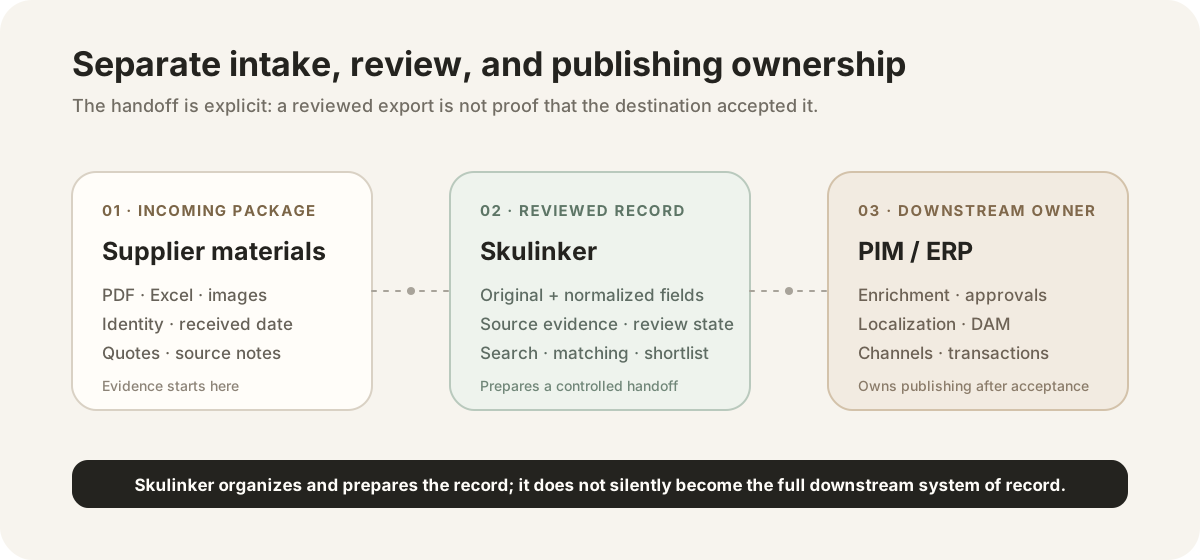
The handoff boundary keeps supplier evidence, reviewed product records, and downstream publishing ownership visible.
When these details arrive across a catalog, price sheet, specification page, and image folder, the intake workflow must keep the item identity and supplier context intact. Otherwise, an elegant downstream schema can still contain a price from the wrong variant or an image detached from its commercial terms.
The furniture product master data model and example shows how to separate the product, variant, supplier offer, asset, and source evidence before those records enter a governed PIM.
A complete platform may need the following capabilities, depending on the distributor's operating model:
| Capability | Decision to test |
|---|
| Product model | Can the system represent families, variants, inheritance, taxonomies, and furniture-specific attributes? |
| Governance | Can owners define completeness rules, approvals, versions, audit history, and exception paths? |
| Enrichment | Can teams manage descriptions, translations, market-specific content, and reviewed AI suggestions? |
| DAM | Are images, videos, documents, usage rights, and asset relationships governed directly or through an integration? |
| Integrations | Are ERP, ecommerce, dealer portal, marketplace, data pool, and analytics connections available at the required depth? |
| Distribution | Can approved content be transformed and delivered to each external channel without manual copying? |
These functions become essential when many teams and markets must publish one approved commercial story. A pilot should use real furniture families and exceptions rather than a perfect demo spreadsheet.
A different bottleneck exists when only part of the supplier assortment has reached a structured system. Sales may ask sourcing to search original files for every customer brief. Prices and dimensions may be copied into a new quotation each time. Images may live in a separate folder with filenames that do not match the supplier's model numbers.
In that situation, more publishing fields do not create the missing records. The team first needs a repeatable path to:
- receive supplier files with the correct supplier identity;
- extract candidate products, variants, attributes, images, and commercial terms;
- flag missing or conflicting values for a person to review;
- publish accepted records for internal search, comparison, and quotation;
- map approved fields into a PIM or ERP under the destination owner's rules.
The supplier product data ingestion workflow describes this upstream path in more detail.
Interactive Demo in this guide
Inspect the intake boundary before choosing a full PIM
Use one sanitized supplier package to see how a brief becomes reviewed product candidates, source evidence, and a controlled selection handoff.
No sign-up required. Click the input below to try it.
Skulinker focuses on supplier-side intake and internal sourcing work. The comparison below is a boundary, not a claim that one tool category should replace the other.
| Requirement | Full PIM software | Skulinker |
|---|
| Supplier PDF, spreadsheet, quotation, and image intake | Varies; may depend on templates, connectors, portals, or services | Core workflow |
| Source-linked extraction and review | Varies by platform | Core workflow |
| Internal supplier catalog search and matching | Possible after records are loaded | Core workflow |
| Product schema, completeness, approvals, and localization | Broad and configurable | Focused readiness and review only |
| DAM and asset-rights management | Often built in or integrated | Does not replace |
| Channel syndication and distribution | Core capability in many platforms | Does not replace |
| Inventory, purchasing, orders, and finance | Requires ERP | Does not replace |
Skulinker does not replace a full PIM, DAM, channel distribution platform, ERP, or MDM. It helps sourcing and sales turn private supplier files into reviewed, searchable records, then prepare a controlled handoff when another system must become the owner.

The customer sees a coherent room; the distributor needs searchable product facts, supplier terms, and approved channel content behind that result.
A practical two-layer architecture can keep speed and control separate without creating two unrelated product versions:
- Sourcing uploads catalogs, quotations, specification sheets, and images.
- The intake workspace structures records, preserves evidence, and routes uncertain values for review.
- Sales searches the approved internal library, compares options, and prepares a shortlist or editable plan.
- Operations maps records that meet the quality gate to the ERP or PIM.
- The destination owner confirms acceptance; the PIM then governs enrichment, approvals, localization, DAM, and external output.
An exported file is only a handoff artifact. It does not prove that a destination system accepted the record, and it should not blur responsibility for later corrections.
Bring sourcing, product, sales, ecommerce, and IT into the same evaluation. Ask:
- Where do new supplier products wait today: inbox, shared drive, spreadsheet, ERP, or PIM?
- Can sales find and compare products that have not entered the ERP?
- Which values must retain a supplier, page, row, or image as evidence?
- Who approves identities, dimensions, materials, prices, images, and descriptions?
- Do you need DAM, localization, retailer templates, or channel syndication now?
- Which systems require a real connector, API, or writeback rather than a mapped export?
- What happens when an AI suggestion conflicts with a supplier source?
- Can the rollout begin with one representative supplier and a measurable review queue?
The answers identify whether the first investment should be a full platform, a focused supplier-data layer, or a designed combination.
Explore the public extraction tool
Next step
Test the intake boundary before choosing a full PIM
Start with one supplier package, inspect original and normalized fields, then define which system owns enrichment and publishing.
Continue reading
Put this question into a fuller workflow
