Supplier master data standardization is the practice of giving supplier records consistent identities, fields, formats, ownership, and source references so teams can use them reliably across procurement and operations. The best practices start by separating the supplier company record from the products, quotations, and catalog files that change around it.
This guide is for procurement operations, distributors, importers, and sourcing teams that receive supplier information through email, PDF catalogs, Excel quotations, image folders, and shared drives. It includes a field dictionary, seven standardization practices, and a document-to-record workflow.
Quick answer: standardize the stable supplier identity first, define the product and commercial fields that belong below it, preserve the original supplier wording, and send ambiguous identities or high-impact terms to a named reviewer.
In this guide
- What supplier master data standardization means
- Company data vs product data
- A practical field dictionary
- Seven standardization best practices
- A workflow for PDF, Excel, and images
- Ownership and source evidence
What Supplier Master Data Standardization Means
Supplier master data is the controlled information used to identify and manage a supplier as a business entity. Standardization defines how that information is represented: which field stores the legal name, how country and currency codes are formatted, how duplicates are detected, who approves changes, and which source supports the value.
SAP's master data overview describes suppliers and products as common master-data domains shared across business systems. The UK Government Data Quality Framework emphasizes fitness for purpose, ownership, assessment, and communication—principles that also apply when supplier records come from inconsistent documents.
Standardization is not the same as forcing every source into one display format. A controlled record can store a canonical country code while retaining the supplier's original address and the document that supplied it.
Supplier Company Data vs Supplier Product Data
These two layers are related but should not be collapsed into one record.
| Layer | Typical fields | Change pattern | Primary use |
|---|---|---|---|
| Supplier company master | Legal name, trading name, country, contact, status, default currency, internal owner | Relatively stable | Identify and manage the supplier entity |
| Supplier product data | Supplier SKU, model, product name, dimensions, material, finish, image | Changes with range and variants | Find, compare, and select products |
| Supplier commercial data | Price, currency, unit basis, MOQ, lead time, quotation date | Changes frequently | Evaluate sourcing and prepare a quotation |
| Source evidence | File, page, row, image, received date | Added with each source package | Verify where a value came from |
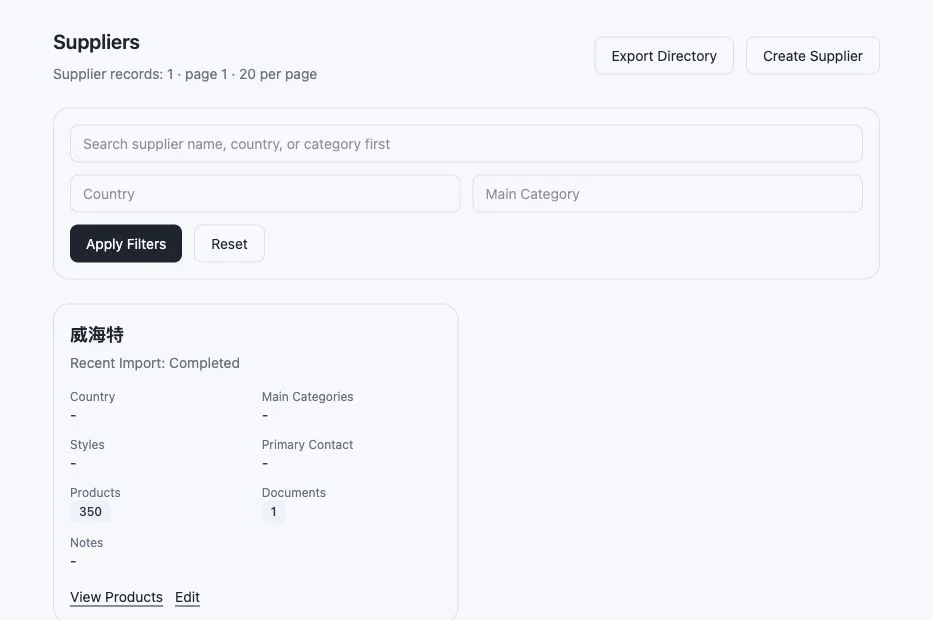
This authorized Skulinker interface shows the relationship rather than collapsing it: one supplier identity can link to many product records and source documents.

Editorial illustration — a visual explanation of supplier master review, not a real customer record or product interface.
A company-level supplier record can be clean while its product catalog remains impossible to search. Conversely, a product can be extracted accurately but still be attached to the wrong supplier identity. Both layers need explicit links and separate quality rules.
The furniture product master data guide shows how to model the product, variant, supplier offer, asset, and source-evidence records beneath the supplier identity.
A Practical Supplier Master Data Field Dictionary
Start with the smallest field dictionary that supports the team's decisions. Each field needs a purpose, format, owner, and source rule.
| Field | Standardization rule | Owner | Evidence example |
|---|---|---|---|
| Supplier ID | Stable internal identifier; never reuse after deactivation | Operations | System record |
| Legal name | Preserve registered wording; keep trading name separately | Procurement | Contract or approved onboarding record |
| Trading name | Store separately from legal name | Procurement | Supplier correspondence |
| Country | Approved ISO country code plus display name | Operations | Registered address |
| Default currency | ISO currency code; do not infer from country alone | Sourcing | Current quotation |
| Primary contact | Name, role, email, and last-confirmed date | Supplier owner | Email or supplier form |
| Supplier status | Controlled values such as candidate, active, paused, inactive | Procurement | Approval record |
| Product source package | File identifiers and received date | Sourcing | PDF, Excel, images, or quotation |
Do not add fields merely because another company uses them. A field belongs in the dictionary when it supports a real workflow, reporting need, approval, or downstream system contract.
Seven Supplier Master Data Standardization Best Practices
- Assign a stable internal supplier ID. Names and contacts change; the identifier should not.
- Separate legal identity from display names. Keep registered, trading, abbreviated, and local-language names in explicit fields.
- Use controlled codes for shared values. Country, currency, status, language, and unit fields should not depend on free-text spelling.
- Preserve original values beside normalized values. Reviewers need to see what the supplier actually wrote.
- Define duplicate-review rules. Similar names, domains, addresses, or contacts can suggest a duplicate, but they do not prove one.
- Record ownership and review dates. A field with no owner becomes stale without anyone noticing.
- Keep source evidence attached. Important identity, product, and commercial fields should link back to the file, page, row, or approved system that supplied them.
The same principles extend into the data quality management process, but the supplier field dictionary gives them a concrete domain and owner.
How to Standardize Data from PDF, Excel, and Images
Step 1: Create one intake package
Keep the supplier identity, PDF catalog, Excel quotation, image folder, received date, and correspondence reference together. Separating these files too early makes it harder to connect a model shown in a catalog with a price stored in a spreadsheet.
Step 2: Confirm the supplier identity
Resolve the company record before publishing products. If the name differs from an existing supplier, compare approved identifiers and contact context rather than creating a duplicate immediately.
Step 3: Extract candidate product and commercial fields
Capture original model names, SKUs, dimensions, materials, prices, currency, unit basis, MOQ, lead time, and images with source evidence. Do not turn missing values into guessed facts.
Step 4: Normalize shared fields
Convert approved units, categories, currency codes, and status values into canonical representations while retaining the source expression. The supplier catalog management workflow shows how these records move from intake through validation and publication.
Step 5: Review exceptions by business risk
Prioritize identity conflicts, ambiguous prices, missing currency, product-versus-variant uncertainty, and image assignment. Low-impact descriptive gaps can remain visible without blocking internal discovery.
Duplicate Supplier, Duplicate Product, or Product Variant?
| Situation | Evidence to compare | Safe action |
|---|---|---|
| Possible duplicate supplier | Approved IDs, legal name, domain, address, contact, ownership | Hold for supplier-owner review before merging |
| Possible duplicate product | Supplier, original SKU, model, dimensions, material, source package | Compare the full identity before consolidating |
| Product variant | Parent model plus size, finish, color, pack, or market difference | Preserve the variant relationship |
| Substitute or similar product | Different identity but comparable use and attributes | Keep separate and represent similarity in search or matching |
Automatic merging is risky because a clean merged record can hide a commercially important distinction. Matching should propose candidates and show evidence; a responsible owner should confirm high-impact merges.
Ownership, Review Cycles, and Source Evidence
Assign ownership by decision rather than by spreadsheet column. Procurement can own company status and approved identity; sourcing can own quotations and supplier context; category teams can own classification and variants; operations can own downstream format contracts.
Review frequency should follow volatility. A legal name changes rarely, while prices, MOQ, and lead times may need review whenever a new quotation arrives. Store last reviewed, reviewed by, and source received separately so recency is not inferred from the record's last edit.
Source evidence should be available at the point of review. A reviewer should not have to search email and shared drives to learn whether a dimension came from the catalog, a quotation note, or a derived conversion.
Where Skulinker Fits—and Where It Does Not
Skulinker connects supplier files to structured product records, source evidence, internal product search, matching, shortlist, and export. It helps furniture and distribution teams use the product layer that often remains outside an ERP.
Skulinker does not replace complete supplier master data governance, KYC, tax verification, banking validation, accounts payable, contract lifecycle management, vendor risk, or enterprise MDM. Those responsibilities should remain in the systems and approval processes designed for them.
Frequently Asked Questions
What is supplier master data?
Supplier master data is the controlled information used to identify and manage a supplier across business processes. It commonly includes names, identifiers, country, contacts, status, ownership, and default commercial settings, while product and quotation records are linked beneath that supplier identity.
What is the first step in supplier master data standardization?
Start by defining the supplier identity and the business decisions the data must support. Then create a small field dictionary with formats, owners, source rules, and duplicate-review criteria before importing or cleaning large numbers of records.
Should supplier product data be stored in the supplier master record?
It should be linked to the supplier but modeled separately. Company identity changes relatively slowly; product attributes, variants, prices, MOQ, lead times, and images change at different rates and need different review rules.
Can AI standardize supplier data without human review?
AI can help extract, classify, normalize, and propose matches, but high-impact identity and commercial decisions still need review when evidence is ambiguous. The system should expose the source and uncertainty rather than publish a plausible guess as fact.
Standardize the Product Layer You Can Use Today
Begin with one supplier package, a clear field dictionary, and the records your sales and sourcing teams need for the next decision. Skulinker can turn supplier product files into source-connected records for review, search, matching, shortlist, and export.
Next step
Link supplier identity to the product files teams actually use
Keep company identity, product records, commercial terms and source packages related without collapsing them into one master row.
Continue reading