ERP integration is a controlled system-to-system process for moving approved data between an enterprise resource planning platform and other applications or files. For furniture distributors, the hard part is often preparing supplier-origin product records before any transfer begins. This guide defines the mapping, validation, approval, and exception controls needed to turn mixed supplier files into a dependable ERP import batch.
What Is ERP Integration?
It combines four disciplines: data movement, field mapping, validation, and workflow orchestration. Data movement carries a file or message; mapping translates source labels into target fields; validation tests identity, type, and business rules; orchestration decides when a record advances or stops. IBM describes the discipline as connecting ERP systems with other applications, software, and databases so data can flow across defined boundaries. The result should be repeatable, observable, and reversible when a batch fails.
Why Supplier Product Data Breaks ERP Integration Projects
Supplier inputs rarely share one schema. A PDF may identify a model beside an image, while an XLSX stores price on another sheet. Variant colors can be embedded in names, dimensions can mix millimeters and inches, and “unit” can mean each, carton, or set. Commercial values may omit currency, validity dates, or MOQ. A source reference may disappear during copying. These mismatches create silent errors unless owners resolve them before transfer. The supplier onboarding guide explains why keeping each package together reduces these gaps.
Supplier Files to ERP: The Six-Stage Data Flow
- Source files: retain the original PDF, XLSX, catalog, image, and receipt context.
- Staging: extract candidate records without treating them as approved master data.
- Validation: test identity, variants, units, commercial terms, and source evidence.
- Mapping: translate reviewed values into the target field contract.
- Approval: assign an owner and reviewer, then resolve exceptions.
- ERP import: load a small approved batch and reconcile accepted and rejected rows.
This sequence creates an auditable handoff. Use the data quality management guide to define checks before scaling beyond the pilot.
Begin with the furniture product master data model so product identity, variants, supplier offers, assets, and source evidence remain distinct before fields are mapped into ERP.
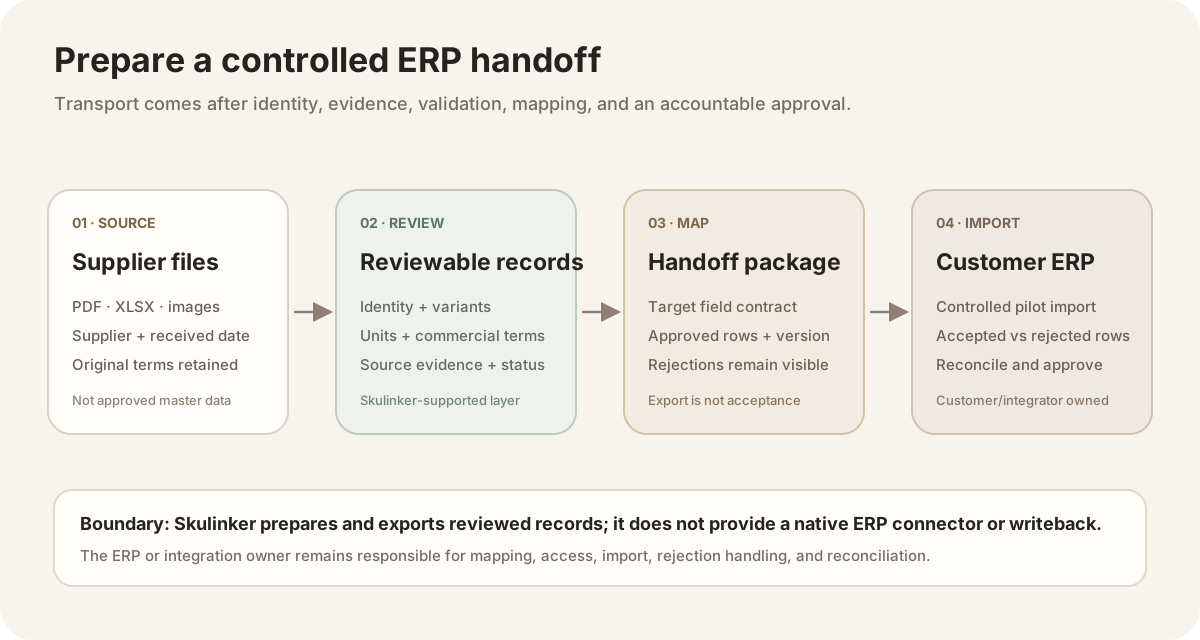
Skulinker supports source-connected preparation and export. The customer or integration owner still controls field mapping, access, import, rejection handling, and reconciliation.

Editorial illustration — a visual explanation of an ERP handoff, not a real customer record or product interface.
ERP Product Data Mapping Table
Map business meaning, not column names. GS1 publishes standards and identification resources that teams can evaluate for shared identifiers, while the furniture product information guide adds governance context.
| Supplier field | Canonical value | Generic target field | Validation gate |
|---|---|---|---|
| Supplier SKU | Source item ID | item_number | Unique per supplier |
| Supplier name | Approved vendor | vendor_id | Matches vendor master |
| Model | Reviewed model | item_description | Nonempty; source-backed |
| Category | Controlled category | item_category | Approved taxonomy |
| Dimensions | Width, depth, height, unit | dimensions_text | Complete; convertible |
| Material | Normalized values | material_description | Evidence retained |
| Finish or color | Explicit variant | finish_color | Variants separated |
| Price and terms | Amount, currency, unit, MOQ, lead time | purchase_price plus terms | Current; owner-confirmed |
CSV, XLSX, API, iPaaS, and EDI Integration Methods
Choose transport after the field contract and ownership are clear. IBM's EDI–ERP overview distinguishes file-based, API-based, middleware, direct, and managed approaches; each still needs mapping, transformation, monitoring, and error handling.
| Method | Appropriate use | Main control needed |
|---|---|---|
| CSV | Simple, inspectable batch exchange | Versioned columns and rejection report |
| XLSX | Human review with multiple sheets | Locked schema and explicit types |
| API | Customer- or integration-provider-built connection | Authentication, retries, and maintenance |
| iPaaS | Orchestration across several systems | Connector ownership and flow monitoring |
| EDI | Standard business-document exchange | Partner rules, message mapping, and audit |
Skulinker exports reviewed PDF, PNG, and XLSX outputs. The downloadable CSV below is a planning template, not an implemented API, iPaaS, or EDI connector. See the furniture EDI guide before assigning transaction-document responsibility.
Identity, Variant, Unit, Price, and Source Validation
Apply gates in a fixed order. First reject missing supplier identity or duplicate SKU-and-variant combinations. Next verify that model, finish, color, and size describe the intended item. Normalize dimension and order units without deleting the original wording. Confirm price type, amount, currency, MOQ, and effective context. Finally require a page, sheet, cell, or image reference for disputed fields. Send incomplete rows to an exception queue with a reason instead of guessing. Keep rejected rows visible with the failed rule, source, assignee, and next action.
ERP Import Approval and Exception Workflow
Give every batch an owner and a separate reviewer. Mark each row approved, rejected, or needs_confirmation; never use a single “done” checkbox. The owner fixes mapping or source issues, the reviewer confirms business meaning, and the ERP operator imports only the approved version. Reconcile the target system's accepted and rejected counts before closing the batch. Keep that reconciliation as audit evidence.
Supplier Product Data ERP Readiness Checklist
Before release, verify every action:
- Confirm a stable supplier and item identity.
- Separate every sellable variant.
- Normalize dimensions and retain units.
- Verify category, material, finish, and color.
- Confirm price, currency, and price type.
- Record order unit, MOQ, and lead time.
- Attach a precise source reference.
- Pilot, reconcile, approve, and version the batch.
Download the Supplier Product Data to ERP Mapping Template
Where Skulinker Fits—and What It Does Not Connect
Skulinker can ingest supplier PDF, XLSX, catalog, and image files; structure fields; retain source evidence; support review, search, matching, and shortlists; and export PDF, PNG, or XLSX. Skulinker does not provide native ERP connectors. Skulinker does not write to ERP systems. Skulinker does not provide real-time ERP synchronization or API writeback. Customers and their ERP or integration providers retain transaction responsibility. This furniture ERP guide clarifies the boundary.
ERP Integration FAQ
How can supplier records be connected to ERP safely?
Start with a controlled field contract, a representative batch, named reviewers, and documented rejections.
Should we choose CSV or an API first?
Choose based on volume, frequency, technical ownership, security, and exception-handling needs—not fashion.
Who approves commercial fields?
Assign purchasing or finance to price and currency, and category owners to product meaning.
Conclusion
A reliable ERP integration begins with traceable records, explicit mapping, validation gates, and accountable approval. Download the template and test a small batch before scaling.
Next step
Prepare the record before choosing the transport
Structure and review one supplier package, then let the customer or integration owner map, import and reconcile the approved batch.
Continue reading