For a furniture distributor asking what is ERP, the direct answer is enterprise resource planning: software that records and coordinates transactions across purchasing, inventory, orders, and finance. It becomes the system of record for approved operational data, not the place where every messy supplier catalog must first be interpreted. IBM defines enterprise resource planning as an integrated approach to core business processes. That distinction matters because reliable transactions depend on reliable master data.
What Is ERP?
ERP gives departments shared data, rules, and process states instead of separate spreadsheets for the same order or item. A purchase receipt can update stock, an approved sales order can inform fulfillment, and the resulting transaction can flow into financial records. The important distinction is responsibility: the system controls operational events after records have been approved. It may store items and vendors, but supplier-file interpretation, image review, attribute cleanup, and merchandising decisions often need a preparation workflow before those records are accepted.
How Furniture ERP Works
The practical sequence starts with a product record. Purchasing uses its SKU, supplier, cost, and order unit to create a purchase order. Receiving changes inventory availability; sales then references that availability when building an order. Shipment, invoice, payment, and general-ledger entries connect the commercial event to finance. A distributor evaluating a furniture operations software guide or office-furniture distribution systems should trace this complete record path, including who approves each change.
Core ERP Modules for Furniture Distributors
Five modules usually shape the distributor workflow. Purchasing manages vendors, purchase orders, receipts, and costs. Inventory tracks item quantities, locations, reservations, and adjustments. Sales and order management captures customer orders, pricing, fulfillment status, and returns. Finance handles invoices, payables, receivables, tax records, and the ledger. Reporting brings approved transactions together for operational and financial analysis. Reporting remains useful only when item, supplier, warehouse, customer, and account identifiers stay consistent across modules. Module names vary by vendor, so assess the actual fields, permissions, approval steps, and audit history rather than relying on a feature-list label.
Cloud ERP vs On-Premise ERP
A cloud deployment runs in the vendor's environment, while an on-premise ERP runs on infrastructure the distributor controls. The cloud deployment model generally shifts platform updates, availability, and remote access toward the vendor; the on-premise model gives the customer more control over infrastructure, release timing, and local administration. A cloud-based ERP still requires data ownership, permissions, backup, and integration decisions. SAP's explanation of cloud deployment is a useful starting point for comparing deployment responsibilities, not a substitute for vendor due diligence.
ERP vs PIM vs EDI vs Supplier Product Data Workspaces
These systems solve related but different problems. Document each owner before choosing an integration method. Review product information management for furniture, EDI for furniture distributors, and IBM's ERP integration overview when defining handoffs.
| System | Primary responsibility | Typical input | Operational handoff |
|---|---|---|---|
| ERP | Approved transactions and operational records | Items, vendors, orders, receipts | Inventory, fulfillment, and finance records |
| PIM | Governed product content for channels | Attributes, descriptions, and media | Consistent product information |
| EDI | Standard business-document exchange | Purchase orders, acknowledgments, and invoices | Messages handled by trading systems |
| Supplier product data workspace | Prepare source material for review | Supplier PDFs, spreadsheets, catalogs, and images | Structured, approved, export-ready records |
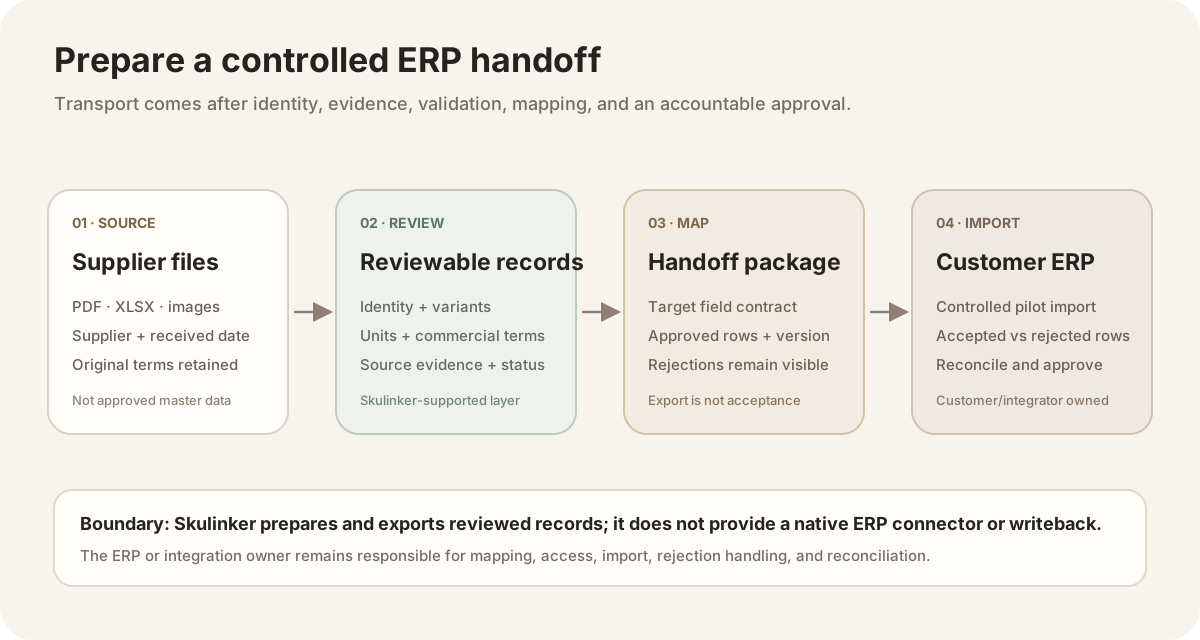
A reviewed export is a handoff package. It is not evidence of a native connector, a successful import, or reconciled ERP records.
What Product Data Must Be Ready Before ERP?
Each item needs a stable identity: supplier, supplier SKU, product name, category, and source reference. Variants require explicit color, finish, material, size, or configuration values rather than differences buried in descriptions. Dimensions need values, units, and a clear order such as width, depth, and height. Commercial fields should identify currency, list or net price, minimum order quantity, order unit, pack quantity, and lead time. Preserve the source page, sheet, or image so a reviewer can resolve ambiguity. A supplier product data preparation guide covers mapping and validation in more depth.
Furniture ERP Readiness Checklist
Before migration or import, have the business owner verify seven actions:
- Assign one stable supplier and item identifier to every approved record.
- Separate variants instead of hiding options inside a product name.
- Normalize dimensions and record the unit for every measurement.
- Define currency, price type, order unit, MOQ, and pack quantity.
- Confirm lead time and flag values that require supplier review.
- Retain a source reference for disputed attributes and commercial terms.
- Test a small approved batch through purchasing, inventory, orders, and finance.
Where Skulinker Fits Before or Beside ERP
Skulinker does not replace ERP. It imports supplier PDF, XLSX, catalog, and image files; structures product fields; retains source evidence; supports review, private search, matching, and shortlists; and exports PDF, PNG, or XLSX outputs. It has no native ERP connector and does not write directly to ERP records. It provides neither real-time synchronization nor API writeback, and it does not generate or transmit EDI messages. The output remains a reviewed handoff for people and downstream systems.
Furniture ERP FAQ
Is an ERP only for large manufacturers?
No. Distributors benefit when order volume, multiple locations, approvals, or financial controls outgrow disconnected tools. Fit depends on process complexity, not company size.
Will an ERP clean supplier catalogs automatically?
Not necessarily. Confirm vendor behavior. Supplier attributes, variants, units, images, and sources often need review before operational import.
When is a distributor ready to implement one?
Start when owners can define workflows, required fields, authority, scope, and acceptance checks. Validate representative records before migrating history.
Conclusion
Understanding what is ERP separates operational truth from supplier-data preparation. Define ownership, validate a controlled batch, then choose a suitable deployment.
Next step
Keep operational truth separate from file interpretation
Use a reviewed export as a handoff package, not as proof of a native connector or a successful ERP import.
Continue reading