Digitizing supplier onboarding documents is not the same as scanning them. A searchable PDF can still leave the product name on one page, dimensions in a table, prices in a spreadsheet, and images in a separate folder. The business only gains usable product data when those pieces are connected, reviewed, and given a clear destination.
For furniture distributors, the highest-value documents are usually product catalogs, price sheets, specifications, image folders, and supplier notes about materials, finishes, MOQ, or lead time.
Route Documents by Business Purpose
Do not send every supplier document into the same repository and call the job complete.
| Document purpose | Examples | Record owner | Likely destination |
|---|---|---|---|
| Legal and compliance | Entity forms, certifications, policy evidence | Legal, procurement, or risk | Supplier-risk or procurement system |
| Payment and tax | Bank details, tax forms, remittance instructions | Finance or AP | Controlled payment onboarding |
| Commercial relationship | Agreements, contacts, terms | Procurement or legal | Contract or supplier record |
| Product and catalog data | Catalogs, price sheets, specifications, images | Sourcing, product, or catalog operations | Product-data workflow and library |
Skulinker belongs to the last row. It should not be used as evidence that the other document types have been approved.
Prepare the Supplier Package Before Import
Keep files from the same supplier and receiving event together. Record the supplier, received date, expected currency, price basis, file list, and any known relationship between the files.
Before processing, check:
- whether the PDF contains selectable text or scanned pages;
- whether an Excel workbook uses merged cells, hidden sheets, or units only in a header;
- whether image filenames contain models or only camera sequence numbers;
- whether one image represents a product, a variant, a collection, or a room scene;
- whether the price sheet is current and whether the amount is per piece, carton, set, or another unit.
These observations become review context. They should not be discarded when extraction begins.
A Six-Step Supplier Onboarding Document Digitization Workflow
- Receive and identify. Keep the supplier and source files attached to one intake event.
- Classify. Route legal, payment, commercial, and product documents to the right owners.
- Extract candidates. Create possible product, variant, image, and supplier-offer records.
- Validate against the source. Review identity, dimensions, units, image assignment, and commercial context.
- Normalize without erasing. Add comparable category and unit values while retaining supplier wording.
- Publish by readiness. Release records for discovery, comparison, quotation preparation, or controlled ERP handoff only when the required fields are reviewed.
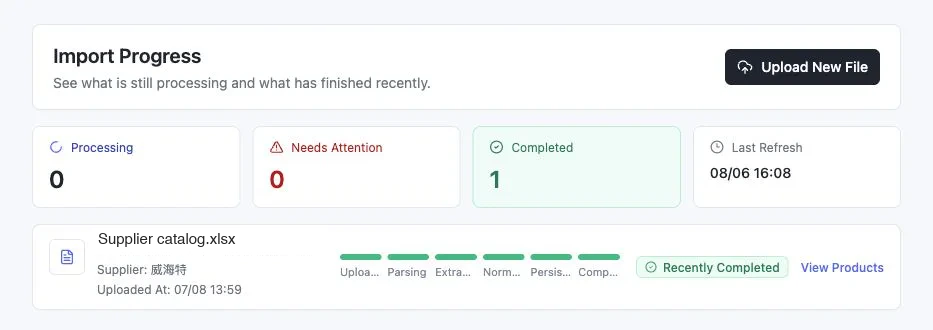
The real import view makes operational progress visible. A completed task still needs a record-level review; processing status and business approval are different facts.
Keep Field Evidence Beside the Record
For every field that changes identity or commercial use, store enough context to return to the source. Useful evidence includes the file, page or row, original excerpt, supplier image, extraction candidate, normalized value, and review status.
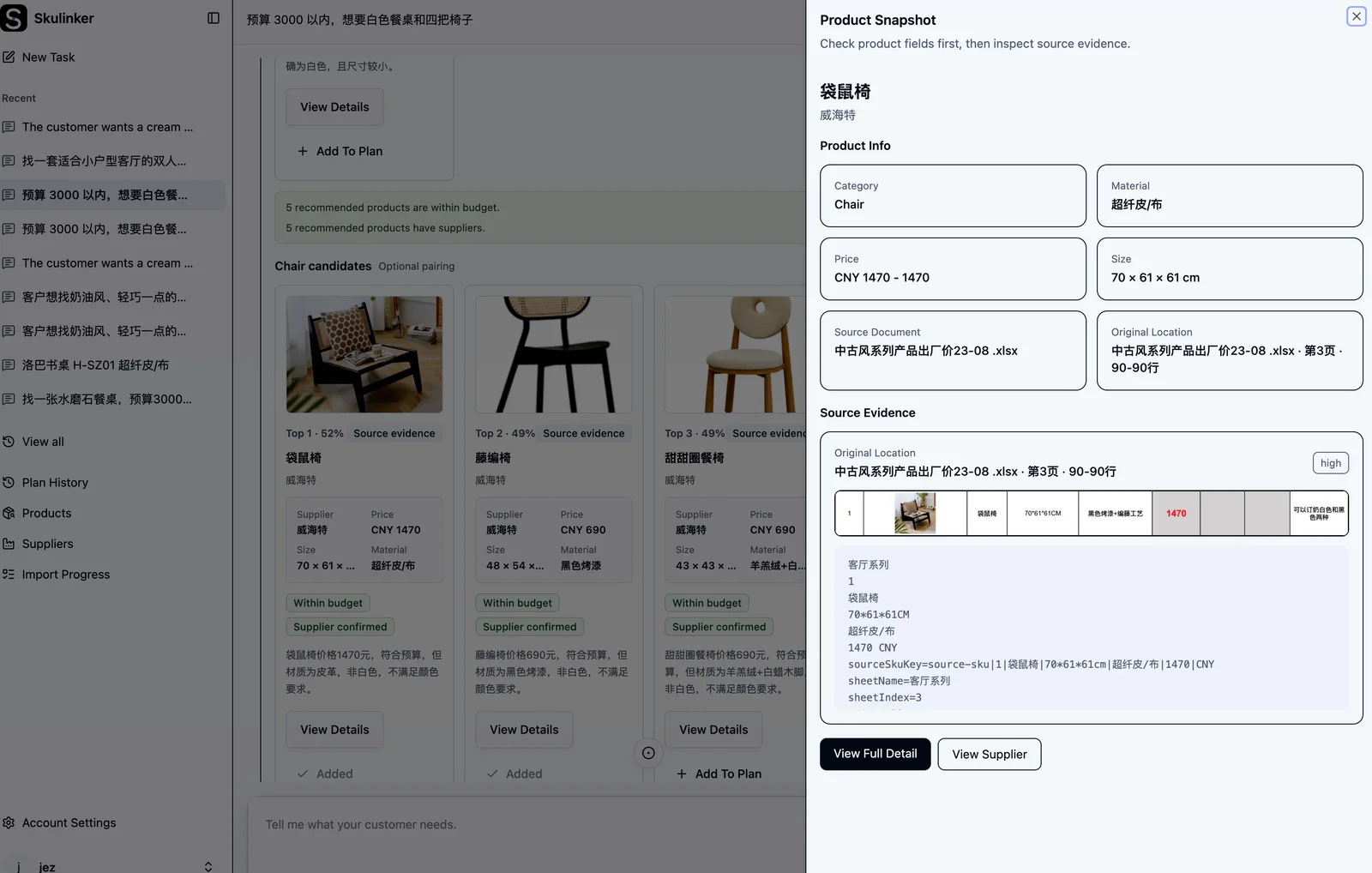
The screenshot shows why digitization is more than OCR: the product record remains connected to the supplier document and original row while a reviewer inspects its attributes.
Acceptance Checklist Before Publishing
- The supplier and source file are known.
- Product identity is present or explicitly marked missing.
- Variants and supplier offers are not flattened into duplicate base products.
- Dimensions have field meaning and units.
- Images are assigned confidently or queued for review.
- Price context includes currency and unit basis when supplied.
- Conflicts and missing values are visible.
- A person owns unresolved commercial exceptions.
- The readiness state matches the intended use.
Skulinker handles the product-file path into source-connected records, private search, matching, shortlists, and exports. Contracts, KYC, tax, payment controls, and formal compliance approval remain in the systems and teams responsible for them.
Continue with the supplier product data onboarding guide and the product data quality checklist before publishing records to a shared library.
Next step
Start with the documents sales actually needs
Separate product catalogs and price sheets from legal paperwork, then test the product-data output on one accepted file.
Continue reading