Product information management best practices change when the work begins with supplier PDFs, spreadsheets, image folders, and repeated catalog updates. The first job is not channel publishing. It is turning uncertain source material into records that a buyer or product-data owner can review and trust.
This guide focuses on that supplier-data operating layer. A complete PIM program may also include taxonomy governance, digital-asset management, localization, channel syndication, approval workflows, and downstream integrations. Skulinker does not claim to replace all of those systems.
1. Model the Business Objects Before the Fields
Do not place every value from a supplier sheet into one flat product row. Define what the business needs to distinguish:
| Object | What it represents | Furniture example |
|---|---|---|
| Product | The stable item identity | A lounge-chair model |
| Variant | A sellable configuration | Walnut frame, oatmeal fabric |
| Supplier offer | Commercial terms from one source | CNY price, MOQ, lead time |
| Asset | Media linked to the record | Cutout image, finish swatch, room scene |
| Source evidence | Where a value came from | Catalog page, worksheet row, image filename |
This separation prevents a new price list from creating a duplicate product and keeps a fabric change from overwriting the base model.
2. Define Required Fields by Category
“Complete” should mean something different for a sofa, a dining table, and a lamp. Create a short required-field contract for each category before importing a large catalog.
For upholstered seating, that contract might require overall dimensions, seat height, frame material, upholstery, color, fire-standard evidence, supplier SKU, image, and commercial readiness. Record optional merchandising copy separately from fields that affect specification, comparison, or purchasing.
Field names alone are not enough. Define units, allowed values, whether multiple values are valid, and who owns exceptions. A dimension without a unit or a material value that mixes frame and upholstery is not ready merely because the cell is filled.
3. Keep Supplier Catalog Source Evidence Beside Normalized Values
Normalization makes comparison possible, but the original supplier statement remains important. Keep both:
- the source value, such as
235 cmorNatural Oak / Fabric A12; - the normalized value used for filtering or comparison;
- the source document, page, sheet, row, or image that supports it;
- the person and time associated with a correction.
This makes review practical. A buyer can compare two products in consistent units while still checking what the supplier actually provided.
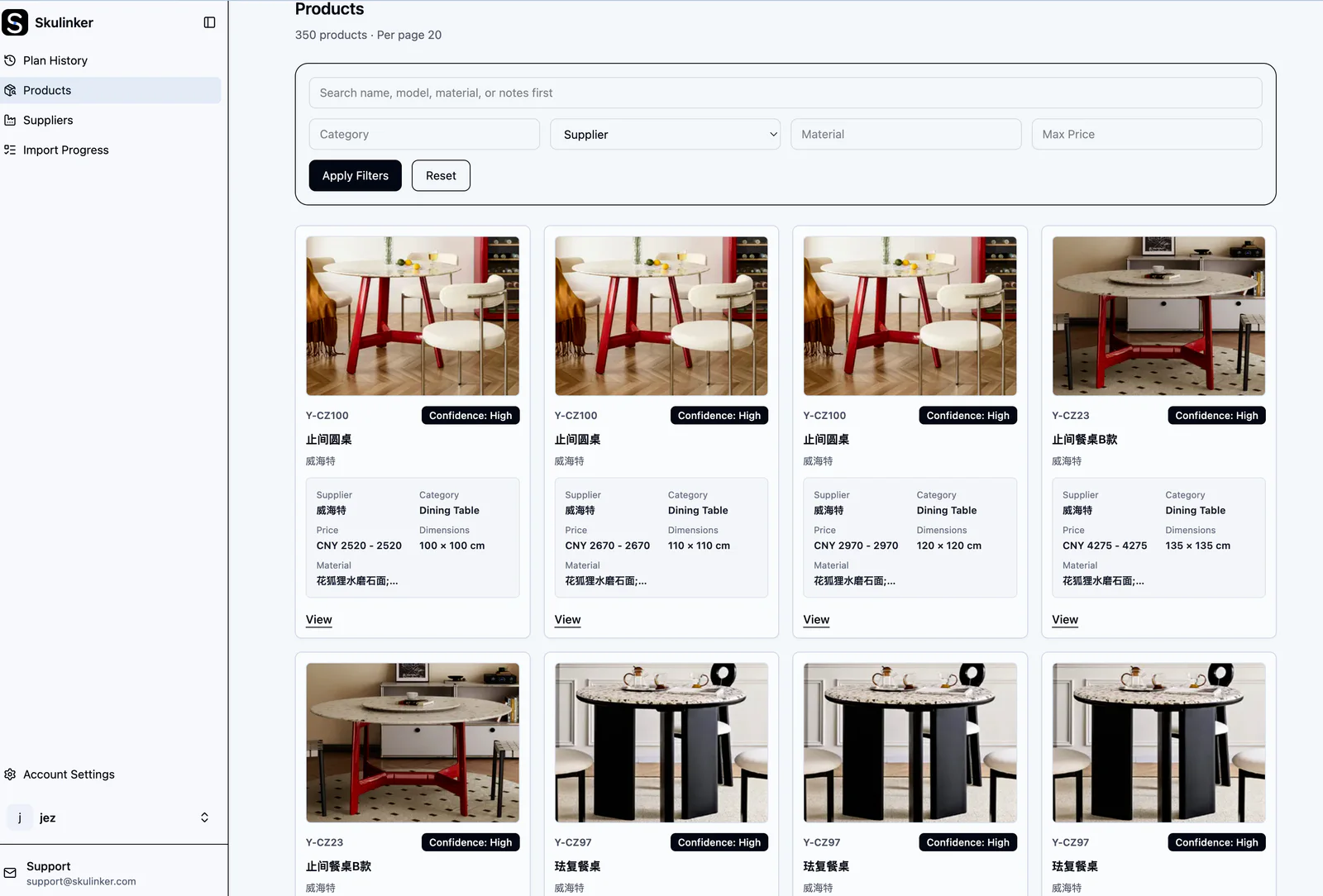
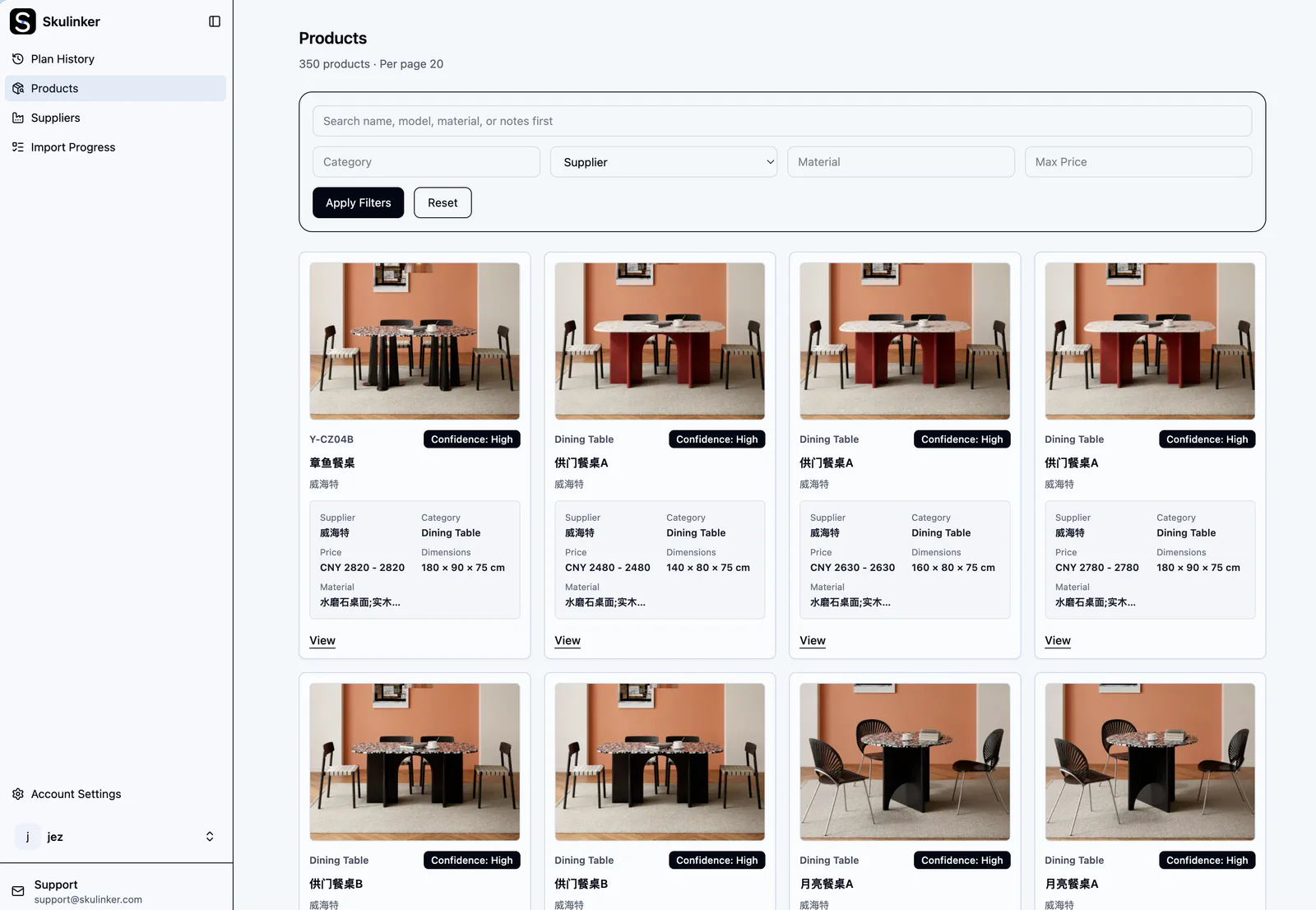
The screenshot shows a real product-library view rather than a conceptual PIM diagram. Each visible record is usable because product identity, imagery, attributes, and supplier context stay connected.
4. Separate Extraction, Review, Approval, and Publication
An extracted value is a candidate, not a fact. Use explicit states so the team knows what it can safely do with a record:
- Received — files are present but not yet interpreted.
- Extracted — candidate fields and assets have been identified.
- Needs review — important values are missing, ambiguous, or conflicting.
- Approved for internal use — a responsible person has accepted the record for search and comparison.
- Ready for publication or downstream use — channel or system-specific requirements have been met.
Not every organization needs these exact labels, but it needs the distinction. Automatically publishing extracted supplier content creates hidden quality debt.
5. Treat Product, Variant, and Supplier Changes Differently
Supplier updates do not all mean the same thing. A price change updates an offer. A new finish may create a variant. A revised dimension may require review against an existing product. A discontinued model changes availability without deleting historical evidence.
Use matching rules and human review together. Exact supplier SKU matching is useful, but it is not enough when suppliers reuse model names, omit variant identifiers, or issue a replacement catalog with different row structures.
6. Design Quality Rules Around Decisions
Avoid a single completeness percentage that treats every field equally. A missing lifestyle description is not equivalent to a missing width, currency, MOQ, or supplier identity.
Group checks by decision:
- identity: model, supplier SKU, category, variant keys;
- specification: dimensions, material, finish, certification evidence;
- commercial readiness: price, currency, MOQ, lead time, effective date;
- presentation: primary image, supporting assets, approved description;
- traceability: source file, location, import date, reviewer.
Show failures and conflicts openly. Quietly inventing or copying values from a similar product makes the library look complete while making it less trustworthy.
7. Make Search and Shortlist Output Follow Reviewed Data
Natural-language search can help a furniture buyer describe a space, style, quantity, or budget. It should search approved private product records and return source evidence that a person can inspect. It should not turn an incomplete catalog into authoritative data through confident wording.
Search, matching, and shortlist output are downstream tests of the data model. If the system cannot explain why a product matched, or if selected products lose their supplier and variant context in the export, the upstream record design is incomplete.
8. Define the Handoff to PIM and ERP
Write down which system owns each change. A focused supplier-data workspace can prepare reviewed product records and evidence. A full PIM may own enriched customer-facing content, localization, approval, and channel syndication. An ERP usually owns purchasing, inventory, orders, and finance.
Do not promise an integration from a logo alone. Verify field mapping, update direction, conflict handling, identifiers, error recovery, and who monitors failed transfers.
A Practical Starting Point
Choose one representative supplier package and one product category. Define the object model and required-field contract, process the files, review a small set of records, and then test search, comparison, and export with a real buyer request. Expand only after the team can explain the evidence and ownership of each important field.
Continue with the PIM guide, the supplier product data onboarding workflow, and the product data quality checklist.
Next step
Build a trustworthy record before adding more channels
Keep original values, normalized fields, evidence and publication decisions separate enough for a person to review.
Continue reading