Quote automation for wholesale furniture distributors begins before a formal quote exists. The document is usually the last step. The difficult work is understanding the customer brief, finding relevant products across private supplier data, checking evidence and commercial readiness, and recording exactly which options the salesperson intends to propose.
Skulinker supports this quote-preparation layer. It does not calculate tax, approve discounts, issue binding prices, reserve inventory, execute contracts, or create orders.
Why Quote Preparation Becomes a Search Problem
A furniture request rarely arrives as a clean SKU list. It may describe a boutique-hotel lounge, a four-person meeting area, a target style, maximum dimensions, quantity, material preference, budget, and installation date.
The salesperson then has to answer several different questions:
- Which products fit the physical and visual brief?
- Is the result based on current supplier data?
- Which variant and image belong to the proposed item?
- Are price, currency, MOQ, lead time, and availability usable or still uncertain?
- Which results are suggestions, and which products did the salesperson actually select?
When those answers live across PDFs, spreadsheets, folders, and personal memory, generating the final quote faster does not remove the upstream risk.
Establish Quote-Readiness Gates
Do not treat every searchable product as quote-ready. Create a small set of gates:
| Gate | Minimum evidence before the product moves forward |
|---|---|
| Identity | Supplier, model or SKU, category, and correct variant |
| Specification | Required dimensions, materials, finishes, and image |
| Commercial | Price, currency, MOQ, lead time, effective date, and owner |
| Selection | Explicit confirmation that this product belongs in the customer plan |
| Final quotation | Approved margin, discount, freight, tax, terms, and validity period in the quoting or ERP process |
The first four gates can prepare a reviewable selection. The last gate belongs to the company’s formal commercial controls.
A Practical Quote Automation Workflow for Furniture Distributors
1. Normalize the customer brief
Capture room type, use, style, dimensions, quantity, budget, timing, and exclusions. Keep the original request, then turn it into criteria a product-data owner can inspect.
2. Search a reviewed private product library
Search should operate on products connected to supplier records and source files. A natural-language request can help explore the library, but it should not bypass missing data or fabricate a product fit.
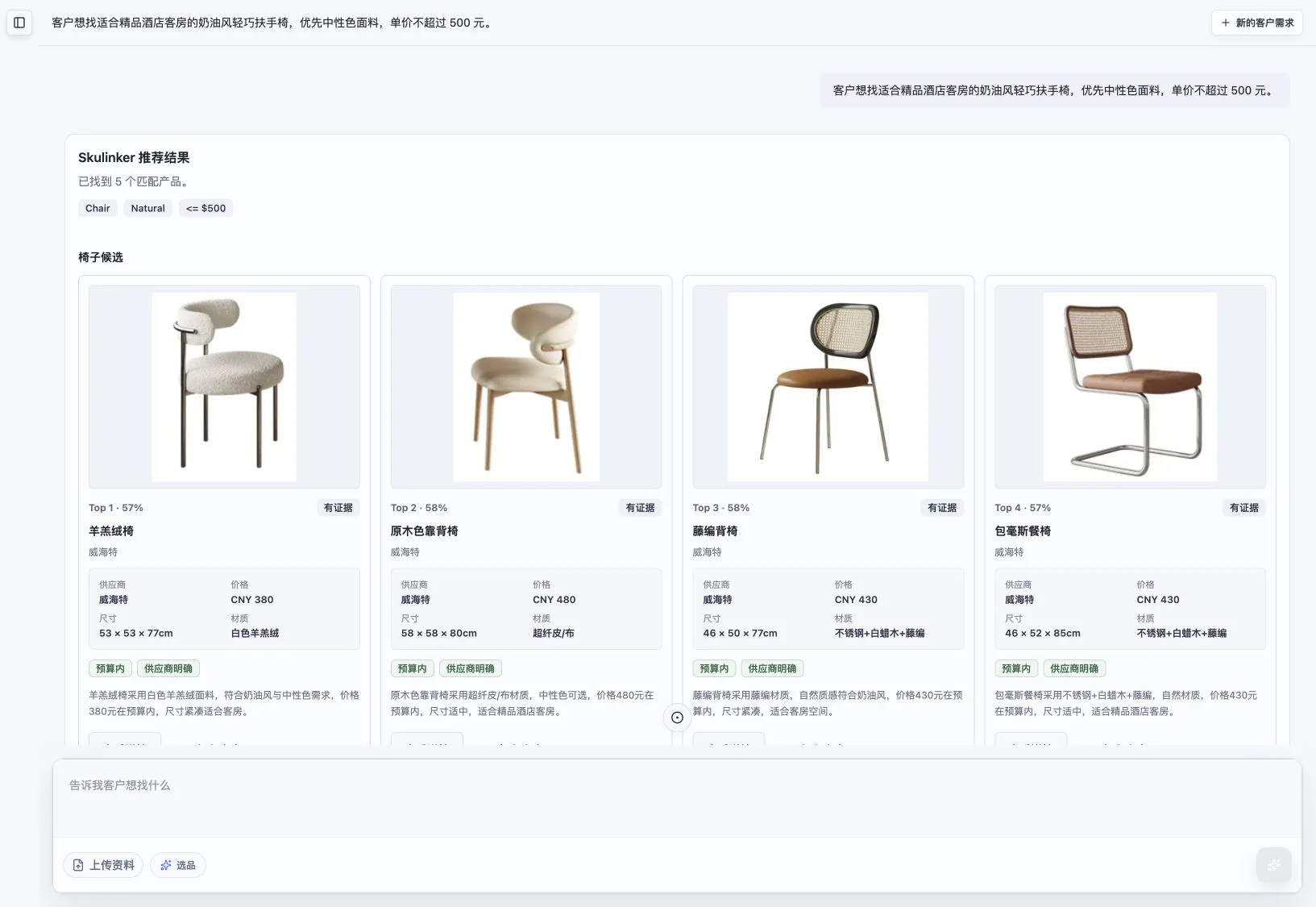
This screenshot shows a real Skulinker product-matching result for a furniture brief. Product images and result context make the recommendations inspectable; the salesperson still decides whether a result should enter the plan.
3. Review source evidence and commercial fields
Before proposing an item, inspect the source behind important dimensions, material, model, and price. Flag missing currency, stale effective dates, unclear variants, or assumptions about lead time. A shortlist should not hide uncertainty.
4. Add only deliberate selections
Search results and selected products are different business states. A product should enter the customer plan only after a user explicitly adds it. Preserve quantity, variant, supplier, unit price, and any review note needed for the next person.
5. Export an editable review package
An export should help sales, sourcing, and the customer discuss the same items. It can include product image, name, quantity, unit price, subtotal, and the plan total, while remaining editable before formal quotation.
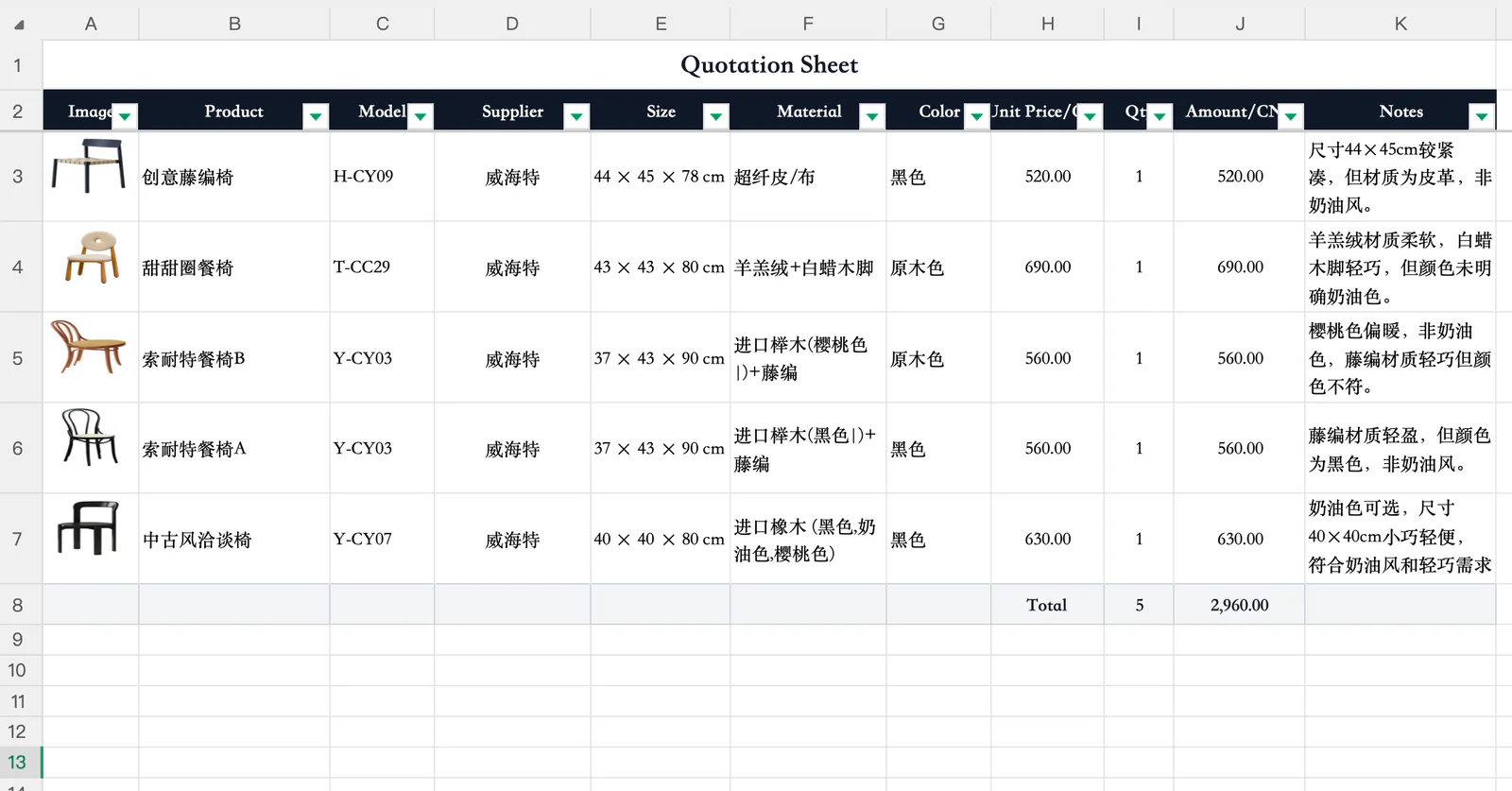
The image shows a real selection-plan output. It is a review package, not a binding customer quote. Commercial approval still needs the distributor’s quoting, CPQ, or ERP controls.
Keep the Final Quote Controls Outside the Matching Layer
A formal quote may require customer-specific price lists, margin rules, discount authority, freight, tax, installation, payment terms, inventory checks, validity dates, and contract language. Those controls vary by distributor and should remain in the system and approval process that owns them.
The handoff should be explicit. Define which product and commercial fields move from the selection plan, which system assigns the quote number, who can change price, and what happens when supplier terms change after the plan was prepared.
Measure the Workflow, Not a Marketing Claim
Use a small set of operational measures without promising unsupported time savings:
- percentage of requested products with verified source evidence;
- number of shortlisted items missing price, currency, MOQ, or lead time;
- duplicate or incorrect variants found during review;
- revisions caused by using outdated supplier files;
- percentage of selected products accepted into formal quoting without re-entering core data.
Compare the same representative request before and after the workflow changes. Results will depend on catalog quality, data rules, review ownership, and integration—not only the software interface.
Where Skulinker Fits
Skulinker can help receive supplier product data, keep source context, search a private furniture library, review matches, create a deliberate selection plan, and export selected items. It is not a complete CPQ, ERP, inventory, tax, contracting, or order-management product.
Continue with the furniture ERP guide, the supplier data for ERP integration guide, and the product data matching workflow.
Next step
Move from matched products to an editable customer plan
Keep product choice, quantities, source prices and export separate from final pricing approval, tax and order management.
Continue reading