
Use this furniture inventory template to record observed furniture, explain count differences and assign follow-up work. The fictional North Studio case has eight records across an office, storage room and sample area, including tagged assets, batches, damage and an uncounted cabinet. Start from the expected furniture inventory list, visit each location, then retain a dated count. Skulinker provides a separate supplier-information workflow.
Download the English furniture inventory template or download the Chinese workbook. Locations, people and observations are fictional. This local workbook does not track stock movements or synchronize with Skulinker.
Begin with the unfinished work
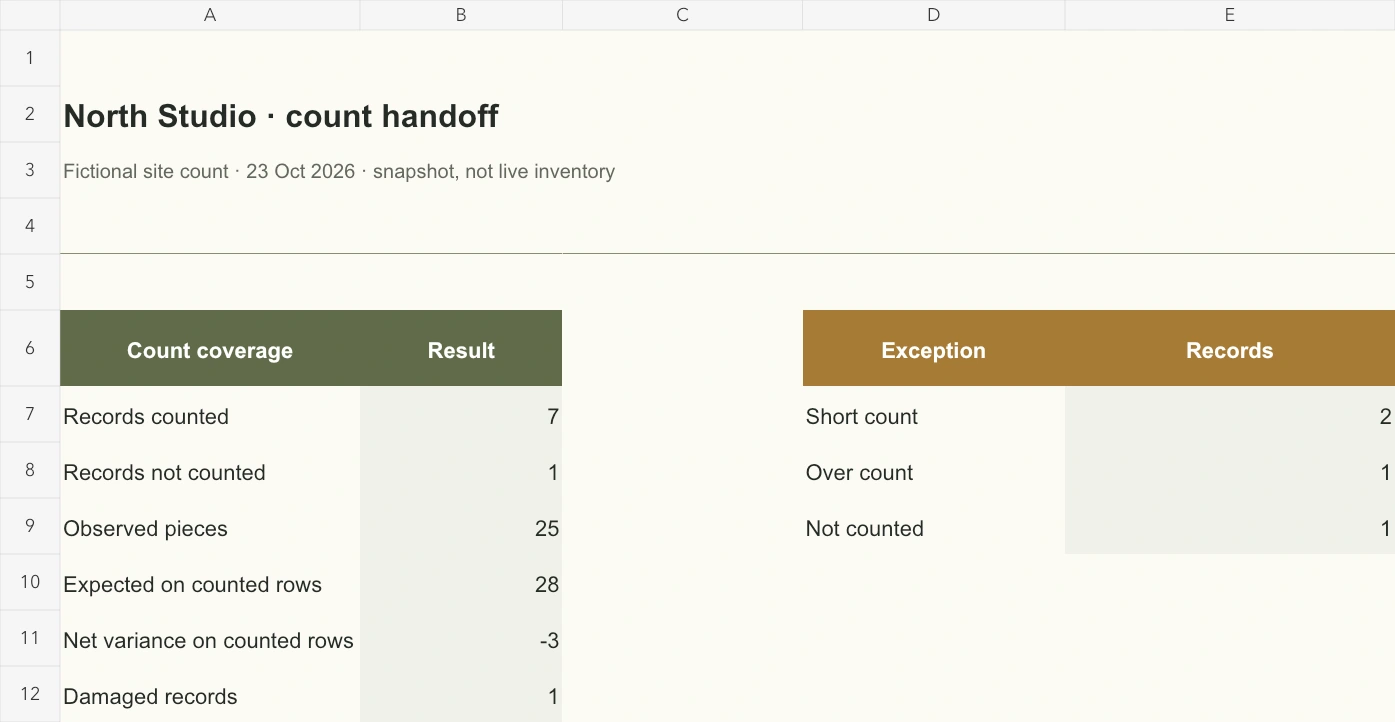
The furniture inventory template opens on Count handoff. Seven records are counted: twenty-five observed pieces against twenty-eight expected, a net difference of minus three. One cabinet remains uncounted. The furniture inventory spreadsheet keeps that pending record visible rather than declaring completion.
B201 is short one visitor chair; B203 has one extra dining chair; B204 has zero stacking tables against three expected. A102's quantity matches, but its height control is loose. Use the furniture inventory template to carry both quantity differences and damage forward: a matching count does not resolve a condition problem.
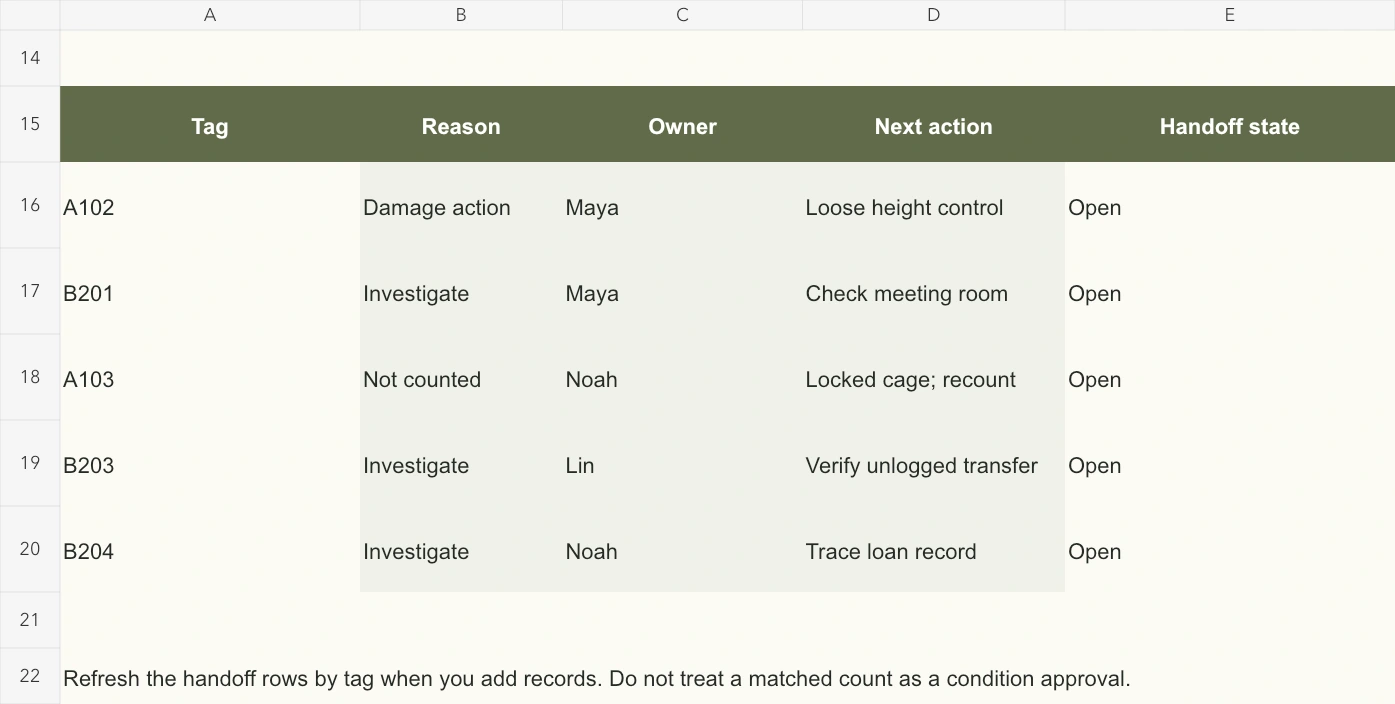
Handoff rows identify the tag, reason, counter, next action and status. Maya, Noah and Lin own these actions. Read these individual exceptions beside the furniture inventory list total; shortages and surpluses can offset without resolving either.
Decide between a single asset and a batch
In the furniture inventory template, Count register holds the observations. Asset records A101–A104 each identify one item, with expected quantity one. Finding a similar desk requires a separate identity check, not changing an existing tagged asset to quantity two.
Batch records group interchangeable furniture at one location: B201 has six expected visitor chairs, B202 twelve folding chairs, B203 four dining chairs and B204 three stacking tables. Split the furniture inventory list when model, location or condition requires separate investigation.
This furniture inventory template uses pieces throughout. Define the contents of a set before comparing it with individual chairs. Keep serial or model details in supporting records when appearance alone cannot establish identity.
Record a site observation, including zero
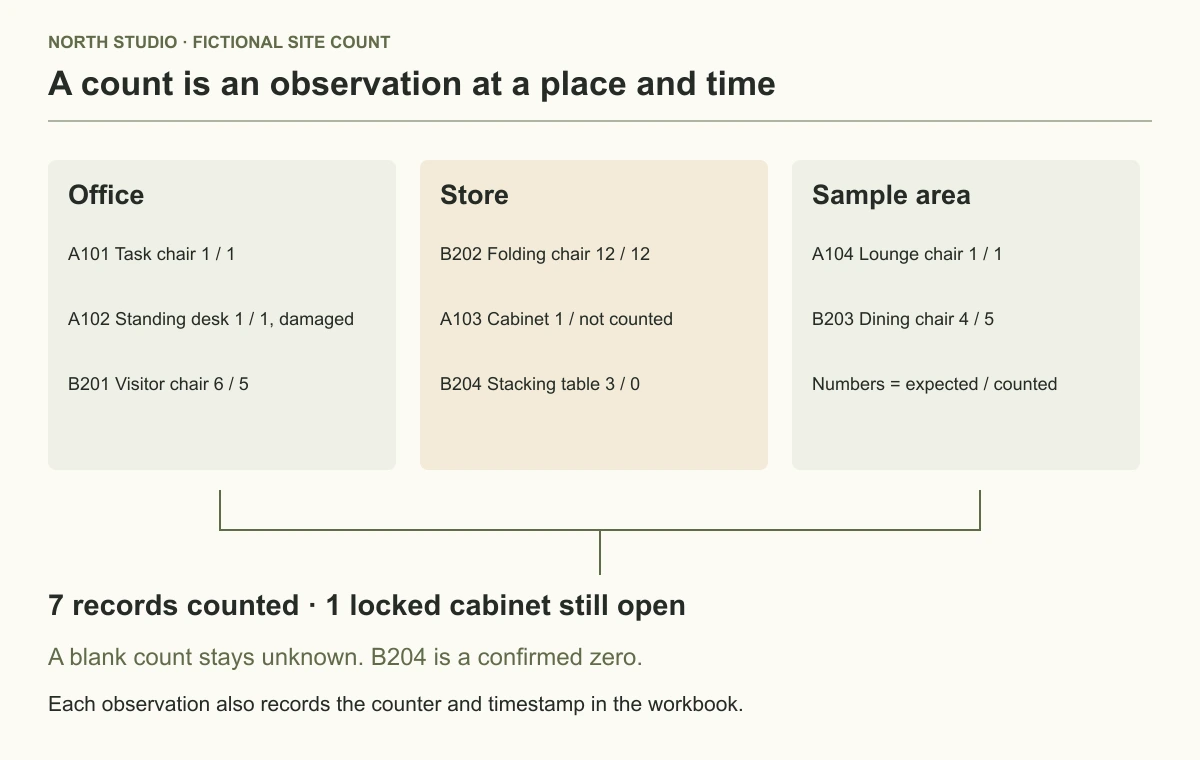
Walk all three locations with the furniture inventory template. Record tag, observed quantity, condition, counter and timestamp. In the office, Maya finds A101 and A102, one each, and five B201 visitor chairs; the desk is Damaged. In storage, Noah counts twelve folding chairs. A103's cage is locked, so quantity and time remain blank. Noah checks B204's location and confirms zero tables. Lin finds one lounge chair and five dining chairs in the sample area.
Keep this distinction in the furniture inventory template: A103's blank means no observation; B204's zero means checked and absent. Filling the locked cabinet with zero creates a false shortage and hides unfinished work. The diagram shows expected and observed quantities for the same eight records.
View full-size image
Three locations contain eight records; the locked cabinet remains uncounted.
Trace the calculation to its source
For counted rows, the furniture inventory spreadsheet subtracts expected from observed quantity. B201 gives 5 − 6 = −1; B203 gives 5 − 4 = +1; B204 gives 0 − 3 = −3. Other counted records have zero variance. Known differences therefore total minus three.
The furniture inventory template excludes A103 from both sides of that comparison. All eight records expect twenty-nine pieces; only the seven checked records expect twenty-eight. Comparing all twenty-nine with twenty-five observations would mix checked and unchecked scope.
In a saved furniture inventory template copy, enter zero for A103: variance becomes minus one and pending records fall to zero. Clear it again: variance becomes blank and pending returns to one. Restore the blank until someone actually inspects the cabinet.
Take the paper sheet to a recount
Print count lists eight tags, locations, item names and expected quantities, with spaces for count, condition, name, time and remarks. This furniture inventory list supports a second visit when a laptop is inconvenient.
Print A1:H18 landscape, one page wide, and check preview. Ask the counter to write confirmed zeros clearly and leave unchecked values blank. These paper fields do not overwrite observations in the furniture inventory template.
Afterward, one designated recorder transfers signed observations into the furniture inventory spreadsheet. Keep the paper or scan beside that dated file. Retain the discrepancy explanation in the furniture inventory list until its owner has reviewed the result.
Close differences with an explanation
Trace the missing visitor chair before reducing its expected quantity. Verify the sample-area transfer before accepting the surplus chair. Check the stacking-table loan record before writing off three tables. Arrange a condition review for the damaged desk and obtain access to the cabinet. Each action in the furniture inventory template needs evidence beyond the net variance.
View full-size image
Five named actions carry count differences, damage and the locked cabinet into the handoff.
The five handoff rows retrieve source details by tag; they remain a manual review list. Keep tags unique in the furniture inventory list: a duplicate can retrieve the first match, while a missing tag cannot supply a reliable source record. Update action rows when scope changes and extend summary formulas beyond the eight supplied records.
Filter the furniture inventory spreadsheet using table controls; sort whole records to keep tags, quantities, names and timestamps together. Save the furniture inventory template with a date before approving baseline changes.
For planned room allocations, use the room furniture schedule. For supplier-product review, visit the Skulinker homepage and public Demo, where current availability is stated. Keep observations, resolved actions and approved baseline changes together for the next physical count.
Next step
See the supplier-file workflow in the Skulinker Demo
Explore how supplier files connect to product records, source review, selection, and export. Check the homepage for current service availability.
Continue reading