
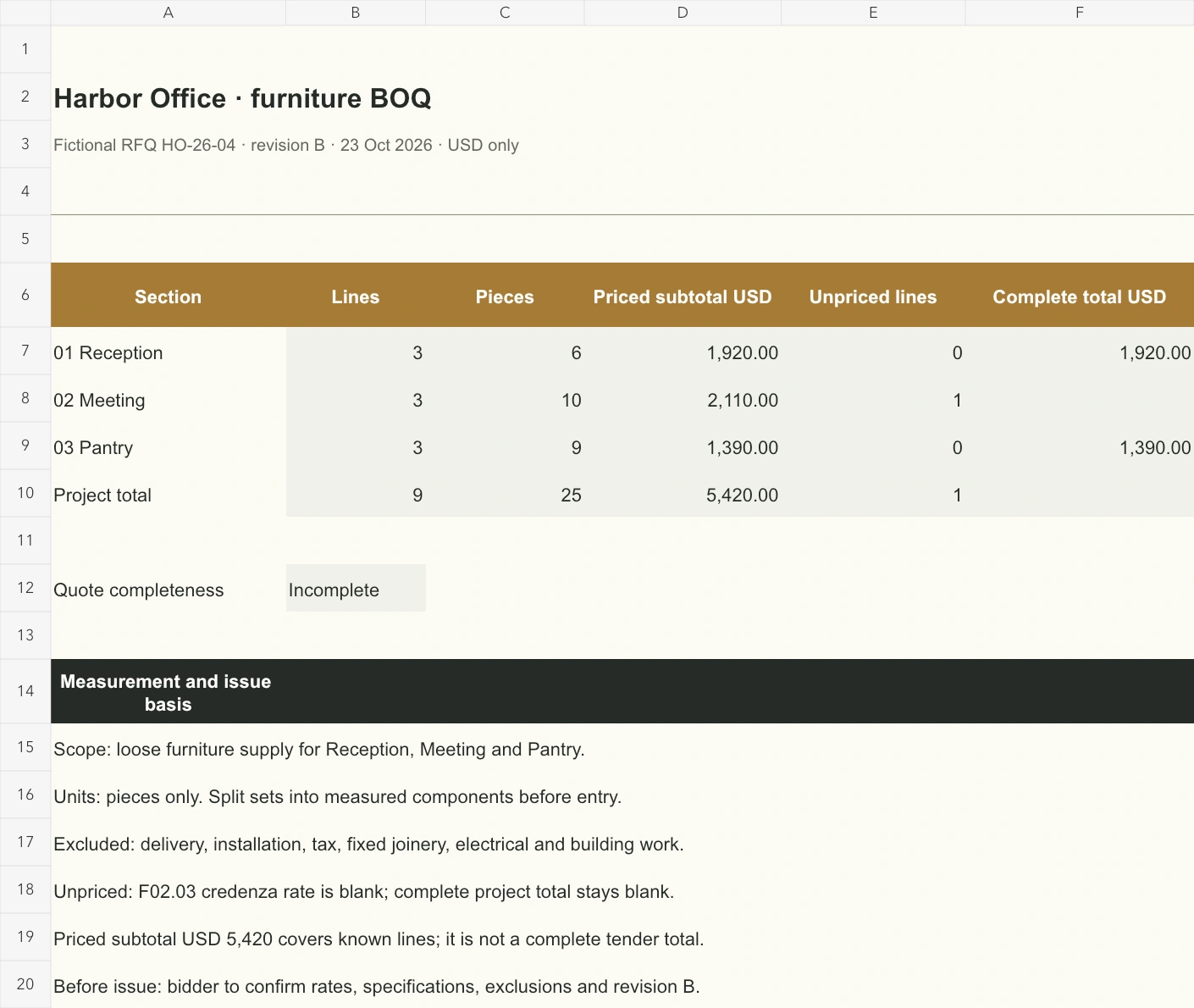
Prepare a bill of quantities for furniture that a supplier can price against defined supply scope. The Excel case has nine numbered lines across reception, meeting room and pantry, with quantities, specifications and completeness checks. Confirm measured scope and rates; the furniture bill of quantities calculates line amounts and area summaries. Skulinker supports the separate supplier-information workflow.
Download the English bill of quantities for furniture or download the Chinese workbook. Fictional Harbor Office is enquiry HO-26-04, revision B, dated 23 October 2026. Quantities, specifications and USD rates are teaching data, not quotations or market-price evidence.
Establish what the bidder is measuring
This bill of quantities for furniture covers loose furniture supply. It excludes delivery, installation, taxes, fixed joinery, electrical work and building work. Send these exclusions on Issue summary with every area sheet. Revise the scope first if your enquiry includes additional services.
The furniture quantity schedule measures everything in pieces: one meeting table is one piece, eight chairs are eight, and two café tables are two. Define any sets separately; a mixed-unit quantity total cannot represent physical pieces.
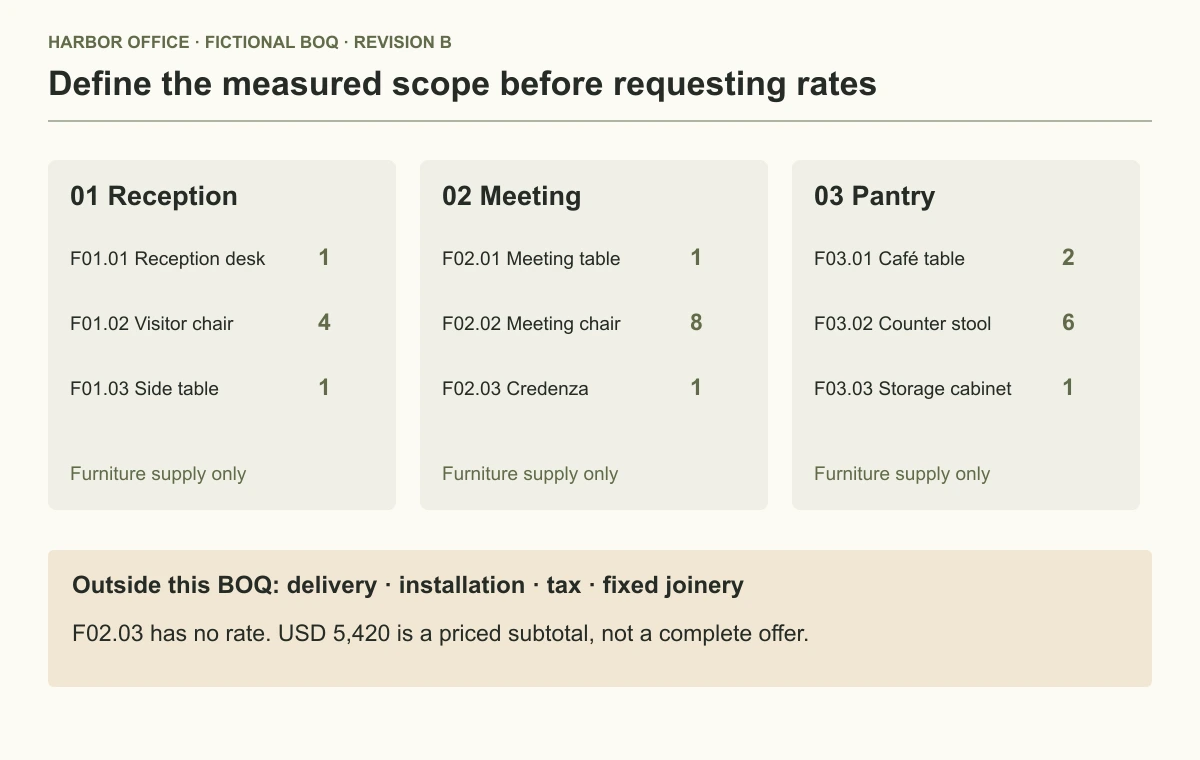
The workbook preserves numbered sections: Reception F01.01–F01.03, Meeting F02.01–F02.03, Pantry F03.01–F03.03. Keep these identifiers when requesting revised rates so bidders can identify scope without guessing from descriptions.
View full-size image
The BOQ assigns nine numbered lines to three areas and states excluded work.
Inspect the three measured sections
Reception contains one desk, four visitor chairs and one side table: six pieces, with known prices totaling USD 1,920. The side table's explicit zero rate represents a fictional concession. It produces a visible zero amount rather than a blank.
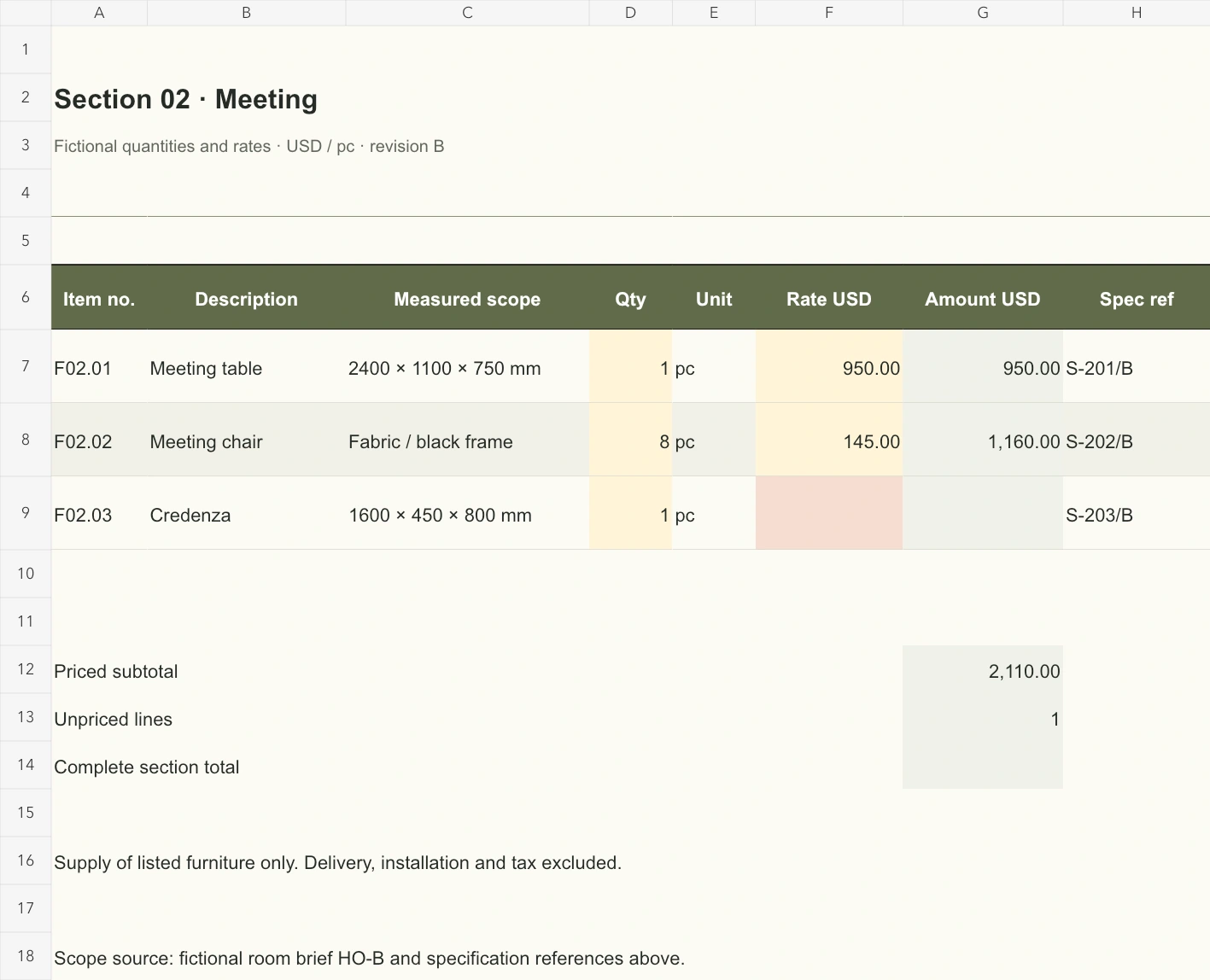
Meeting contains one table, eight chairs and one credenza: ten pieces. The table costs USD 950 and chairs USD 145 each, producing USD 2,110 in known prices. The credenza rate is missing, so its amount and the complete Meeting total remain blank in the bill of quantities for furniture.
Pantry contains two café tables, six counter stools and one cabinet: nine pieces, fully priced at USD 1,390. The furniture quantity schedule therefore contains twenty-five pieces. USD 1,920 + USD 2,110 + USD 1,390 = USD 5,420 in known prices; the unpriced credenza prevents a complete supply total.
Line F02.03 identifies a 1600 × 450 × 800 mm credenza and specification S-203/B. Replace fictional references with issued documents. Dimensions in a furniture bill of quantities do not replace material, finish, construction and acceptance specifications.
Leave an unknown rate visibly unknown
The bill of quantities for furniture multiplies numeric quantity by numeric rate and rounds the amount to two decimal places. A missing input leaves the amount blank; an explicit numeric zero remains valid and produces zero.
That distinction reaches Issue summary: Meeting has one missing rate, known project prices are USD 5,420, and the complete project total is blank. Use the furniture bill of quantities completeness column before comparing suppliers' totals.
In a saved copy, enter USD 300 for the credenza. The line becomes USD 300, Meeting becomes USD 2,410 and the bill of quantities for furniture shows a complete project total of USD 5,720. Clear the rate and the complete total returns to blank. Restore the missing value afterward: USD 300 checks arithmetic, not a recommended price.
View full-size image
Meeting section retains a blank credenza rate, so its complete section total remains blank.
Adapt the enquiry without weakening its scope
- Identify the issue. Replace project, enquiry reference, revision and date; choose one quotation currency. This case uses USD.
- Confirm measurement. Check areas and included furniture against the latest layout; assign a person to approve counts.
- Edit records. Keep item number, description, unit and specification together in the furniture quantity schedule. Split lines with different pricing bases.
- Request rates. Leave unanswered rates blank. Use zero only for an explicitly quoted zero charge and record its reason.
- Review completeness. Check every blank quantity and rate before treating the bill of quantities for furniture as fully priced.
- Issue the package. Attach specifications, exclusions and revision details; request the same numbered schedule in return.
Area sheets have native Excel filters and frozen headers. Sort whole records so rates stay attached to numbered items. When expanding the furniture bill of quantities, extend line formulas, subtotal ranges and missing-rate counts. Existing formulas cover three records per area; adding a row elsewhere does not extend every summary dependency.
Read the summary before sending
Issue summary collects line counts, quantities, known prices, missing rates and complete area amounts. Its project total appears only when all three area totals are complete. The furniture bill of quantities counts each price once, rather than adding subtotals to their underlying detail again.
Before issuing the enquiry, confirm currency, specifications, exclusions, delivery assumptions and return deadline in the enquiry correspondence. Record substitutions and qualifications. Two suppliers pricing different construction need scope reconciliation before their totals are comparable.
Print the summary and each area landscape, one page wide. Keep number, unit, quantity, rate and amount on each readable row of the furniture quantity schedule. Check preview and include the referenced specifications; readable columns alone cannot establish supply scope.
A supplier's furniture quotation format records the offer and commercial terms. A room furniture schedule checks placement and required quantities before measurement. Keep shared identifiers consistent through revisions.
Retain the checked enquiry, returned workbook and clarifications. To explore supplier-document review and shortlisting, visit the Skulinker homepage and public Demo, which states current availability. The project team confirms measurements, price completeness and issue approval.
Next step
See the supplier-file workflow in the Skulinker Demo
Explore how supplier files connect to product records, source review, selection, and export. Check the homepage for current service availability.
Continue reading