
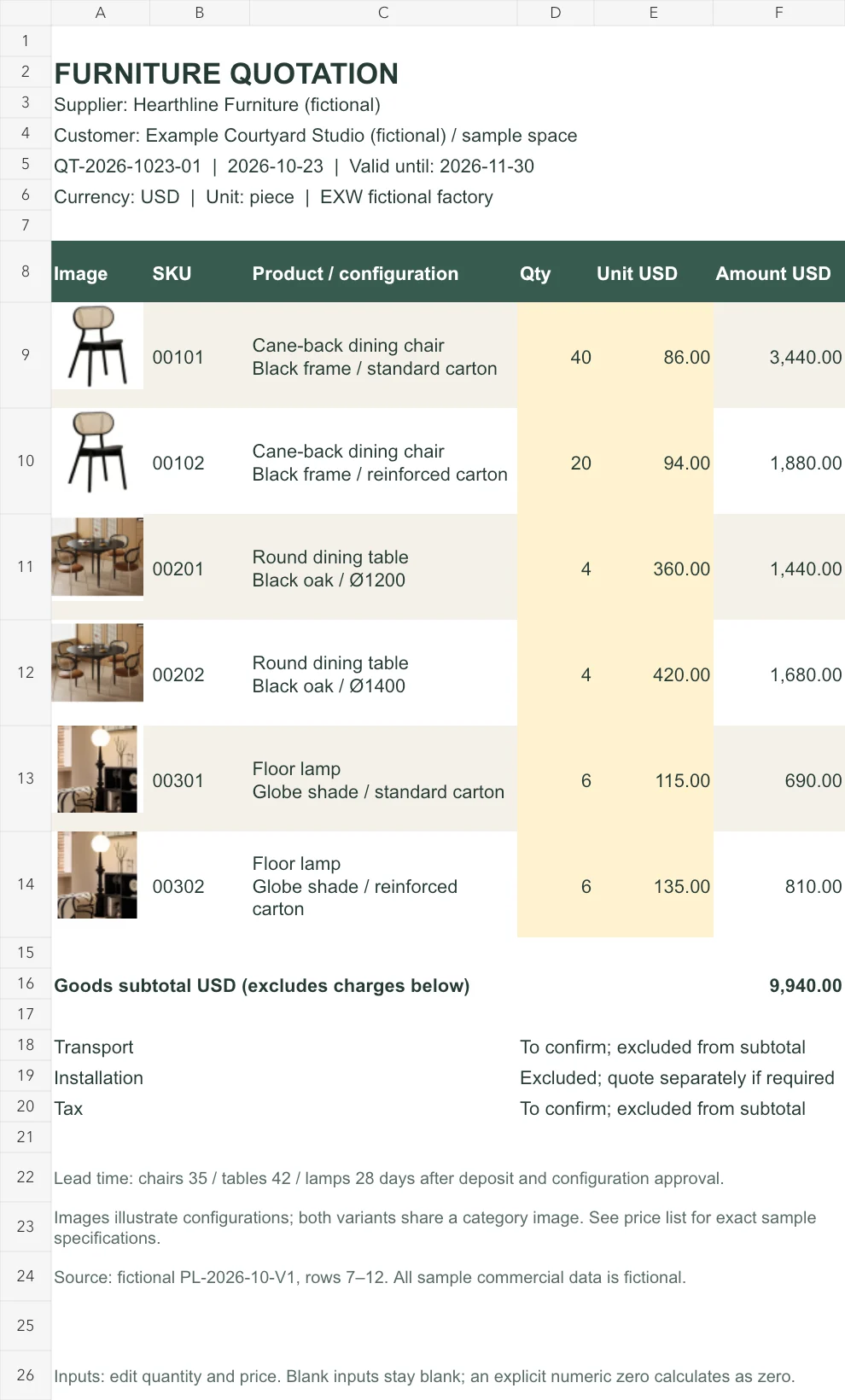
This furniture quotation format in Excel presents six pictured selections in an A4 portrait offer. Supplier and customer details, quote number, dates, quantities, and a single-currency subtotal accompany separate freight, installation, and tax conditions. Skulinker explains how supplier records behind an offer connect to a private product library, selection, and export.
Download the English quotation workbook or the Chinese workbook. Each contains sample and blank sheets. All names and offers are fictional; photographs illustrate categories rather than verified configurations.
See the offer as your customer will see it
The sample furniture quote template identifies Hearthline Furniture’s offer to Example Courtyard Studio: QT-2026-1023-01, dated October 23, 2026, valid through November 30. The header states USD per piece and a fictional EXW factory basis.
Each SKU has a line linking image, configuration, quantity, unit price, and amount. The furniture quotation template separates goods from excluded charges so the customer can review scope without opening formulas.
Follow six products from price book to quote
This furniture quotation format in Excel draws prices from fictional PL-2026-10-V1. Text SKUs preserve zeros: 00101 identifies standard-carton chairs and 00102 reinforced-carton chairs. Tables and lamps also retain separate configuration identifiers.
| SKU | Selected item | Quantity | USD / piece | Amount USD |
|---|---|---|---|---|
| 00101 | Standard-carton cane-back chair | 40 | 86.00 | 3,440.00 |
| 00102 | Reinforced-carton cane-back chair | 20 | 94.00 | 1,880.00 |
| 00201 | Round table, Ø1200 | 4 | 360.00 | 1,440.00 |
| 00202 | Round table, Ø1400 | 4 | 420.00 | 1,680.00 |
| 00301 | Standard-carton floor lamp | 6 | 115.00 | 690.00 |
| 00302 | Reinforced-carton floor lamp | 6 | 135.00 | 810.00 |
The furniture quotation template totals USD 9,940.00 for goods. All quantities meet the sample MOQs: twenty per chair configuration, four per table configuration, six per lamp configuration. Check current supplier conditions before issuing a real selection.
Keep the source price book with the furniture quotation template. For an order below MOQ, obtain a confirmed reduced-quantity price. Correct multiplication cannot establish that a collection rate still applies.
Replace the header before editing item lines
Open the blank furniture quotation format in Excel and enter supplier, customer, quote number, date, and expiry. Identify revisions consistently and retain earlier issued copies so changes remain explainable. When a customer changes one selection, check whether the supplier’s minimum order or combined pricing also affects the unchanged lines. Send the complete revised offer so the recipient need not assemble a current quote from several emails.
The furniture quotation format in Excel uses USD throughout and performs no currency conversion. For mixed-currency sources, agree and document conversion before preparing the offer. Adding unlike currencies cannot produce a meaningful subtotal.
Check units before pasting prices into the furniture quote template. After replacing a price, check its amount and subtotal update. One chair and a two-chair carton require different quantities. Specify material, finish, size, accessories, and included parts so the customer can identify the complete offer.
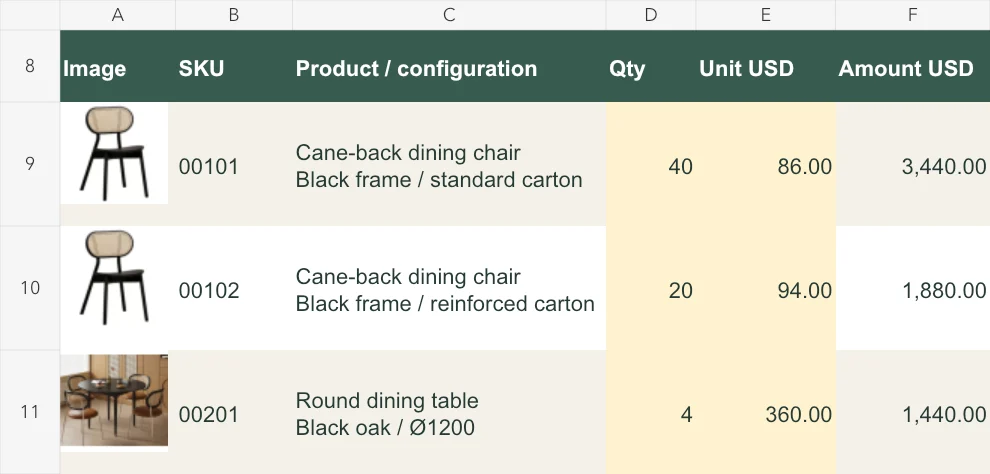
The standard-carton line calculates 40 × USD 86 = USD 3,440. The reinforced-carton line uses its own quantity and USD 94 rate.
Understand the formulas before extending the quote
Highlighted inputs in the furniture quotation format in Excel accept numeric quantities and prices. Both must be numeric before a line calculates. Blank inputs leave the amount empty; an explicit zero calculates as zero. Keep missing prices distinguishable from free items.
The furniture quotation template sums completed lines and leaves the subtotal blank when none are complete. A partially filled sheet totals only completed items. Review missing lines before issue and clearly label any deliberately partial offer.
To extend the furniture quotation format in Excel beyond six items, insert rows within the item section, copy formulas, and check the subtotal range. Change quantities in the first, middle, and last new rows. Inspect image anchors, page breaks, and the charges section. Print preview should show each row with its identifying information and amount; move a page break when it separates a picture from the configuration it represents.
Keep unconfirmed charges out of the promised amount
The furniture quotation template marks transport “To confirm; excluded from subtotal.” Installation needs a separate quote if required; tax remains unconfirmed and excluded. These notes are not numeric zeros or assumed allowances.
When charges are confirmed, update the furniture quotation format with amount, currency, scope, and treatment in the total. Specify curbside, loading dock, room, or another destination. Enter the verified tax basis for the transaction.
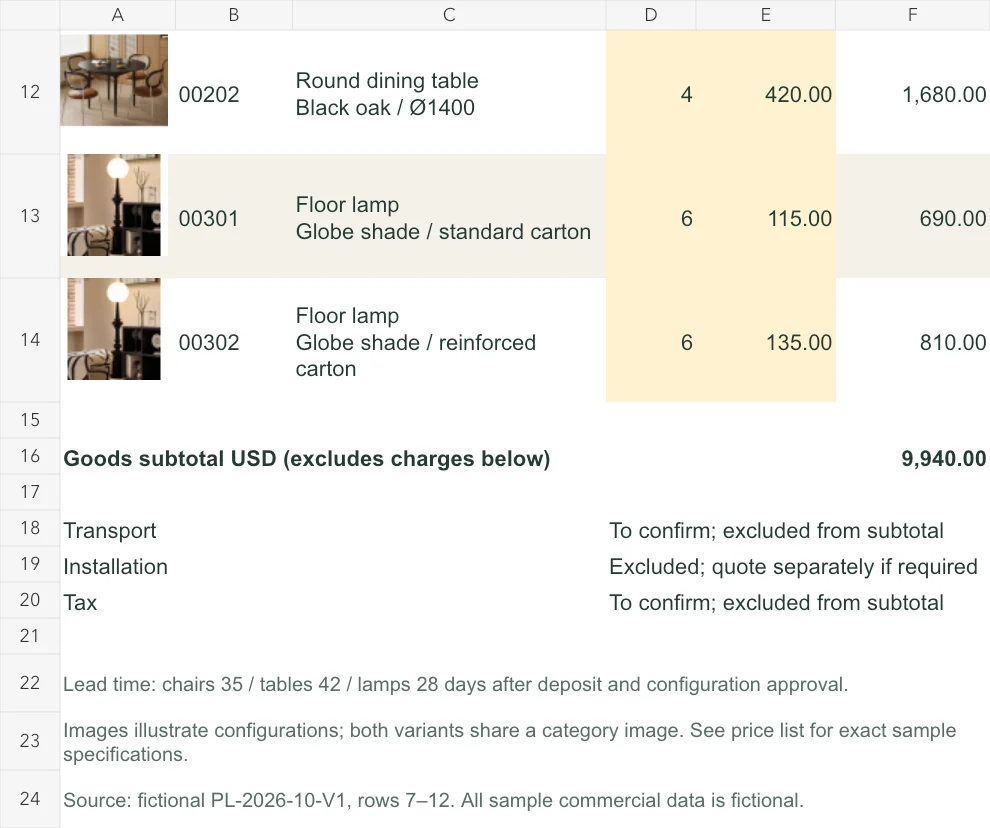
Open the subtotal and conditions.
USD 9,940 is the six-line goods result. Transport and tax remain unconfirmed; installation is excluded. Shared category pictures are labelled as illustrations.
Review the printed offer and its evidence
Preview the furniture quotation format in Excel using its A4 portrait settings. Inspect the header, six lines, subtotal, and conditions. Replace demonstration photographs with approved images. Shared category photographs make each written configuration essential.
The furniture quotation template states thirty-five days for chairs, forty-two for tables, and twenty-eight for lamps after deposit and configuration approval. Verify those starting events. Replace fictional price-book rows 7–12 with retrievable sources and retain the originals.
Use the supplier price list workbook to prepare a collection and the supplier comparison matrix for competing offers against one requirement. Explore structured records, private-library selection, and export in the public Demo on the Skulinker homepage. The live workspace is paused for a refresh.
Next step
See the supplier-file workflow in the Skulinker Demo
Explore how supplier files connect to product records, source review, selection, and export. Check the homepage for current service availability.
Continue reading