
Use this supplier comparison template to review three offers for forty woven dining chairs. The case separates unit price from order commitment and flags an expired offer. Skulinker connects supplier materials with structured records, private-library selection, and export.
Download the English comparison workbook or the Chinese version. Open the supplier comparison template to inspect the case or fill the blank matrix. All offers are fictional; the photograph is illustrative. No automated winner is selected.
Begin with one requirement all three suppliers can answer
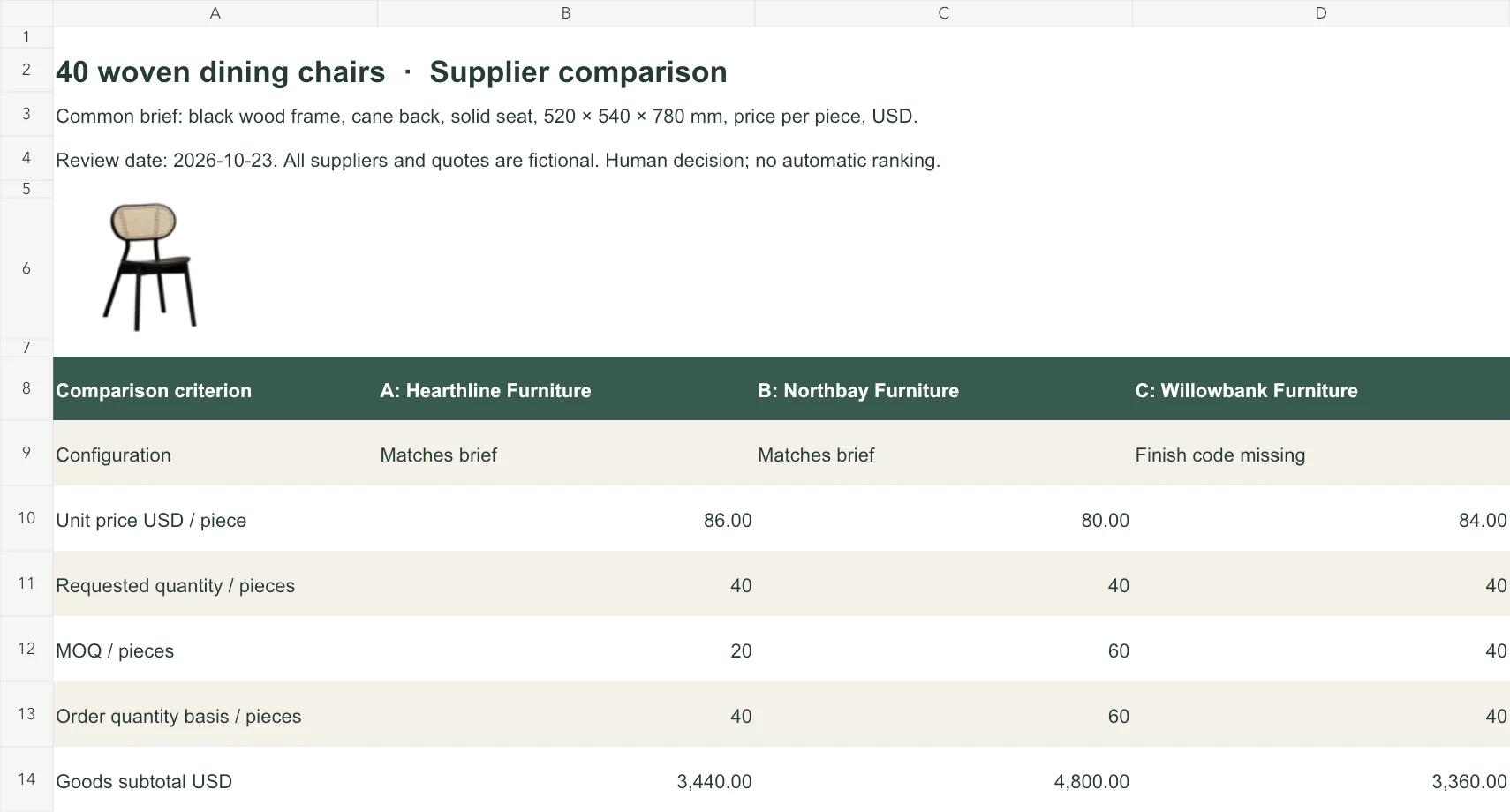
Start the supplier comparison template with a common brief: forty chairs, black wood frame, cane back, solid seat, 520 × 540 × 780 mm, priced in USD per piece. Review date: October 23, 2026. Keep this brief at the top of the supplier comparison table so a revised offer is still checked against the same requirement.
Hearthline and Northbay describe matching configurations. Willowbank omits a finish code. Keep this gap in the supplier comparison sheet: a similar picture cannot establish finish, dimensions, construction, or performance.
Read the quantity basis before the apparent saving
The supplier comparison template has separate rows for requested quantity and editable order basis. Keep MOQ beside unit price.
| Quote | Unit USD | MOQ | Order basis | Goods subtotal USD |
|---|---|---|---|---|
| A: Hearthline | 86.00 | 20 | 40 chairs | 3,440.00 |
| B: Northbay | 80.00 | 60 | 60 chairs | 4,800.00 |
| C: Willowbank | 84.00 | 40 | 40 chairs | 3,360.00 |
Northbay saves USD 6 per chair but requires twenty extra chairs. The supplier comparison template calculates Northbay's USD 4,800 commitment against Hearthline's USD 3,440. Ask Northbay for a forty-chair option before judging its suitability.
Enter the actual order basis manually in the supplier comparison matrix. MOQ may apply by finish, carton, order value, or combined conditions. The goods formula multiplies the reviewed quantity by unit price; it does not automatically enforce MOQ.
Separate known amounts from comparable delivered totals
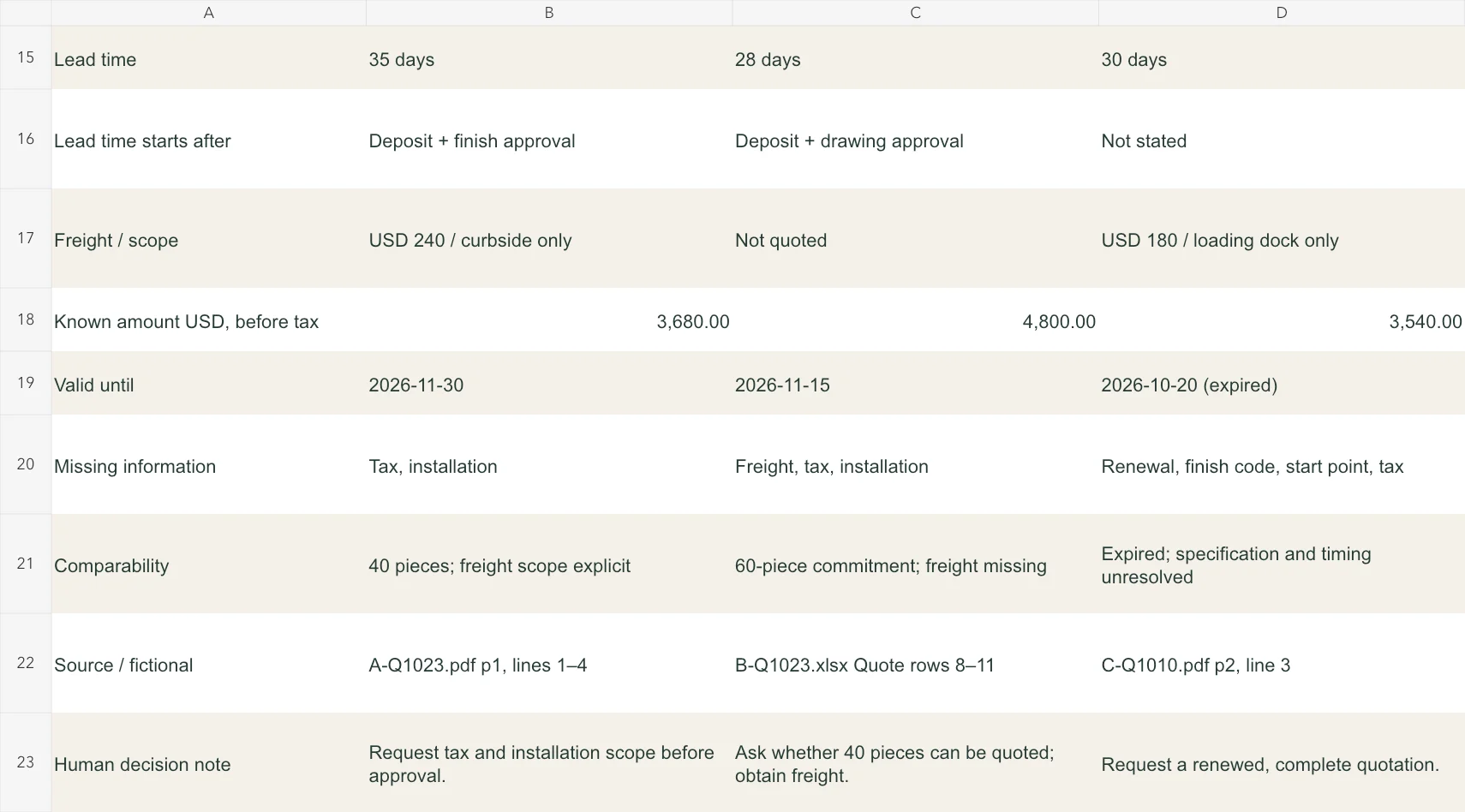
The freight row of the supplier comparison template adds Hearthline’s USD 240 curbside charge, yielding USD 3,680. Willowbank’s USD 180 loading-dock freight yields USD 3,540. Northbay’s USD 4,800 covers goods only; freight is unquoted. Tax and installation remain outside all three amounts.
Keep unquoted freight blank in the supplier comparison sheet. Confirm unloading, access, appointments, inside delivery, and packaging removal: curbside and loading-dock services leave different receiving work for the buyer.
The scope notes in the supplier comparison template identify the services behind each amount. Adding known charges does not make delivery services equivalent; agree the destination and receiving scope before comparing delivered costs.
Open the freight and validity detail.
Northbay freight is unquoted. Willowbank's October 20 expiry precedes the October 23 review. Those gaps remain unresolved.
Review timing and validity as conditions
The lead-time row of the supplier comparison template records Hearthline’s thirty-five days after deposit and finish approval; Northbay’s twenty-eight after deposit and drawing approval; and Willowbank’s thirty days with no starting event. Obtain the approval sequence and transport allowance before promising handover.
The supplier comparison sheet retains expiry dates: November 30 for Hearthline, November 15 for Northbay, and October 20 for Willowbank. Willowbank expired three days before review. Request a renewed offer; its recorded price in the supplier comparison matrix is historical evidence.
Use the dated brief in the supplier comparison template to check validity on the decision day. When the decision date changes, obtain dated supplier confirmations. An earlier saved matrix cannot establish today's available offer.
Fill the blank matrix with retrievable evidence
In the blank supplier comparison template, replace the brief and supplier headings first. Enter original configurations and numeric prices before interpreting them. Put qualifications in their designated rows, keeping calculation cells numeric.
To trace sample offers, the supplier comparison template cites fictional A-Q1023.pdf page 1, B-Q1023.xlsx Quote rows 8–11, and C-Q1010.pdf page 2. Replace these with retrievable originals and exact locations so colleagues can verify revised terms.
After clarification, update the supplier comparison table with the dated response. Do not substitute freight estimates from another project. A revised quantity, finish, or currency requires checking the entire supplier comparison table column, including formulas and conditions.
Open the worked decision matrix.
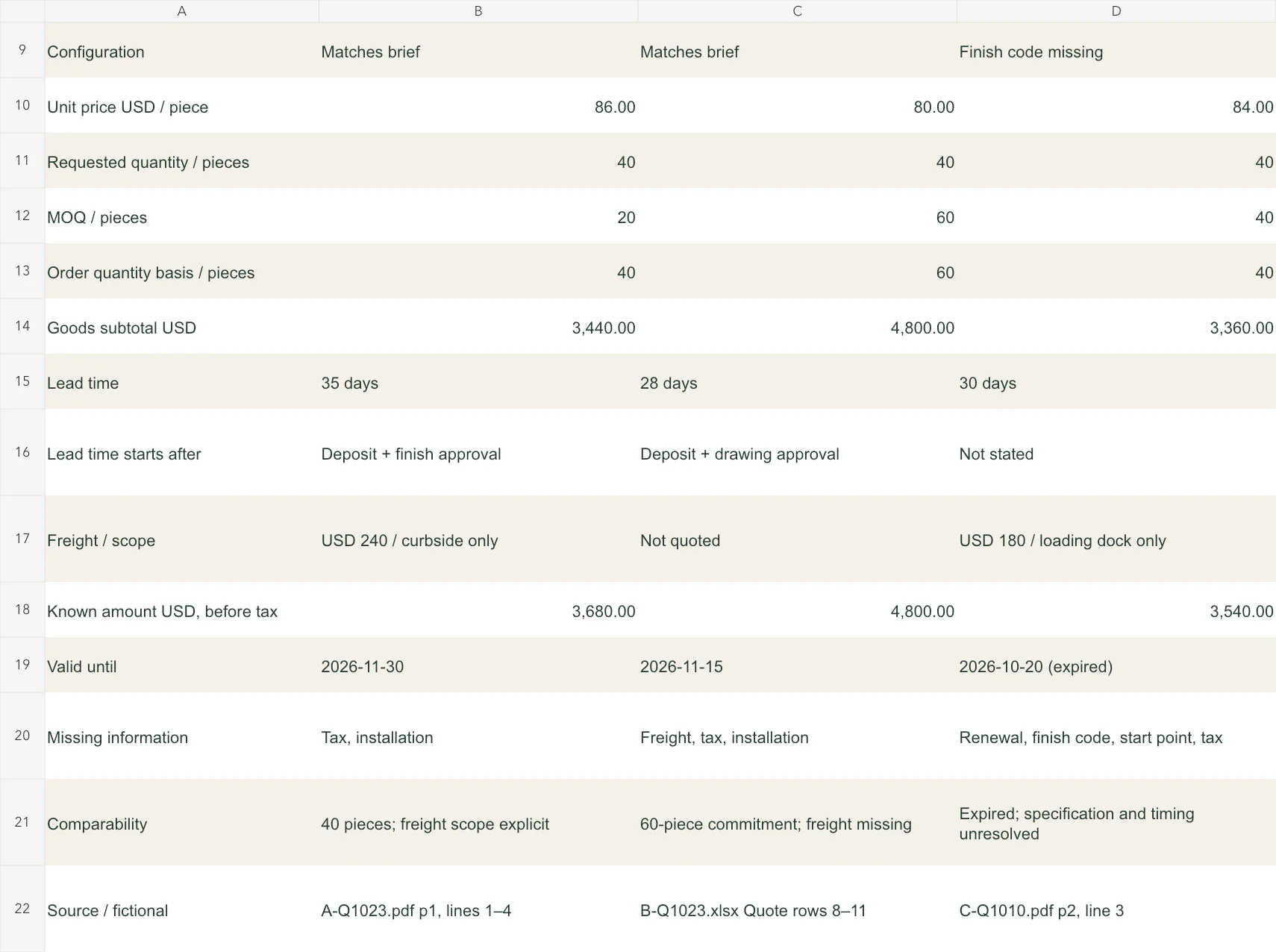
The case produces three different follow-ups: confirm excluded charges, request a forty-chair option, and renew an incomplete expired offer.
Record a human decision with reasons
Complete the supplier comparison template with a decision note recording the choice, conditions, and supporting response. Quotations cannot establish factory capability, compliance, financial stability, or delivery performance; the workbook calculates no reliability score.
Assign the follow-ups from the supplier comparison matrix: confirm Hearthline’s excluded charges; request Northbay’s forty-chair option and freight; renew Willowbank’s offer and obtain its finish code and lead-time starting event. Record who will verify each response.
Use the supplier price book for one collection and the customer quotation format for selected quantities in an itemised offer. Explore the public Demo through the Skulinker homepage. The live workspace is paused for a refresh; inspect structured records, selection, and export in the Demo.
Next step
See the supplier-file workflow in the Skulinker Demo
Explore how supplier files connect to product records, source review, selection, and export. Check the homepage for current service availability.
Continue reading